 19 Min



Updated October 2026
Call center IVR best practices are the design, routing and maintenance rules that let an interactive voice response system resolve simple calls, send the rest to the right agent with context, and stay short enough that callers do not give up. Good practice judges an IVR by the calls it resolves.
That last point is where most IVRs go wrong. The usual scorecard rewards containment, the share of calls that end inside the IVR. But a menu can raise that number simply by hiding the exit to a person.
So this guide argues against containment as the main goal. It then sets out twelve practices, two tables and a worked example for a contact center IVR built around resolution instead.
Table of contents
- Why call center IVR best practices start with resolution
- The 12 call center IVR best practices at a glance
- How to apply call center IVR best practices, with example prompts
- IVR metrics that show whether the practices worked
- The knowledge behind the menu decides what an IVR can resolve
- When an IVR is the wrong place for a call
- Where Knowmax fits beside a contact center IVR
- Frequently asked questions
Why call center IVR best practices start with resolution
The case for containment is strong, and it deserves a fair hearing. An agent-handled call costs more than an automated one, an IVR answers at any hour, and a balance check or a keypad payment needs no human at all. In fact, Wikipedia’s IVR entry describes these systems as automated telephony that interacts with callers, gathers information and routes calls. That is exactly the work a busy contact center wants taken off its agents. So a team that pushes containment up is, on paper, saving money and freeing agents for harder calls.
The trouble is what the number counts.
Containment records that a call ended in the IVR. However, it cannot tell a resolved caller from one who hung up in frustration and rang back an hour later, or one who switched to chat, or one who quietly gave up on the company.
What Gartner’s self-service data shows
Gartner’s evidence points the same way. In a December 2023 survey of 5,728 customers, Gartner found that only 14% of service issues were fully resolved in self-service, and even for issues customers called very simple, only 36% resolved there. Also, 45% of customers who started in self-service said the company did not understand what they were trying to do. The most common reason for failure, in 43% of cases, was that customers could not find content relevant to their issue. Note the scope: the survey covers all self-service channels, IVR among them. Still, an IVR is a self-service channel, and the two failure reasons it names, misread intent and missing content, are the two a phone menu produces most often.
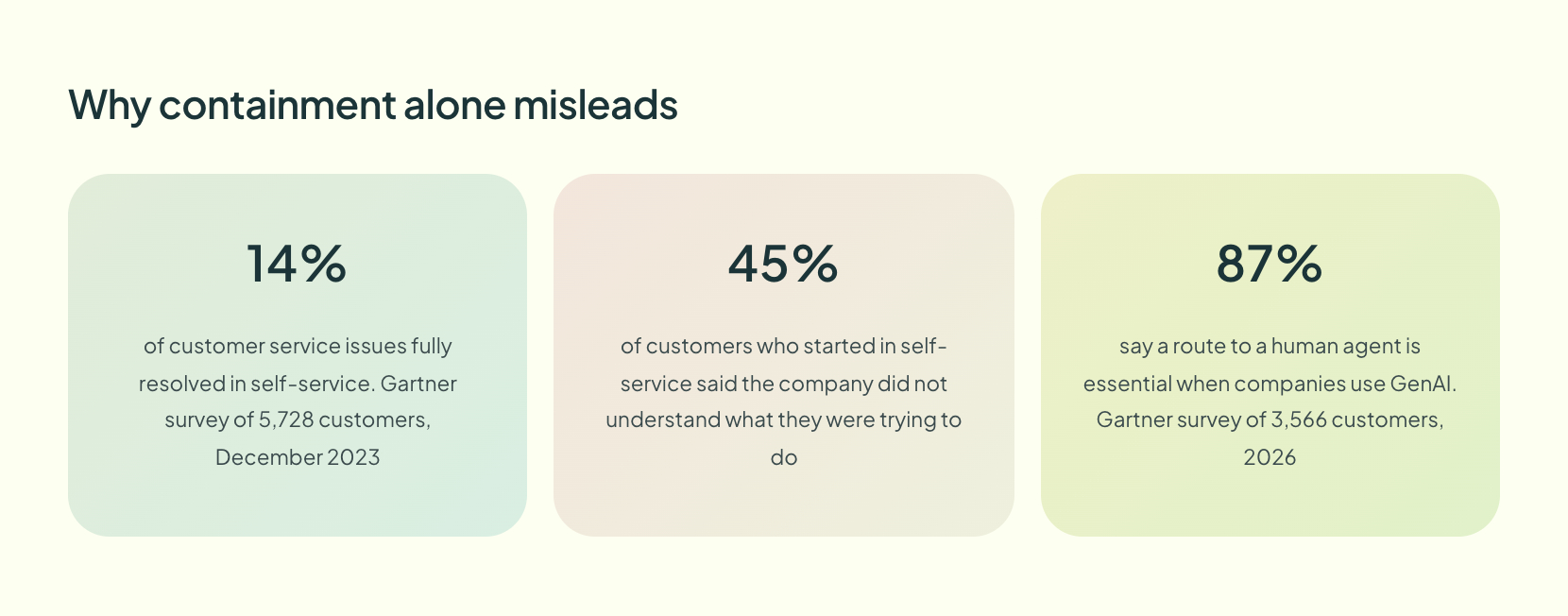
Customers also notice when a company hides the exit. In an August 2026 survey of 3,566 customers, Gartner found that 87% say it is essential for companies using GenAI to offer a way to reach a human agent. A speech-driven IVR is GenAI service by phone. As a result, a contained call that should have reached an agent simply moves the cost to the next contact.
The position here is therefore simple. Measure an IVR by the calls it resolves and by the quality of the calls it hands over, and treat containment as a side effect of getting those two right.
The 12 call center IVR best practices at a glance
The table below lists every practice with the check that shows whether it is working. The next section explains each one, with example prompts.
| # | Practice | What to do | What to check |
|---|---|---|---|
| 1 | Design around caller intent | Build options from the top reasons people call, in their words | Option chosen against the reason the agent records |
| 2 | Keep each level short | Five options or fewer, most common first | Repeat and timeout rates per menu |
| 3 | Offer an agent exit everywhere | Say it early and let 0 work at every level | Opt-out rate by menu level |
| 4 | Cut the preamble | No promotions before the first option | Time to first option |
| 5 | Allow barge-in | Let callers press or speak before a prompt ends | Average time in the IVR |
| 6 | Use speech where intents are open | Conversational IVR for reasons, keypad for numbers | Recognition failures |
| 7 | Re-prompt in new words | Rephrase after an error instead of repeating | Success on the second attempt |
| 8 | Pass context to the agent | Send identity, intent and steps tried | Agents re-asking for details |
| 9 | Offer a callback | Hold the caller’s place without hold music | Queue abandonment |
| 10 | Match authentication to the task | Light checks for status, full checks for payments | Drop-off at authentication |
| 11 | Automate only what the IVR can finish | Balances, status, payments, resets | Repeat calls within seven days per path |
| 12 | Review the call flow on a schedule | Monthly data review, quarterly redesign | Changes shipped per review |
How to apply call center IVR best practices, with example prompts
These IVR menu best practices fall into four groups, and several assume the prompt wording lives in an approved call center knowledge base. Menu design comes first, because no amount of speech technology rescues a menu built on the wrong options.
Menu design: practices 1 to 4
- Design the menu around caller intent. Pull the top call reasons from wrap-up codes. Then name each option in the caller’s words. For example, “For the accounts receivable department, press 3” becomes “To pay a bill, press 1.”
- Keep each level short. Most published IVR design best practices settle on five IVR menu options or fewer per level. Four is safer, because callers hold every option in memory until they choose.
- Offer an agent exit in every menu. Say “To speak with someone, press 0 at any time” early, then honor it at every level. Hiding it raises containment and lowers trust.
- Cut the preamble. A promotion before the first option wastes every caller’s time. Required legal notices can stay, but play them only where they apply.
Speech and recognition: practices 5 to 7
- Allow barge-in. Regular callers know they want option 2. So let them press or speak before the prompt finishes, which shortens the call for exactly the people most likely to use the IVR again.
- Use speech where the reasons are open. Conversational IVR lets a caller say “you charged my card twice” instead of guessing which branch holds disputes. However, keypad entry still beats speech for account numbers and dates, especially in noisy places.
- Re-prompt in different words. Repeating the same prompt after an error teaches the caller nothing. Instead, follow “Please say or enter your account number” with a clue. Try “Your account number is the eight digits at the top of your bill.” Only then, after a second failure, route to an agent.
Read the Guide to Conversational AI for Voice and Chat
Handoff and queue: practices 8 to 10
- Pass context to the agent. Everything the caller entered should reach the agent screen. For example: “Verified caller, chose Billing, then Disputed charge, tried card lookup twice.” Repetition is a known irritant: according to Zendesk’s CX Trends 2026 report, 74% of customers find it frustrating to tell their story over and over to different agents. Good IVR routing sends the call and the story together.
- Offer a callback when queues are long. An IVR callback keeps the caller’s place without holding the line, so state the expected wait first and then offer the option. Also, honor the callback window you promised, because a missed callback undoes the goodwill it bought.
- Match authentication to the task. An order status check needs less proof than a payment change. Therefore, ask for the minimum each path requires, and carry the result into the agent call so nobody verifies twice.
Automation scope and upkeep: practices 11 and 12
- Automate only what the IVR can finish. Balances, order status, payments and password resets suit IVR self-service, because each ends in a clear outcome. In contrast, disputes and complaints rarely end in a menu, and forcing them there turns call deflection into delay.
- Review the IVR call flow on a schedule. Read the data monthly and redesign at least quarterly, plus after any product, pricing or policy change. Meanwhile, give every prompt a named owner, since IVR prompts are content and decay like any other article.
IVR metrics that show whether the practices worked
No single number tells you whether a contact center IVR is working. So read these IVR metrics together, and always per menu path, to judge whether call center IVR best practices are paying off. A routine export from most IVR platforms is enough to start.
| Metric | What it tells you | Warning sign |
|---|---|---|
| IVR containment rate | Share of calls that end in the IVR | Rising while repeat calls rise too |
| Resolution by path | Whether a contained call ended the need | High containment with many callbacks within a week |
| Opt-out rate | Callers asking for an agent at once | Climbing month on month |
| Transfer rate by option | Which branches fail | One option far above the rest |
| Handle time after the IVR | Whether context reaches the agent | Agents re-asking for identity |
| Post-call satisfaction by path | How each branch feels to callers | One path dragging the average down |
The pairing matters more than any single row. For instance, containment that climbs while repeat calls also climb usually means callers are hanging up unresolved, which is the exact failure the containment debate above warns about.
A worked example: one billing menu, before and after
Take a utility whose main menu opens with a twenty second promotion and offers seven options, with billing disputes buried under option six. Callers with a dispute often press the billing option, give up, and then press 0 for a person. Agents taking dispute calls ask for the account number again, because the IVR never passes it on.
The team applies three call center IVR best practices. It deletes the promotion, moves disputes into a two-option billing menu, and sends the verified account number and chosen path to the agent screen. Afterward, it reads the table above per path: whether repeat calls about disputes fall, whether opt-outs at the main menu fall, and whether agents stop re-asking for the account number. These steps are illustrative rather than measured results, so a real team should record its baseline before changing anything.
Map Your IVR Call Flow as a Decision Tree
The knowledge behind the menu decides what an IVR can resolve
Most teams scope IVR projects as telephony work. Yet the self-service answers an IVR reads aloud, such as outage updates, refund windows and reset steps, are knowledge, and the Gartner finding above names missing content as the top reason self-service fails. That is the premise of KM-enabled self-service: every channel is one content problem.
That has a practical consequence. When the IVR says refunds take five days and the agent says ten, the caller now trusts neither. Nobody on the line cares which system holds the refund rule. They hear two answers from one company. So the IVR script, the help center and the agent’s screen should draw on one approved source. That job belongs to contact center knowledge management.
Two kinds of content matter most. Short, approved answers belong in one knowledge base that both the IVR team and agents work from, and each answer needs an owner and a review date like any other article. Meanwhile, branching procedures such as a disputed charge belong in an interactive decision tree. Then the agent who receives the transferred call continues from the step where the IVR stopped instead of starting over.
The same logic runs through digital channels too. A self-service knowledge base and a phone menu that disagree will generate the very calls both exist to absorb.
Get the Self Service Playbook for Your Support Team
When an IVR is the wrong place for a call
A fair guide has to name the cases where these call center IVR best practices do not apply, because sometimes the right menu is no menu.
Distressed or high-stakes callers. Fraud reports, bereavement and medical issues should reach a person quickly. Even a well-designed menu adds friction at the worst moment, so route these numbers straight to trained agents.
Low call volumes. A team of six taking a few dozen calls a day gains little from a layered menu. A direct line or a single-option greeting serves those callers better.
Tangled, multi-issue calls. A business customer with a billing error, a delivery problem and a contract question will fail every branch. Route to an agent immediately when the first answer is “several things.”
There is also a cost that projects understate. Moving from keypad menus to conversational IVR needs ongoing tuning of intents and phrases, and making the agent exit easier will usually send more calls to agents in the short term. Budget for both, rather than expecting the redesign to cut agent load in its first month.
Where Knowmax fits beside a contact center IVR
Knowmax is a knowledge management platform for contact centers and customer service, and it does not replace an IVR or a telephony platform. It holds approved articles and step-by-step decision trees that agents use after the handoff. Self-service channels can draw on the same content, so the answer a caller hears in the menu matches the one an agent gives.
The menu is the easy part to change. Ultimately, the harder and more valuable work is making sure that whatever the IVR says, and whatever the agent says after it, comes from the same approved answer.
Ready to Give Your IVR and Your Agents the Same Answers?
Frequently asked questions
A good IVR containment rate is one that rises while repeat calls, opt-outs and complaints stay flat or fall. No single benchmark fits every contact center, because a bank, a utility and a retailer automate different tasks. Track containment per menu path and pair it with repeat calls within seven days.
Keep each IVR menu level to five options or fewer, and start with four where possible. Callers hold every option in memory until they choose, so long menus produce wrong choices and repeats. Put the most common reason first. Every menu also needs the agent option.
Conversational IVR lets callers state their reason for calling in their own words instead of pressing keys through a menu. Speech recognition and natural language understanding map the request to an intent and route the call. It suits open questions with many possible reasons. Keypad input still works better for numbers such as account IDs and dates.
Review IVR data monthly and redesign the call flow at least quarterly, plus after any product, policy or pricing change. The monthly review reads opt-outs, transfers and repeat calls by path. The quarterly pass removes options nobody uses and rewrites prompts that callers keep misunderstanding.


 Word Document)
 Excel File)


