 20 Min


Three agents take the same billing dispute on the same afternoon. Each gives a different answer. Two customers accept what they hear. The third escalates, because that agent had opened last quarter’s refund policy instead of this quarter’s, and nobody noticed until the complaint landed.
That is not a training failure. It is a retrieval failure, and it happens in the seconds before an agent commits to an answer while a customer waits.
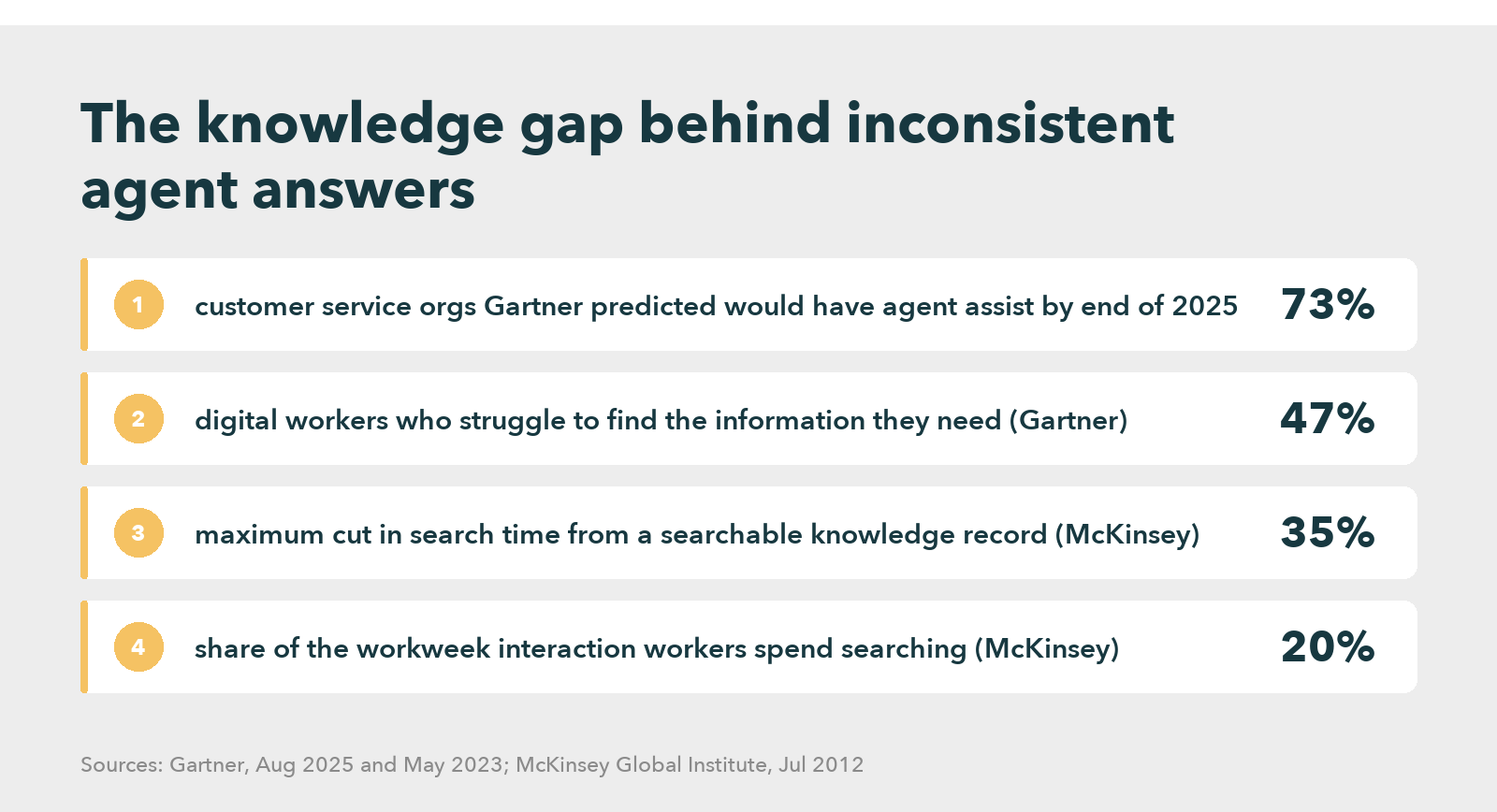
Real time agent assist exists to close that gap, and most contact centers are now buying it. In a Gartner customer service survey of 265 service leaders, published in August 2025, Gartner predicted that 73% of customer service organizations would have agent assist in place by the end of that year. This guide, updated on 6 October 2026, explains what the technology does on a live call, why it so often disappoints after launch, and how five tools compare.
Table of contents
- What is real time agent assist?
- Real time agent assist tools compared (Updated October 2026)
- Where real time agent assist sits: before, during and after the conversation
- Inconsistent answers look like a skills problem, and usually are not
- How does real time agent assist work on a live call?
- The knowledge layer decides whether real time agent assist works
- Real time agent assist benefits show up in behavior first
- Agent assist implementation: a readiness test and a sequence
- Frequently asked questions
What is real time agent assist?
Real time agent assist is software that follows a customer conversation as it happens, by transcribing the call or reading the chat, works out what the customer needs, and puts the matching answer, script or next step on the agent’s screen before the agent has to search. The agent checks that the suggestion fits, then responds. In other words, the goal is a correct, consistent answer on the first attempt.
Vendors use several names for the same thing: agent assist software, AI agent assist, agent copilot, or real-time agent guidance. Some also fold it into larger suites, which makes side-by-side comparison harder than it should be. Whatever the label, the job is live call guidance during the conversation. Not training before it, not review after it.
Real time agent assist tools compared (Updated October 2026)
Every row comes from the vendor’s own page, read on 6 October 2026. The table lists no prices, because every vendor quotes by deployment.
| Tool | What it does during a live interaction | Where the answers come from | Verdict |
|---|---|---|---|
| Knowmax | Surfaces knowledge, scripts and next best action guidance in real time; no-code decision trees that connect to the CRM; visual step-by-step guides | A knowledge base, SOPs and decision trees that your own team authors and approves | Best fit when answer consistency is the problem, because the guidance comes from approved, structured knowledge |
| Verint | Analyzes the live interaction and surfaces information and actions at the moment they matter, with prompts for compliance and accuracy | Verint’s knowledge and analytics stack across the contact center | Strong for large operations that already run Verint for quality and workforce management |
| Cresta | Real-time hints, reminders and workflows; source-backed answers; suggested chat replies; live notes during the call | The enterprise knowledge base and CRM, plus patterns learned from top performers | Strong for coaching agents toward top-performer behavior in sales and service |
| Salesforce | Dynamic plans that guide reps on any channel, generative replies, AI-powered search answers in the service console, case summaries | Enterprise knowledge in Salesforce Data 360 plus the customer record | Natural choice when Service Cloud is already the system of record |
| Zendesk | Suggested macros applied in one click, a proactive Copilot that recommends responses, one view of customer history and articles viewed | Zendesk help center articles and ticket history | Good for Zendesk teams with an active help center; suggestions are only as good as those articles |
In short, each tool delivers guidance quickly, but none can make an outdated article correct. So choose the one that connects most cleanly to knowledge your team keeps current.
Where real time agent assist sits: before, during and after the conversation
Contact center AI does three different jobs, and buyers often blur them together.
Before the agent. Chatbots, voice bots and help center search try to resolve the issue without a person. When they cannot, the conversation moves to an agent.
During the conversation. Here real time agent assist does its work. It listens, detects intent, and offers guidance: the policy, the troubleshooting steps, the disclosure the agent must read, or the next best action.
After the conversation. Summaries, wrap-up notes, quality scoring and analytics all look back. They cannot help the customer who is still on the line.
Agent assist vs conversational AI, chatbots and analytics
The question of agent assist vs conversational ai comes up in almost every buying cycle. The short version fits in a table.
| Technology | Who it talks to | When it acts | What it fixes |
|---|---|---|---|
| Chatbot or voice bot | The customer | Before an agent joins | Simple, repeatable requests |
| Conversational AI agent | The customer | Before or instead of an agent | Multi-step requests it can complete on its own |
| Real time agent assist | The agent | During the live conversation | Slow, inconsistent or noncompliant answers |
| Post-call analytics | Supervisors and QA | After the conversation | Patterns, coaching needs and compliance gaps |
Many platforms sell all four together. That works well, as long as the team knows which part should fix which problem.
Inconsistent answers look like a skills problem, and usually are not
When agents give different answers, the usual response is more training. If handle time climbs, managers push for speed. And after a call escalates, the review focuses on what the agent said.
All three responses treat a retrieval problem as a behavior problem.
The research disagrees. In a Gartner workplace survey of 4,861 employees in 2023, Gartner found that 47% of digital workers struggle to find the information they need. In a contact center, that struggle happens while a customer waits. Earlier work from the McKinsey Global Institute put the cost in time: interaction workers spend nearly 20% of the workweek looking for internal information. A searchable record of knowledge, it estimated, can cut that search time by as much as 35%.
Customers hit the same wall on the self-service side. In a Gartner customer survey of 5,728 people, published in August 2024, 43% of failed self-service attempts came down to the customer not finding relevant content. In other words, the same content gap that strands a customer in the help center strands the agent who picks up the call a minute later.
The agent who gives the wrong answer usually knows a right one exists somewhere. Time ran out. As a result, the agent fell back on whatever training left in memory, or on the first search result that looked close enough, and the customer had no way of knowing the difference. That search is what the tool removes from the live call, which explains why it helps. It also explains why it fails when the knowledge behind it is weak.
How does real time agent assist work on a live call?
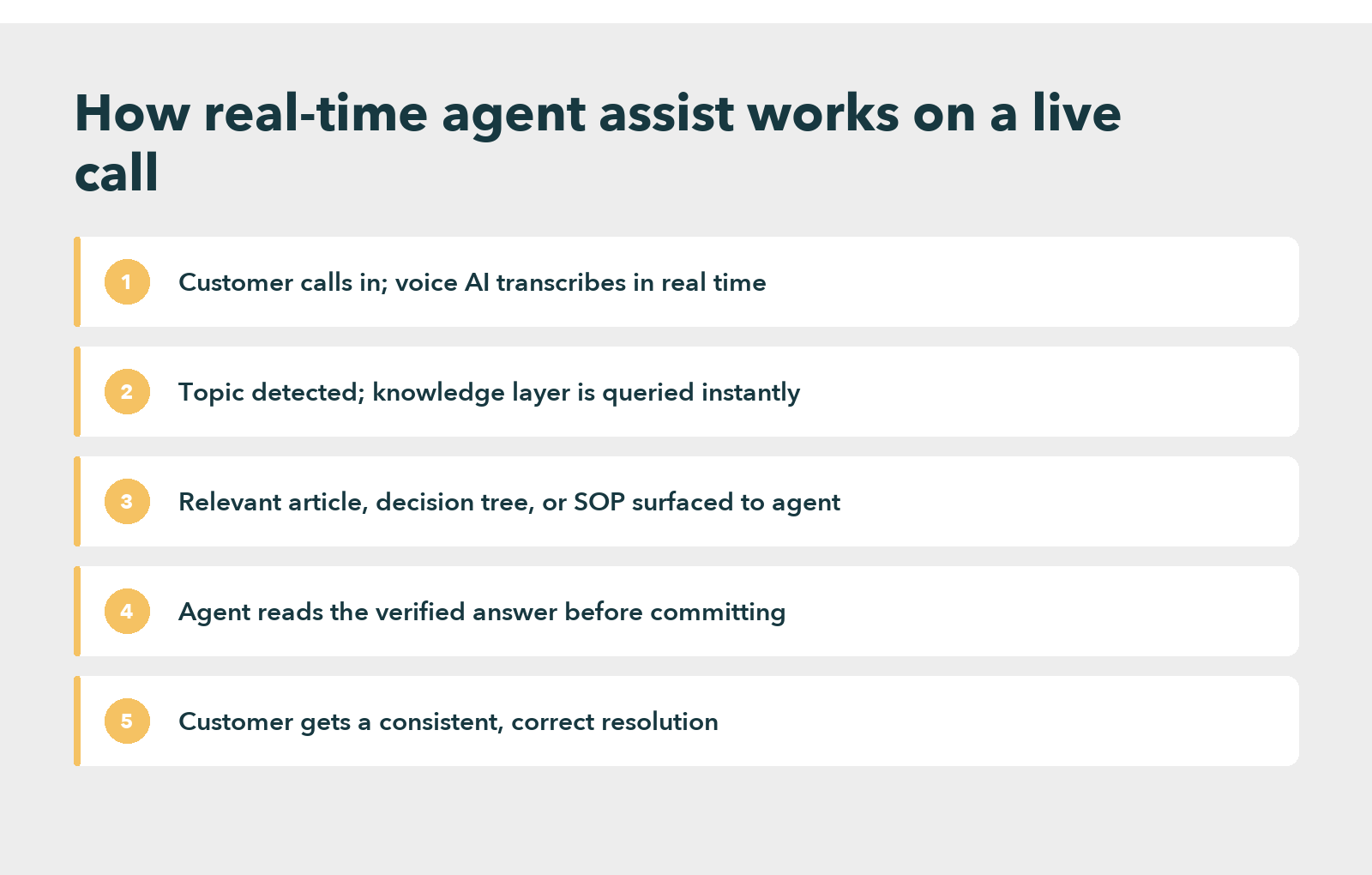
Most tools follow the same five steps.
- Capture. On voice, the tool transcribes speech as the customer talks. On chat, it reads the messages directly.
- Detect intent. The system recognizes the topic, such as a refund, a failed payment or a cancellation, plus useful details like the product or plan.
- Retrieve. The tool queries the knowledge base, decision trees or CRM for content that matches that intent.
- Display. The agent sees an article, a script, a checklist or a next best action, often with the current step highlighted.
- Verify and respond. The agent confirms the suggestion fits this customer and answers with it, instead of searching or guessing.
Vendors compete hardest on capture, detection and display. Retrieval, though, is where most deployments succeed or fail. It depends far more on the knowledge than on the software.
Why the Knowledge Behind Agent Assist Decides CX
The knowledge layer decides whether real time agent assist works
For example, picture a tool that hears “cancellation” and surfaces the cancellation article. If that article is two versions old, the agent now reads a wrong answer with confidence. A refund decision tree that skips the edge cases real customers raise will stall the agent just as badly. In both cases the technology works perfectly. Still, the customer loses.
Service leaders seem to know this. In a Gartner leadership survey of 321 customer service leaders, published in February 2026, 91% reported pressure from executives to implement AI, and 58% planned to upskill agents into knowledge management specialists. The second number is the telling one, because it shows where the work goes. Leaders under pressure to buy AI are, at the same time, investing in the people who keep the knowledge right.
In practice, teams that get value from agent assist for contact centers treat the knowledge as the product and the assist screen as the delivery channel. Their contact center knowledge management has three properties.
It stays current. Policy and product changes reach the knowledge base before they reach customers. Otherwise the tool delivers wrong answers faster than before.
It follows the resolution. Writers build content as steps that resolve an issue, not as long topic pages. An agent in a billing dispute needs the next step, not a general article about billing.
It fits a live call. A suggestion that takes a minute to read is one the agent will skip. Short answers, checklists and branching steps work; long documents do not.
Put assist on top of an unmaintained wiki or a neglected customer service knowledge base, and agents soon stop trusting the panel. They are right to. Nobody built those suggestions for a live call.
Real time agent assist benefits show up in behavior first
The clearest sign that assist works is not a dashboard number. It is a change in how agents behave: they stop searching and start verifying.
The metrics then follow. Average handle time falls on assisted contacts because less of each call goes to searching. Fewer answers need a callback to correct, so first contact resolution improves. Meanwhile answers converge, and a new hire gives the same answer as a five-year veteran, because both are reading the same approved step rather than relying on memory or on whichever article their own search happened to return.
To see whether this is happening, compare assisted and unassisted contacts on four measures:
- Suggestion use rate. How often agents open or accept what the tool offers.
- Handle time on assisted contacts. Compared with similar unassisted contacts.
- Repeat contacts within a week. A drop means answers land right the first time.
- Answer consistency. Reviewers check whether different agents gave the same answer to the same issue.
However, low suggestion use after the first few weeks points to the knowledge, not the software. The usual causes are articles that run too long, decision trees with missing branches, or content organized around how the knowledge team thinks rather than how agents hear problems.
See How a Retail Giant Gave Every Agent Structured Knowledge
Agent assist implementation: a readiness test and a sequence
Some teams are not ready yet. Worse, an early launch can hide the real problem.
If the knowledge base misses the most common contact reasons, or covers them in long pages, the tool surfaces more irrelevant suggestions than useful ones. Agents then learn to ignore the panel. Once they do, trust comes back slowly. The same thing happens without governance over AI knowledge management, because suggestions then reflect whatever someone edited last rather than what is correct.
The readiness test
First, take your 20 most common contact reasons. Then ask an experienced agent to resolve each one using only the knowledge base, with one search per issue. Where that works, assist will speed it up. Otherwise, fix the knowledge first.
The sequence that holds up
- Connect the data before the AI. In the Salesforce State of Service report of 6,500 service professionals, published in September 2025, companies that unified their customer service channel data were 1.4 times more likely to call their AI implementation very successful. Without that record, the tool guesses more.
- Rewrite the top contact reasons as steps. Short, branching, approved. Leave the long reference pages for later.
- Pilot on one queue. Measure suggestion use, handle time and repeat contacts against a matched queue without assist.
- Expand only when agents use it unprompted. If use is low, go back to step two, not to the vendor.
How Knowmax handles the knowledge layer
Knowmax starts from that knowledge. Its AI agent assist software surfaces knowledge, scripts and next best action guidance during the conversation, and it structures that knowledge before any agent sees it.
An interactive decision tree walks the agent through a resolution path. The agent picks what the customer describes, and the tree shows the next step, with no searching and little room for guesswork.
As a result, that structure matters most in a contact center with high turnover or frequent product changes. Consistency then stops depending on tenure.
Every tool in the table delivers guidance quickly. Speed is cheap now. What stays scarce is a knowledge base worth delivering quickly, and that work sits with the team, whichever tool it buys.
Ready to Give Every Agent the Right Answer in Real Time?
Frequently asked questions
It will not. Instead, the tool supports the agent on conversations that already need a person, such as disputes, complex troubleshooting and emotional calls. Chatbots and voice bots take the simple requests, so the human role shifts toward harder work rather than disappearing.
It works on both. On voice calls, the tool transcribes speech in real time and detects the topic from what the customer says. On chat and messaging, it reads the text directly, which is usually more accurate. Voice results depend on transcription quality when lines are noisy.
It needs three things: access to the live conversation through the telephony or chat platform, a CRM connection for customer context, and a knowledge base that stays current and uses short, resolution-focused steps. Teams most often lack the third, and it decides whether agents trust the suggestions.
They differ. Whisper coaching lets a supervisor speak to the agent mid-call without the customer hearing, so it depends on a supervisor listening at that moment. By contrast, an assist tool runs automatically on every conversation at once. Many teams use both, keeping whisper coaching for escalations.
The software side usually takes weeks, because it connects to telephony, chat and the CRM through existing integrations. The knowledge side sets the real timeline: rewriting the top contact reasons as short, approved steps often takes a quarter. Skip that step and agents soon ignore the panel.


 Word Document)
 Excel File)


