 21 Min


Every help desk carries a queue that nobody enjoys touching. Password resets. VPN access. The same printer on the same floor, reported every Monday by a different person.
Help desk automation is the promise that software clears those tickets so people do not have to. Teams buy on that promise, and then they find the awkward part: the tickets that automate cleanly were rarely the expensive ones, while the ones that cost real money resist automation for reasons that have very little to do with the tool anybody just signed for. That is not a vendor failure.
So what follows is a set of questions worth settling before the contract rather than after it. What the software really takes off the queue. Which tickets to start with. Why projects stall in month three. Which numbers move, and which ones only look like they move.
Table of contents
- What does help desk automation actually automate?
- Which tickets should a help desk automate first?
- Why does help desk automation fail when the knowledge is thin?
- What does an automated password reset look like, step by step?
- Which help desk metrics move, and which only look like they move?
- When does automating a help desk make the service worse?
- How should a team sequence its help desk automation ideas?
- Frequently asked questions
What does help desk automation actually automate?
Strip the category language away and help desk automation does four separable jobs. Intake, routing, resolution and closure. Because a tool that does one of them well is often sold as though it does all four, the first evaluation task is working out which job the demo was showing you.
How an automation rule actually fires
Underneath all four sits the same anatomy, and it is worth knowing before any demo. Every automation rule is a trigger, a condition, an action and a log entry. A trigger is the event that wakes the rule, such as a ticket arriving or a status changing. Conditions then decide whether this particular ticket qualifies. Actions are what happens next, and the log records what fired and why. Vendors dress this up with different vocabulary, though a rule that cannot show you its log is a rule you cannot debug at two in the morning.
The four layers, and how each one fails
Intake turns a message into a structured ticket: category, priority, affected system, requester. Routing then sends that ticket to the person who can close it. Resolution is the only layer that removes work instead of moving it, since it answers the requester while nobody reads the ticket. Finally, closure handles confirmation, the survey and the audit trail.
Intake and closure both happen inside the ticket system, which records every problem in detail and usually keeps the answer as a single line of free text.
Those four fail differently, and they pay back differently. Together, intake and routing shave minutes off every ticket, while resolution deletes tickets outright. So the cost case rests on that third layer, though the fast wins sit in the first two, which is why a pilot can look excellent and change the staffing math by almost nothing.
| Layer | What it removes | What it needs underneath | How it fails |
|---|---|---|---|
| Intake | Manual tagging | A category tree that fits real tickets | Silent mis-tagging corrupts reporting |
| Routing | Triage time | Accurate skills and ownership data | Tickets bounce and age |
| Resolution | The ticket itself | Current answers a requester can follow | The requester gives up and calls |
| Closure | Chasing confirmations | Agreed rules on what counts as resolved | Tickets close while the fault is live |
Note that three of the four layers depend on current, structured content. That dependency is the whole subject, and it is why a help desk automation workflow stalls in month three rather than month one. The same pressure shapes contact center automation, where nothing routes well until somebody agrees what the categories mean.
Which tickets should a help desk automate first?
Volume is the obvious sort order. It is also the wrong one on its own, because a high volume ticket with a branching diagnosis underneath it will absorb months of build time and return very little.
Rank candidates on two axes instead. How often the ticket repeats, and how many decisions sit between the request and the fix. A password reset repeats constantly while carrying exactly one decision, so it automates. A slow laptop repeats constantly too, though it carries a dozen decisions and a hardware inspection before anybody can say what is wrong, so it does not.
The typical tier 1 help desk has a short head of repeats and a very long tail of one-offs. Automate the head, leave the tail, and resist the argument that the tail is where the real money sits. It is where the real difficulty sits, which is a different thing.
Across those ideas, the same three mechanisms do most of the work, and they are worth naming because vendors sell them separately. Tagging and categorization put structure on free text so everything downstream can route. SLA management watches the clock and escalates before a breach rather than reporting one afterwards. Canned responses and macros hand an agent an approved reply in one click, which is the cheapest automation in the building and the one most often left unconfigured.
Ten automation ideas, scored on both axes
Most service desk automation ideas arrive as a flat list of ticket types with no test attached. Apply the two-axis test, though, and the list shortens fast.
| Automation idea | Repeats | Decisions to the fix | Verdict |
|---|---|---|---|
| Password reset and account unlock | Constant | 1 | Start here |
| Ticket status lookup | Constant | 0 | Yes |
| Software install from an approved catalog | High | 1 to 2 | Yes |
| Access or permission request | High | 2, plus approval | Yes, keep the manager step |
| New starter onboarding bundle | Predictable | 3 to 5 | Yes, as a workflow |
| Known error workaround | High | 2 to 3 | Yes, as a guided path |
| VPN or connectivity fault | High | 4 to 6 | Guided path, not one answer |
| Slow laptop or performance complaint | High | 12 or more | No |
| Third-party vendor escalation | Medium | Varies | No |
| Anything approved on judgment | Low | Human | No |
Access requests, software installs, status lookups and known error workarounds all survive it. Performance complaints do not. Neither does third-party vendor work, nor anything a manager approves on judgment rather than on policy.
One caveat on the middle band. Tickets with four or five decisions between request and fix rarely automate as a single answer, but they often work as a guided path, where an interactive decision tree walks the requester through the branches one question at a time. That is a real category of service desk automation use cases, and plenty of teams skip past it because it looks like content work rather than automation work.
Help desk or service desk, and why the label changes the plan
The two words get used interchangeably and the distinction matters when you buy. A help desk fixes things that break, ticket by ticket, and answers for speed and resolution. A service desk owns more ground: service requests, a catalog, change and problem management, usually against an ITIL-aligned process. Automating a help desk mostly means removing repetitive tickets. Automating a service desk means encoding a process, which is slower, needs approval paths, and fails differently when the underlying policy is wrong.
Why does help desk automation fail when the knowledge is thin?
Because the resolution layer has nothing to say. A router can work from metadata alone. An answer cannot.
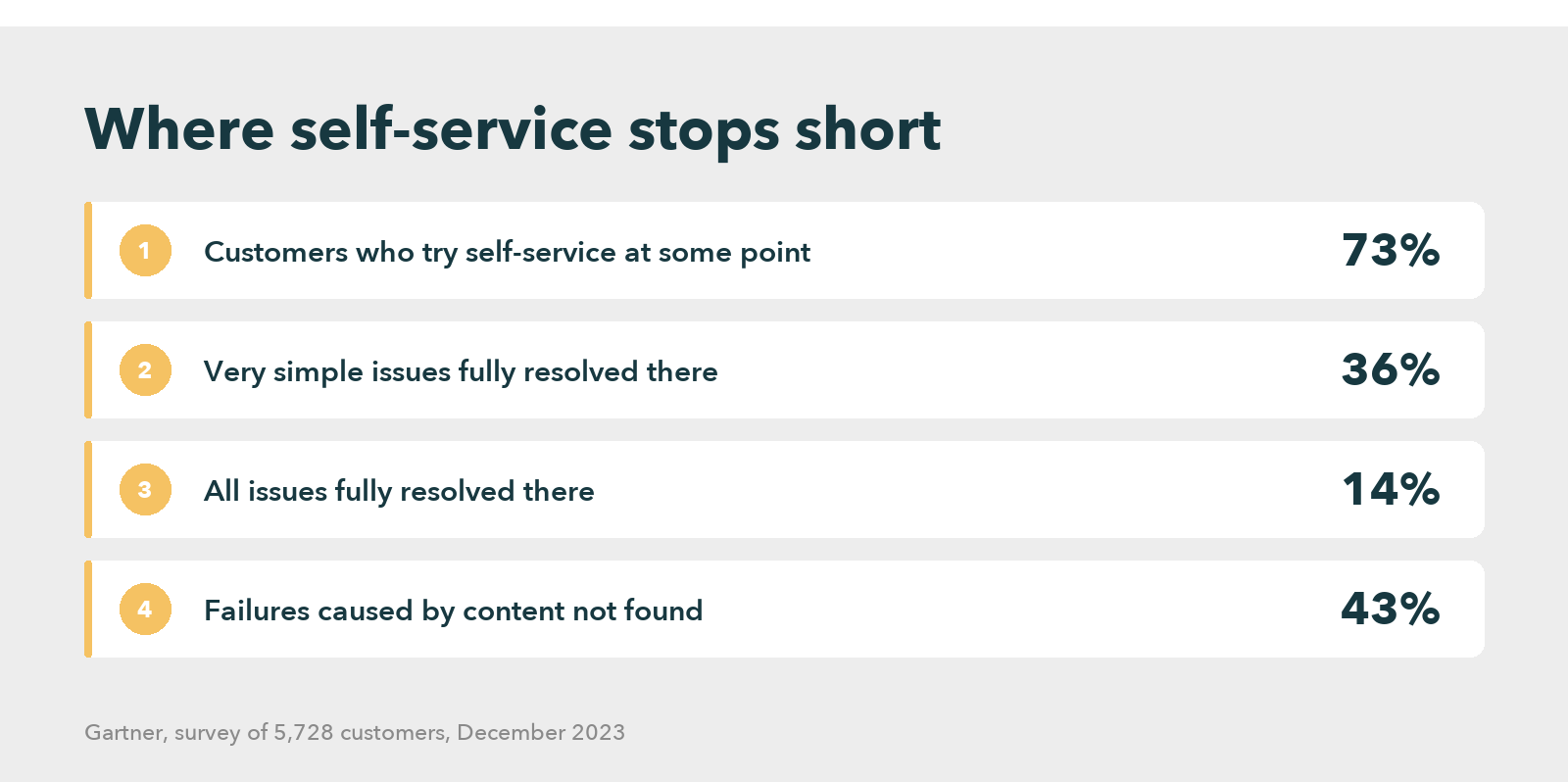
Gartner surveyed 5,728 customers in December 2023 and found that only 14% of customer service issues fully resolve in self-service, even though 73% of customers try it at some point. For issues customers themselves called very simple, the figure still reached only 36%. The most common reason for failure was not a broken bot. In 43% of cases, customers could not find content relevant to their issue.
That is a content problem wearing an automation costume. The same pattern shows up inside the business, because McKinsey Global Institute reported that the average interaction worker spends nearly 20 percent of the workweek looking for internal information or tracking down colleagues, while a searchable record of knowledge can cut that search time by as much as 35 percent.
So the honest sequence runs backwards from how most projects get planned. First, write and structure the answers for the twenty ticket types you intend to automate. Then wire the automation to them. Buy the platform first and the next quarter goes somewhere else entirely, because the articles turn out to be three years old, written for a product version nobody runs, and stored in four places. Good knowledge base software makes that work faster. It does not make the work optional.
The same order applies to an AI help desk, which can only be as accurate as the articles it retrieves.
Knowledge Management For a Higher CX Standard
What does an automated password reset look like, step by step?
Close range beats description here. Here is the whole path for the most automated ticket in existence, at an assumed workforce of four thousand people and a reset volume near 900 a month.
- The requester types “I can’t log in” into the portal. Intent classification maps that phrasing, and dozens of variants such as “locked out”, onto one reset intent.
- Identity comes first. A prompt goes to the registered device, with manager attestation as fallback when that device is the problem.
- Then one question appears, rather than an article: “Is your account locked, or have you forgotten the password?” Two buttons.
- On “forgotten”, a reset link valid for fifteen minutes goes out. On “locked”, the system clears the lock and names the cause: “five failed attempts from a device in Pune at 09:14”.
- Confirmation carries one line: “If this was not you, reply STOP and we open a security ticket.” The human version rarely asked.
- The ticket closes itself. Agent handle time on this type falls from roughly six minutes to zero, and the queue loses about 900 items a month.
Notice how little of that is clever. Step 1 is pattern matching, while steps 3 and 4 are a two-node decision tree. The intelligence sits in step 5, where somebody thought about the failure case and wrote a plain sentence for it. Short, specific, honest about what just happened. That register is most of the gap between a flow that improves the first contact resolution rate and one that annoys everybody who touches it.
Which help desk metrics move, and which only look like they move?
Automation moves four numbers reliably. Volume reaching a human, first response time, cost per ticket, and the share of tickets closed outside business hours. Those are the real help desk benefits, and they show up within a quarter.
Two other numbers get quoted far more often, and both deserve suspicion. Ticket deflection is the first. A deflection rate counts the sessions that ended in self-service, so someone who found the answer and someone who gave up in frustration count exactly the same. Unless it pairs that session against a follow-up contact within seventy-two hours, the number reports abandonment as much as success.
Average handle time is the second. Automation removes the shortest tickets from the queue first, which mechanically raises the average handle time of everything left behind. The number goes up, the operation improves, and somebody in a steering committee still reads it as a failure. So report it beside total handled volume, or do not report it at all.
Among help desk metrics worth adding at the same time, two are usually missing. Reopen rate on automated resolutions tells you whether help desk automation fixed anything, or merely closed the ticket. Article coverage is the second: the share of your top fifty ticket types with a current answer written, and it predicts next quarter’s ceiling better than any vendor benchmark will.
Test a vendor claim against a deployment that publishes both figures, before and after, with the window stated. Read one in full, then check which metrics the write-up quietly leaves out.
Read the Full Case Study
When does automating a help desk make the service worse?
Three situations, and the first is the common one.
Applied to a broken process, help desk automation locks that process in. A request needed three approvals because nobody had revisited the policy since 2019, so now it needs three approvals forever, at machine speed, with the review meeting that might have questioned it removed from the path. Automate the ticket, and you have also automated the reason it existed.
The second is escalation design. A requester who has spent four minutes with a bot arrives annoyed, and no context travels with them. That handoff is where most of the goodwill from the automation gets spent. Unless the agent can see the self-service transcript the moment the chat lands, the automation has made that interaction worse rather than better.
Third, and nobody sets this expectation early enough: the headcount case rarely lands as promised. Gartner surveyed 321 customer service and support leaders in October 2025 and found that only 20% had reduced agent staffing because of AI, while another 55% reported stable staffing against higher volumes. The same firm forecasts that half of the organizations planning major AI-driven cuts will abandon them by 2027.
Read that as good news rather than bad. Stable staffing against rising volume is a real result, and it is a defensible one to promise. A headcount reduction promised at signature and missed at renewal is how automation programs lose their sponsor.
How should a team sequence its help desk automation ideas?
Ninety days of content work, then ninety days of tooling. That order is uncomfortable because the tooling is the visible part, and it is still the right order.
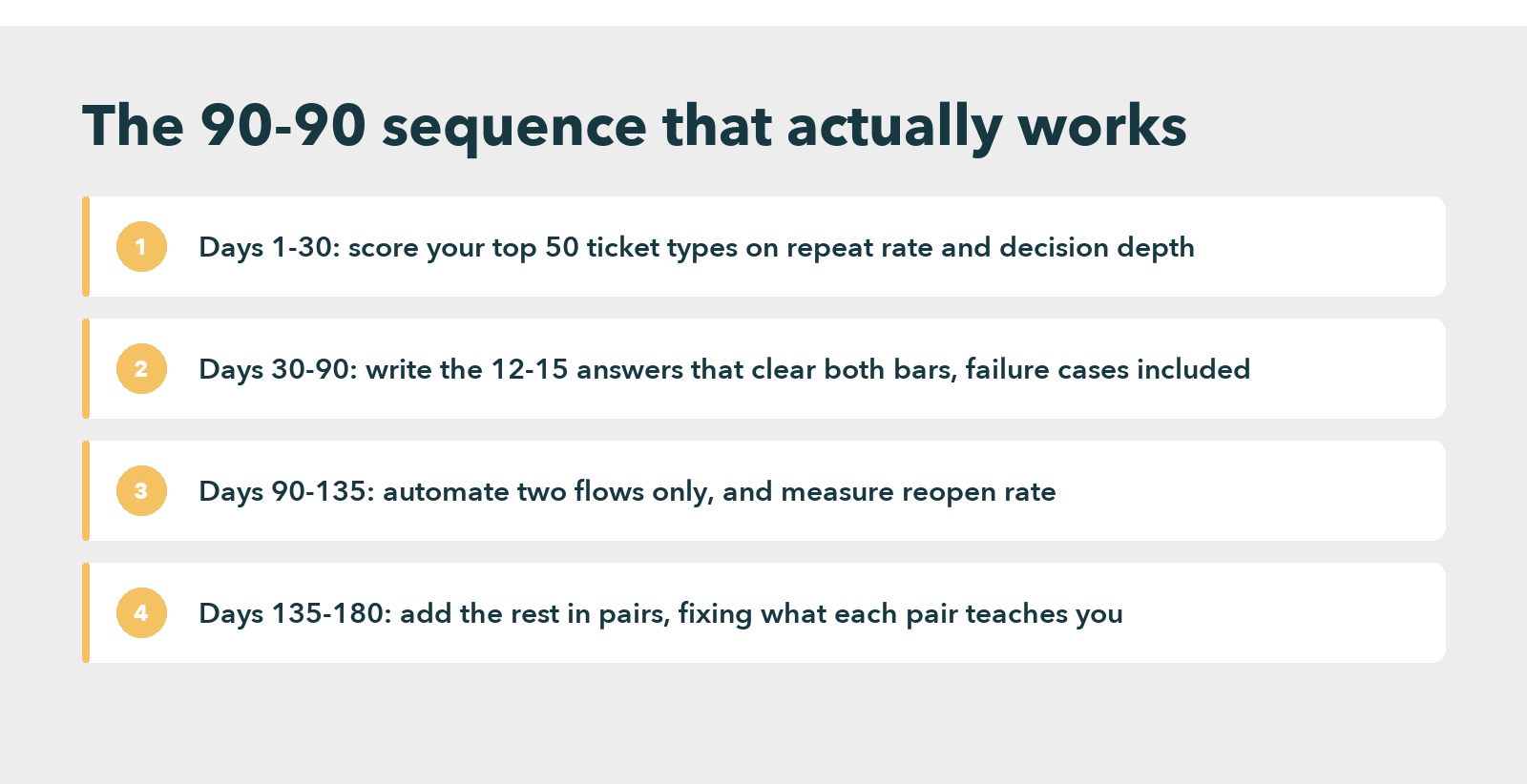
In the first thirty days, pull the top fifty ticket types by volume, then score each one on repeatability and decision depth. Twelve to fifteen usually clear both bars. Write those answers properly during days thirty to ninety, in a procedural format that includes the failure cases, and put them somewhere one search reaches them.
Only then does the tool question become answerable, because your help desk software requirements are now a list of things the content already needs rather than a list of features a vendor demonstrated. Compare help desk automation software on how it handles your twelve flows. Most help desk automation tools converge on the same feature list anyway, so the differences that matter are authoring speed, content freshness, and whether an agent and a customer read from one source.
Modern help desk tools and service desk automation software have narrowed the gap between internal and external support, so the same answers can serve an employee portal and a customer one. That is where self-service platforms earn their keep, since the expensive part is the content rather than the second interface.
Run the second ninety days on two flows, not twelve. Measure reopen rate and paired follow-up contacts, fix what those two taught you, then add the rest in pairs. Any plan that promises all twelve live in a quarter is describing a demo environment, and whoever signs it spends the next quarter explaining the missing numbers.
Ready to Fix the Answers Your Help Desk Automation Depends On?
Frequently asked questions
Two things change quickly. The volume of tickets a human touches falls, and first response times shorten, usually inside one quarter. Headcount rarely moves in year one. The larger effect is compositional: simple tickets leave the queue, so the remaining work is harder and the team’s skills profile has to change.
Ticket deflection is the share of support sessions that end in self-service without a ticket reaching an agent. Treat it carefully, because a session where someone gave up counts the same as one where someone found the answer. Pair every deflection figure with follow-up contacts inside seventy-two hours before you trust it.
The reliable gains are lower volume reaching agents, faster first response, lower cost per ticket, and coverage outside business hours. Auditability improves too, since every automated action writes itself to a log. Gains concentrate in high repeat, low decision tickets: password resets, access requests, status lookups.
Not on the current evidence. Surveyed service leaders overwhelmingly report stable staffing against rising volumes rather than cuts. AI replaces the repetitive tier of tickets, not the function. The role shifts toward harder cases, owning the content automation reads, and designing escalation paths. That is a skills change, not a headcount one.
Knowmax covers the knowledge half: the retrieval layer that pulls the approved answer from the knowledge base and keeps it current. Around it, nearly every platform shares one architecture. A rules engine handles routing, an intent classifier maps free text onto request types, and a workflow engine executes actions in connected systems. Differences sit in content freshness, not the pipeline.


 Word Document)
 Excel File)


