 21 Min


Customer service budgets barely moved this year. Spending on AI inside those budgets jumped. In a survey of 199 service and support leaders run in April and May 2026, Gartner found that spending on AI rose 38% while overall function budgets grew just 2%, according to its August 2026 survey. Much of that money goes into AI help desk software, also sold as AI helpdesk software: tools that sort tickets, draft replies, answer customers and suggest fixes to agents.
Returns, however, have not kept pace.
This guide does two jobs. First, it compares nine AI help desk software tools on what their AI actually does, using each vendor’s own product pages rather than their sales decks. Second, it explains, with Gartner’s data, why so much of that spending is not paying back yet, and turns the answer into a way to judge vendors before anyone signs a contract.
Table of contents
- What AI help desk software actually does
- 9 AI help desk software tools compared
- AI helpdesk software spending is rising faster than its returns
- Why the returns go missing
- How to evaluate AI help desk software on what predicts returns
- The knowledge layer beside the AI help desk
- When a simpler AI help desk is the right call
- Measuring AI help desk software in its first 90 days
- Frequently asked questions
What AI help desk software actually does
In short, AI help desk software is a help desk platform, or a layer added to one, that uses machine learning and large language models for work people once did by hand. Vendors also call it an AI based help desk, an AI powered helpdesk, help desk AI or AI helpdesk automation. It usually does some mix of five jobs.
- AI ticket triage and routing. The system reads a new request and sends it to the right queue. Ticket routing AI is the oldest use and the most dependable. After all, a wrong guess costs one reassignment rather than a wrong answer sent to a customer.
- Customer-facing answers. An AI helpdesk chatbot replies to the customer directly. That is where automated ticket resolution using AI earns its headline numbers, and where most of the risk sits.
- Agent assist. Here, the software suggests an article or a next step while a person works the ticket.
- Drafting and summaries. In addition, generative models write a first reply or condense a long thread.
- Agentic actions. Newer products act for the customer, for example by issuing a refund. Agentic AI for help desk automation is the fastest growing claim in vendor decks. It is also the least tested.
The same jobs on the internal side
An AI IT helpdesk handles password resets and access requests for employees. Similarly, an AI employee help desk answers HR and facilities questions. A generative AI service desk wraps the same idea in ITIL incident and request management. As a result, buyers looking for the best AI help desk software tend to compare all of these at once.
Automation of this kind is only one layer of wider help desk automation. Rules, macros and service level timers still do most of the reliable work.
AI ticketing system or AI layer: the first fork
Before any feature comparison comes a decision. An AI ticketing system replaces the platform with one designed around AI from the start. In contrast, an AI layer sits on top of the ticket system a team already runs. Replacing the platform means a migration but a cleaner data model, whereas adding a layer is faster but keeps every weakness of the old one.
9 AI help desk software tools compared
The features have converged. For example, every serious vendor of AI helpdesk software now offers a customer-facing AI agent, an agent copilot, ticket triage and summaries, and most call the same product an AI service desk when selling to IT. What differs is where each product started, what its AI reads from, and who it suits. The table summarizes; the entries below give the detail, taken from each vendor’s own product pages in September 2026.
| Tool | Where the AI sits | Best fit |
|---|---|---|
| Knowmax | Knowledge layer that feeds agents, chatbots and self-service from one approved source | Contact centers that need every AI channel to give the same answer |
| Zendesk AI | AI agents, copilot, QA, all reading a knowledge graph | Mid-size to enterprise CX teams already on Zendesk |
| Freshdesk AI (Freddy) | AI Agent for customers, AI Copilot for agents | Growing support teams that want AI switched on fast |
| Zoho Desk (Zia) | Answer Bot, Zia Agents, auto-tagging, drafting | Cost-conscious teams, especially in India and APAC |
| Intercom (Fin) | A single customer agent across service and sales | Product-led SaaS with high chat volume |
| HubSpot Customer Agent | Answers grounded in CRM contact and contract data | Teams that run sales and service on HubSpot |
| Help Scout | AI drafting, reply improvement and summaries | Small teams that want a shared inbox first |
| Salesforce Agentforce for Service | Help agent plus Service Rep Assistant on CRM data | Enterprises standardized on Salesforce |
| ServiceNow Otto | One assistant across IT, HR and customer workflows | Large IT and employee service desks |
1. Knowmax
Knowmax takes a different position from the eight platforms below. It is not a ticketing system. Instead, it is the AI knowledge layer beside one, holding the articles, step-by-step guides and decision trees that agents, chatbots and self-service all read from. Its AI search surfaces the approved answer as a ticket or chat arrives, and its chatbots train on that same knowledge base. Every item carries an owner and a review date. For contact centers running several AI channels, that single source keeps the bot, the agent and the portal from giving three different answers. It pairs with any help desk below.
2. Zendesk AI
The company positions its AI as a resolution platform with four parts: a knowledge graph that unifies service content, AI agents that resolve multi-step workflows, a copilot that recommends next actions, and AI quality assurance across all interactions. The knowledge graph is the part to examine hardest, since every other part reads from it. It fits mid-size and enterprise CX teams that already run Zendesk and want AI without a platform change.
3. Freshdesk AI
Likewise, Freshworks splits its AI into Freddy AI Agent, which answers customers in natural language, and Freddy AI Copilot, which prioritizes tickets by sentiment, summarizes conversations and suggests replies. The pitch is speed to value. In other words, switch it on and it starts on common questions at once. As a result, growing support teams that want AI built in, not bolted on, are its natural buyers.
4. Zoho Desk with Zia
Zia is Zoho Desk’s AI layer. Its Answer Bot replies from your knowledge base across web and messaging, and Zia Agents take on roles such as resolution and quality. On the agent side, it auto-tags tickets, drafts responses and fetches articles. Meanwhile, admins control when Zia predicts fields, generates content or auto-replies. Cost-conscious teams are the target. In practice, it is also the tool Indian buyers meet first.
5. Intercom Fin
Intercom, meanwhile, now sells Fin as a single customer agent across service, sales and ecommerce, running on the company’s own models trained on support interactions. As a result, it is the most chat-native product here, and the most aggressive about resolving without a human. Product-led SaaS companies with high chat volume and clean documentation get the most from it.
6. HubSpot Customer Agent
HubSpot’s customer agent resolves common questions around the clock. Its answers are grounded in the customer’s contact and contract history in the CRM, so it knows who is asking and what they bought. Companies already running marketing, sales and service on HubSpot should look here first.
7. Help Scout
By contrast, Help Scout applies AI to the work agents do inside a shared inbox: drafting and improving replies, summarizing long conversations, and powering self-service through its Beacon widget. It is deliberately lighter than the platforms above. Accordingly, small teams that value simplicity are the fit.
8. Salesforce Agentforce for Service
At the enterprise end, Agentforce pairs a customer-facing help agent, deployable across voice, web, portals, SMS and WhatsApp, with a Service Rep Assistant that builds step-by-step plans for agents from CRM data. Similarly, everything is grounded in the CRM. Enterprises already standardized on Salesforce, with the data in one place, are the audience.
9. ServiceNow Otto
Finally, ServiceNow has unified Now Assist, Moveworks and its AI Experience into Otto, an assistant that routes requests across systems, executes them through existing workflows, and hands unresolved cases to a person with full context. Consequently, it is built for employee and IT service first. Large organizations running IT, HR and customer workflows on the Now Platform are its audience.
All nine entries above share one thing, however: the AI answers from content the buyer already has. That thread runs through the rest of the guide.
AI helpdesk software spending is rising faster than its returns
Put two recent Gartner surveys side by side, and the shape of the problem is plain.
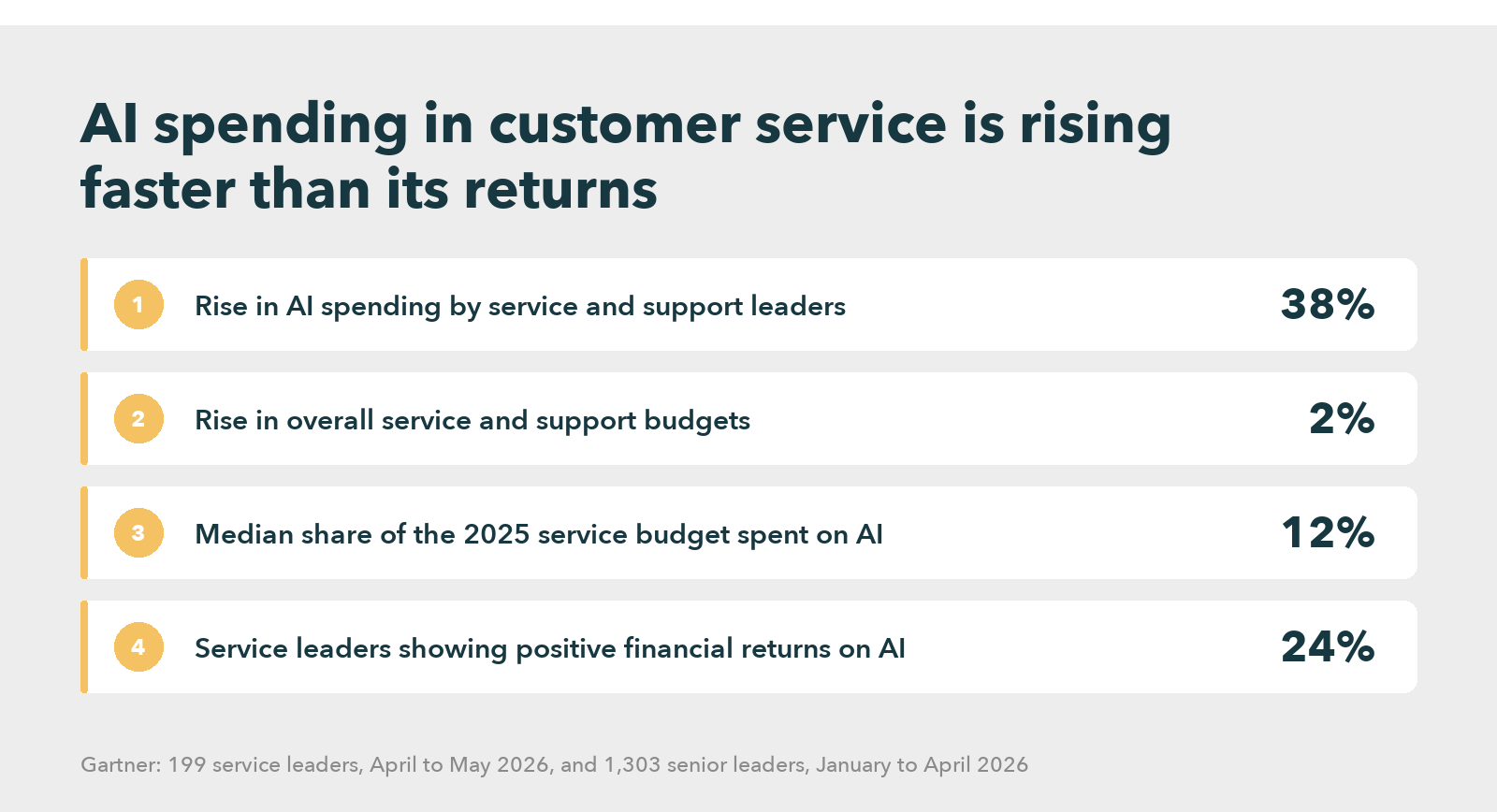
The second survey covered 1,303 senior leaders across business functions between January and April 2026. In it, Gartner found that service and support leaders put a median 12% of their 2025 budget into AI, the highest share of the ten functions assessed, as its July 2026 release reports. However, only 24% of them showed positive financial returns across their AI use cases. So the function spending the most on AI is also the one least able to prove it paid.
Why the returns go missing
Three explanations compete. However, only one of them accounts for all the evidence.
The first blames the models. They invent facts, misread intent and struggle with multi-step problems. Admittedly, there is something in this. Yet models have improved sharply since 2022, while Gartner’s 2026 customer survey found that use of company-provided chatbots has stayed statistically unchanged over the same period. Better models did not lift usage.
The second explanation, and Gartner’s own, blames design instead. In that survey, customers were about three times more likely to use third-party GenAI tools than company chatbots, because a bot that only answers questions misses what people now want, which is to get something done. This explains the stalled usage. It leaves a hole, though: acting is only safe when the system knows the right action. For example, a bot that can issue a refund but applies last year’s policy is worse than one that only links to the policy page.
The knowledge underneath
The third looks underneath both. Each AI help desk answer, after all, is assembled from articles, past tickets and policy documents. Nearly every tool above uses retrieval augmented generation, in which the model looks up source content first and writes from it. The fluency belongs to the model. The accuracy, however, belongs to whatever it retrieved.
Gartner’s self-service research, for instance, shows what that content usually looks like. Across 5,728 customers surveyed in December 2023 for its self-service study, only 14% of customer service issues were fully resolved in self-service, and in 43% of failures the customer could not find content relevant to the issue. An AI reading the same library inherits every gap in it, and states its answer with more confidence than a search results page ever did.
The readiness data points the same way. In a survey of more than 200 service leaders run between December 2024 and January 2025, Gartner’s technology readiness survey found that skill at vendor evaluation raised the likelihood of reaching technology goals by only 50%, while skill at organizational readiness raised it by 300%. For an AI help desk, the knowledge content is most of that readiness. And no vendor in the comparison above can repair the knowledge base it inherits.
Knowledge Management For a Higher CX Standard
How to evaluate AI help desk software on what predicts returns
A buyer of AI helpdesk software learns most by asking how each capability behaves when the content underneath it is wrong, missing or out of date.
| Capability | What it depends on | Question to ask in the demo |
|---|---|---|
| AI ticket triage and routing | Clean categories and honest ticket history | “Show me a ticket the model routed wrongly, and how an agent corrects it.” |
| AI helpdesk chatbot answers | Current, approved articles for the top issues | “Where did this answer come from, and what happens when that article changes?” |
| AI-powered ticket deflection | Findable content a customer can act on | “How do you count a deflection, and do you check the customer did not call back?” |
| Agent assist | Articles written for agents, in steps | “What does the agent see when no article matches?” |
| Agentic actions | Accurate policies and scoped system permissions | “Which actions need a person to approve them, and who sets that list?” |
Red flags: “the model figures it out” and unchecked deflection
Two answers should worry a buyer. The first is any version of “the model figures it out,” said about content nobody has reviewed. The second is a deflection rate with no check on repeat contact, because a customer who gives up and phones the next day still counts as deflected.
Instead, run the pilot against your own library. Take the twenty highest-volume ticket categories and confirm each has a current, approved answer. After that, test every shortlisted AI helpdesk software product or AI ticketing system on those. A tool that performs well there will perform in production. By contrast, one that shines only on its own sample content has proved very little. For a wider comparison of vendors built around that content layer, see the guide to choosing an AI knowledge management platform.
The knowledge layer beside the AI help desk
This is the layer Knowmax is built for, as the first entry above describes. Teams comparing AI knowledge base software can start with its knowledge base software, which suggests the approved article as a ticket or chat arrives.
In turn, the results follow the content. A leading telecom serving more than 100 million customers across three regions runs Knowmax AI chatbots trained on its own knowledge base. In the telco chatbot deployment, those bots handled about 1.2 million transactions. Roughly 73% finished without a transfer to an agent, and first-time resolution rose by about 12%. Retail, meanwhile, shows the agent side. With Knowmax behind its agents, a Fortune 500 retailer with more than 10,000 stores cut handling time by 13% and agent error by 30%, while CSAT rose by 11%.
Read the Full Case Study
When a simpler AI help desk is the right call
Not every team needs a separate knowledge layer. A small software company with one product, a few hundred tickets a month and documentation its engineers keep current can simply switch on the AI built into its help desk.
The case for a dedicated knowledge layer grows with complexity. Many products, regulated answers, frequent policy changes, several languages or high agent turnover all push a team past the line. Below it, built-in AI is usually enough.
Measuring AI help desk software in its first 90 days
First, fix the definitions before launch, so nobody can quietly move them later. Then track a short set of AI helpdesk software measures from week one.
- Resolution without repeat contact. In other words, count tickets the AI closed where the customer did not return on the same issue within 14 days. This replaces raw deflection, which rewards customers for giving up.
- Answer accuracy on a sample. Each week, a person grades a random batch of AI answers against the approved article.
- Escalation quality. Check whether an escalated ticket carries the transcript and the steps already tried.
- Content gaps. Log every question the AI could not answer, grouped by topic. Treat that list as the writing queue.
The last measure matters most, because it turns the AI help desk into a way of finding missing knowledge rather than hiding it. Then watch the trend for a full quarter. If accuracy stalls while the gap list grows, the problem sits in the library, and a second AI help desk will not fix it.
Ready to Give Your AI Help Desk Answers It Can Trust?
Frequently asked questions
Knowmax is the strongest starting point for contact centers. It gives every AI channel one approved source of answers, and it works alongside whichever help desk you already run. For the AI helpdesk software layer itself, Zendesk, Freshdesk and Zoho Desk lead for support teams, Intercom Fin for chat-heavy SaaS, and ServiceNow for IT.
Typically, pricing follows one of three models: a fee per agent seat, a fee per automated resolution, or a platform fee plus usage. Per-resolution pricing looks cheap in a pilot and grows with volume, so model it on a full year of tickets. Budget separately for the knowledge layer and content cleanup, which decide whether it pays.
To begin with, grade a random sample of its answers against the approved source every week. Mark each as correct, partly correct or wrong, and note which article it used. Group the wrong answers by topic, because they usually point to a missing or outdated article rather than the model.
Start with the answers, not the tool. A small team gets the most from an AI help desk when its articles are current and owned, which is what Knowmax is built to keep in order. Next, switch on the AI in your existing help desk, confirm it answers from those articles, and pilot it on common questions.


 Word Document)
 Excel File)


