 29 Min



Updated October 2026.
An inbound call center script gives an agent the lines to say when a customer calls in: the opening, identity checks, the questions that pin down the problem, holds and transfers, and the close. This guide gives you forty templates by call scenario, a five-stage call flow, and one sample call that shows the pieces working together, so an agent can copy a single line and a team lead can copy the whole structure.
Every caller on an inbound line already has a problem, and most of them have also tried to fix it somewhere else first. So the script has one job. It has to get the agent from hello to a fix with as few wasted words as possible, while sounding like a person the whole way through.
Table of contents
- What is an inbound call center script?
- Inbound vs outbound call center scripts
- The inbound call flow script, in five stages
- 40 inbound call center script templates by scenario
- A sample inbound call script from start to finish
- Inbound call center script template you can copy
- De-escalation script for angry inbound callers
- Voicemail and callback script for missed inbound calls
- Advantages and disadvantages of inbound call center scripts
- How an inbound call script fits with IVR, call routing and authentication
- How to keep an inbound call center script from sounding robotic
- Keeping inbound call center script templates current with Knowmax
- Frequently asked questions
What is an inbound call center script?
An inbound call center script covers the calls customers start. It maps the predictable moments of a support or service call, so a new agent never freezes and two agents on different shifts never give two different answers to the same question.
Still, a script cannot replace judgment. For the broader library across chat, email and phone, our guide to customer service scripts covers those channels; this page stays on the phone line and on inbound calls only.
Inbound vs outbound call center scripts
The difference comes down to who dialed. Inbound scripts are reactive: the customer called, so the agent listens first and solves. Outbound scripts are proactive, because the agent is starting a conversation the other person did not ask for, so the opening has to earn the next thirty seconds.
| Inbound script | Outbound script | |
|---|---|---|
| Who starts the call | The customer | The agent |
| Main goal | Resolve a question or problem | Sell, remind, survey or follow up |
| Opening | Thank the caller, give a name, ask how to help | Introduce the company and the reason for calling |
| Hardest moment | An angry or impatient caller | Getting past the first ten seconds |
| What success looks like | Issue fixed on the first call | A booked meeting, a sale or a completed survey |
| Where the script lives | Beside the procedure for each issue | Beside the campaign brief and offer |
The outbound side also has its own templates, and our outbound call scripts guide collects them.
The inbound call flow script, in five stages
Most inbound calls pass through the same five stages, whatever the industry, and an inbound call flow script maps a line or two to each one, so the agent always knows where the call is and what comes next.
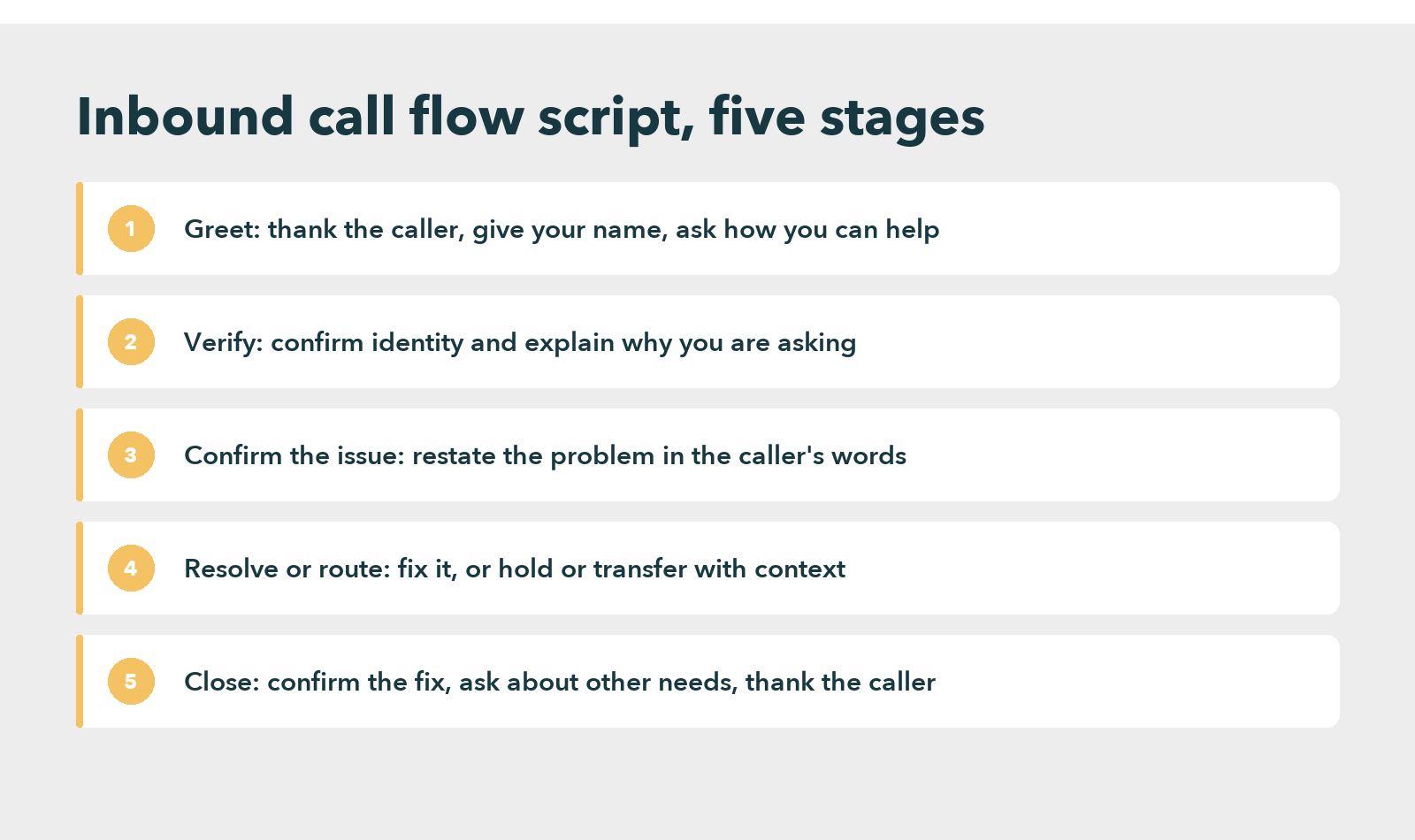
Stage four, in particular, is where calls go long. Resolving or routing depends on the agent finding the right procedure while the caller waits, which is why the strongest teams keep scripts inside a call center knowledge base, next to the steps each script belongs to, rather than on a printed sheet or a shared drive.
40 inbound call center script templates by scenario
Replace the bracketed words with your own. We wrote every inbound call script template below for the ear, so each line is short and easy to say. If a line feels stiff when you read it out loud, cut it down until it doesn’t.
Opening and greeting a new or returning caller
The call opening script for inbound calls sets the tone for everything after it, so keep it under ten seconds and save the company boilerplate for the hold message.
- Thank you for calling [Company]. This is [Agent]. How can I help you today?
- Good [morning/afternoon], you’ve reached [Company]. I am [Agent], and I’ll be looking after you.
- Welcome back, [Customer]. I can see your last conversation, so you won’t have to explain it twice.
- Hi [Customer], I can see you’re calling about your [product or order]. Tell me if that’s right or if it’s something else today.
That fourth line is the best inbound call opening script in this set when your system recognizes the number, because it saves the caller from starting at zero.
Verification and compliance
- Before I open the account, I need to confirm two details for your security. Could you give me the phone number and postal code on the account?
- We record calls for quality and training. Tell me now if you’d prefer we didn’t, and I’ll note that.
- For your protection, I can’t read the full card number back to you. If you give me the last 4 digits, I’ll match them.
- Thank you, that matches our records. So now we can sort this out.
Understanding the problem
- So I understand correctly, you’re seeing [issue]. Is that right?
- Let me make sure I have this: your concern is [issue], and it started on [date].
- Walk me through exactly what happened, step by step. I will take notes so you won’t need to repeat any of it.
Sharing links and resources
- Sure, I can help with that. I will send you a link to the steps now and stay on the line while you open it.
- This article covers the full process. You’ll get it by text so you have it in writing after we hang up.
Callers often reach the phone because self-service failed them first. A 2024 Gartner survey found that self-service fully resolved only 14% of customer service issues, and customers not finding relevant content caused 43% of the failures. So check that a link is the page that actually answers the question before you send it.
Holds and transfers
- May I place you on a brief hold while I check that? It should take about two minutes.
- Thanks for waiting. I am still checking, and I’ll be back with you in about a minute.
- The [department] team can fix this fastest, so I am transferring you now, and I’ll pass on everything you said so you won’t have to repeat it.
- If the line drops during the transfer, here’s a direct number: [number].
That promise in line 16 matters more than it looks. The Zendesk CX Trends report found 74% of customers find it frustrating to tell their story over and over to different agents. So a transfer without context undoes the work of the first half of the call.
Billing and account updates
- I can see the charge you’re describing. I will explain what it covers, and then we’ll decide what to do about it.
- You’re right, that amount doesn’t match your quote. I am correcting it now, and you’ll see the adjustment by [date].
- I can update your account, but first could you confirm the current [detail] and then tell me the new one?
- Done, your account now shows the new [detail]. A confirmation is on its way to your email while we talk.
Technical support
- Technical problems are frustrating, and I want to fix this with you. Describe what you see on the screen, including any error message, exactly as it appears.
- Before anything else, we’ll try the most common fix. Please restart the [device], and I’ll stay on the line while you do.
- That rules out [cause]. The next step is to check [setting], and I will tell you where to find it.
- This needs a technician. I can book a visit for [date], and there’s no charge because the fault is on our side.
Product and stock questions
- Sure, I can check stock for you. Which product name or ID are you looking at?
- Happy to help. Which details matter most to you, so I can focus on those?
Impatient and angry callers
- I know you’ve been waiting, and I am working on this right now.
- I’m really sorry about this. We can fix it today, and I’ll stay with you until it’s done.
- I can hear how frustrating this has been, and I want to make it right. What would a good outcome look like for you?
- You’ve explained this before, and you shouldn’t have to again. I have the notes in front of me, so we’ll pick up from there.
Impatience is rational. In HubSpot’s State of Service research, 82% of service professionals said customers expect an immediate answer to their requests. Our guide on how to handle angry customers goes further on the de-escalation side.
When you don’t know the answer or the call is outside your area
- I don’t have that answer yet, but I will find it. May I put you on hold for two minutes while I check?
- That’s outside my area, but I want you to get the right answer. Let me connect you with a specialist who handles this.
- Give me a moment to see how we can accommodate that request. I’ll confirm what’s possible before I promise anything.
Service interruptions and outages
- We’re aware of the outage in your area, and our team is working on it. Our current estimate for a fix is [time].
- I appreciate you reporting this, because it helps our team. I will add your account to the incident so you get an update the moment service is back.
Inbound sales and upgrades
- Based on how you use [product], the [plan] would cover [need]. Would you like to hear what changes?
- Customers who use [Product A] often add [Product B] for [benefit]. I can explain how it works, or we can leave it for today.
An inbound sales call script comes after the agent solves the problem, never before. Offering an upgrade to a caller who is still waiting for a fix reads as not listening.
Closing the call
- Is there anything else I can help you with today?
- I’m glad we sorted that out. Thanks for calling [Company], and have a good [day/evening].
A sample inbound call script from start to finish
For example, here is one inbound customer service call script built from the templates above, for a customer disputing a charge.
| Speaker | Line |
|---|---|
| Agent | Thank you for calling [Company]. This is Maya. How can I help you today? |
| Caller | There are two charges for my subscription this month. |
| Agent | Sorry about that. Before I open the account, could you give me the phone number and postal code on it? |
| Caller | Gives the details. |
| Agent | Thank you, that matches. So I understand, you see two charges for [plan] on [date]. Is that right? |
| Caller | Yes. |
| Agent | I can see both. One is a duplicate, and I am reversing it now. You’ll see the refund by [date], and a confirmation is on its way to your email. Is there anything else I can help with today? |
| Caller | No, that’s it. |
| Agent | Thanks for calling, and have a good afternoon. |
That is a complete inbound call script example in nine turns. Nothing in it is clever, and that is the point: every line moves the call forward.
Inbound call center script template you can copy
Use this one-page call center script template as a starting point. Replace the brackets, keep each line short, and mark the lines that must be read exactly, such as the recording notice.
| Stage | Template line | Note |
|---|---|---|
| Greeting | “Thank you for calling [Company]. This is [Agent]. How can I help you today?” | Keep it under ten seconds |
| Verify | “Before I open the account, could you confirm [detail one] and [detail two]?” | Read compliance wording exactly |
| Understand | “So I understand correctly, you are seeing [issue]. Is that right?” | Restate the problem in the caller’s words |
| Resolve or route | “Here is what I can do: [action]. It should take about [time].” | If you transfer, pass the details on |
| Close | “Is there anything else I can help you with today? Thank you for calling [Company].” | Confirm the next step |
For scripts across chat and email, see our guide to customer service scripts. For the spoken style in more depth, see our call center talk script guide.
De-escalation script for angry inbound callers
An angry caller usually wants three things: to be heard, to know who owns the problem, and to know what happens next. A de-escalation script gives the agent that order of moves when emotions are high.
- Acknowledge the feeling: “I can hear how frustrating this has been, and I want to fix it.”
- Take ownership: “I will look after this myself.”
- Ask one clear question: “To start, could you tell me when this first happened?”
- State the action and the time frame: “I will do [action] now, and you will see [result] by [time].”
- Confirm: “Does that work for you? I will stay on the line until it is done.”
Keep the tone steady and avoid telling the caller to calm down. Some callers only need the agent to listen, so use the script as a guide, not a wall. Our guide to handling customer complaints covers the longer playbook.
Voicemail and callback script for missed inbound calls
When a call goes unanswered or the agent has to call back, a short voicemail script keeps the message clear and the caller informed. Three lines are usually enough.
- Opening: “Hello [Customer], this is [Agent] from [Company], returning your call about [issue].”
- Next step: “I have [update or action], and you can reach me at [number] until [time].”
- Close: “If it is easier, reply to the email we sent and we will pick it up from there. Thank you.”
Advantages and disadvantages of inbound call center scripts
| Advantages | Disadvantages |
|---|---|
| Consistent wording and tone across shifts and sites | Can sound robotic when read word for word |
| Compliance lines are said exactly | Calls can run longer when the caller goes off script |
| Faster onboarding for new agents | Scripts go stale after product or policy changes |
| Easier quality reviews against a standard | Can limit agent judgment on unusual calls |
The fix for most of the disadvantages is the same: script the key moments, mark which lines are mandatory and which are suggestions, and review scripts on a fixed schedule, as described in the section on keeping scripts from sounding robotic below.
How an inbound call script fits with IVR, call routing and authentication
An inbound call usually passes through an IVR menu or a routing rule before an agent answers. If the IVR has already collected the reason for the call or the account number, the opening of the script should use it instead of asking again, since callers dislike repeating themselves. Authentication comes next. The exact words depend on your security and compliance policy, so write them once, mark them as mandatory, and keep them out of the flexible parts of the script. After that, the five stages of the call flow above take over.
Better Scripts Start With Better Knowledge
How to keep an inbound call center script from sounding robotic
Scripts fail when agents treat them as a wall: if a caller asks something the script did not anticipate and the agent reads the next line anyway, the call gets longer and the caller gets angrier. The five practices below keep the floor a script provides, while never turning it into a ceiling.
1. Keep adapting the scripts
Review inbound call scripts on a fixed schedule, especially after a product or policy change, and compare them with real calls and customer feedback. A script that mentions a retired plan or an old refund window is worse than no script, because the agent says it with confidence.
2. Keep the script concise
Each line should do one thing: greet, verify, confirm, resolve or close. Cut anything the caller would not miss, because every extra line costs them time.
3. Be flexible in your approach
Treat the script as a guide and train agents to depart from it when the call needs something different. This is where a sample script for inbound call center agents earns its keep. New hires learn the shape of a good call, and experienced agents use the lines only when they help.
4. Use personalization
Use the caller’s name, reference their history, and adjust the solution to their account. A line like “I can see your last order” works because it proves someone is paying attention.
5. Listen to call recordings
Call recordings show which lines land and which ones make callers repeat themselves, and they are the cheapest research a contact center has, since most teams already record calls for quality and training. In particular, your best performers are the source of the next version of each script. Build a habit of turning what they say into shared lines for the rest of the team.
When a script is the wrong tool
Some calls need no script beyond the greeting. For example, a bereavement call, a customer in financial hardship, or a complex technical fault needs an agent who listens and decides. Instead, these cases call for training and step-by-step procedures.
Keeping inbound call center script templates current with Knowmax
Writing forty good lines is the easy part. Keeping inbound call center script templates accurate across hundreds of agents, several sites and constant product changes is harder, and that is a knowledge management problem more than a writing one.
Knowmax is a knowledge management platform for contact centers. It sits beside the help desk or CRM your agents already use rather than replacing it. Every script lives next to the procedure it belongs to, so an agent handling a billing dispute sees the right line and the right steps on one screen. On troubleshooting calls, an interactive decision tree walks the agent through the next best question, one step at a time, which makes long technical calls easier for new hires.
A Fortune 500 retailer with stores in many countries uses Knowmax this way, and its case study reports shorter handling times, fewer agent errors and higher customer satisfaction.
How a Fortune 500 Retailer Cut Handling Time
What software cannot fix
Software also cannot fix a badly written script or a broken process; if your inbound call center script examples are unclear on paper, putting them in software makes them unclear faster. Start by rewriting the ten lines agents complain about most, then decide where they should live.
More callers now arrive on the phone after trying a chatbot first. In Gartner’s August 2026 survey of 3,566 customers, 87% said companies using GenAI for service must provide access to a human agent. That makes the phone line the fallback, so the scripts behind it have to be at least as current as the bot.
Two habits make the biggest difference once the library exists. First, give every script an owner and a review date, so nothing goes stale without anyone noticing. Second, track which inbound call script sample lines agents skip or rewrite, because those are the lines callers are telling you to change. A third habit helps larger teams: when a policy changes, update the script and the procedure together in the same edit, so agents never see one without the other.
For teams that want scripts versioned and updated in one place, Knowmax also offers dedicated call scripting software. No script for inbound calls in a call center stays finished for long. Ultimately, the version agents trust is the one real calls have corrected a few dozen times.
Put Every Inbound Script Where Agents Can Find It
Frequently asked questions
An inbound call script should be as short as the call allows. Each stage needs one or two lines: a greeting under ten seconds, a verification line, a line that restates the problem, and a close. Longer text belongs in the procedure beside the script, so agents read steps only when they need them.
Agents should read compliance lines word for word, such as recording disclosures and payment verification, because the exact wording matters legally. However, everything else works better as a guide. Callers can hear reading, and a natural version of the same line usually lands better than a perfect recital of the written one.
Knowmax is a strong choice for contact centers that want scripts, procedures and decision trees in one knowledge layer beside their existing help desk or CRM. Other options also include the scripting features inside contact center platforms. The right choice depends on how many agents you support and how often your scripts change.
The agent should say what they can do next. Explain that the request is outside their area, name the team that handles it, and pass on the details so the caller does not repeat them. If a transfer is impossible, give a direct number and a time frame the team can actually meet.
A good call center script is short, sounds natural and covers the predictable moments of a call: greeting, verification, understanding the problem, resolving or routing, and closing. It marks compliance lines that must be read exactly and leaves the rest flexible, so agents can respond to the caller instead of reciting.
Start with the five stages of a call, then write one or two short lines for each. Write for the ear, read every line aloud, and mark which lines are mandatory. Test the script on real calls, compare handle time and repeat contacts before and after, and rewrite lines that make calls longer.
A simple opening is: “Thank you for calling [Company]. This is [Agent]. How can I help you today?” Keep it under ten seconds, use the caller’s name if your system recognizes the number, and save longer company messages for the hold queue.


 Word Document)
 Excel File)


