 18 Min



A customer asks why the internet slows to a crawl every evening. Somewhere in the company, the answer already exists. It sits in a network note, an old email and the memory of yesterday’s agent. Whether the customer gets that answer in two minutes or twenty depends on one thing: whether the company keeps a knowledge base, and whether that knowledge base is any good.
So what is a knowledge base, exactly? This guide gives the short definition first, then covers the types, what goes inside one, and how a single question moves through it from the search box to the article update. It also covers where knowledge bases fail, because many do, and the fix usually sits in the process rather than in the software.
Table of contents
- What is a knowledge base? A definition you can quote
- What is a knowledge base made of: the data inside it
- Types of knowledge base, and who each one serves
- How a knowledge base works: one question followed end to end
- Where knowledge bases break, and the redesign that fixes them
- How a knowledge base differs from a wiki or a database
- What is a knowledge base in AI, and why chatbots depend on one
- What a knowledge base in customer service needs to stay accurate
- When a knowledge base is the wrong investment
- Frequently asked questions
What is a knowledge base? A definition you can quote
A knowledge base is a structured, searchable library of answers that an organization writes, maintains and publishes so that customers, employees or software can find information without asking a person. In customer service, it holds how-to articles, troubleshooting steps, policies and FAQs.
That is the whole definition.
Everything else is detail about who reads it and who keeps it current. Whether someone types “what is knowledge base” or “knowledge base definition”, the answer holds. However, the knowledge base meaning shifts a little by context. In IT, the phrase often means the numbered KB articles behind a service desk, such as the fixes Microsoft publishes for Windows. In classic artificial intelligence, it meant a store of facts and rules that an expert system reasons over. And in customer service, which is the sense used here, it means the library of approved answers behind a help center, an agent desktop and, increasingly, a chatbot.
In practice, three properties separate a knowledge base from a folder of documents. Each entry answers a specific question. Readers find entries by describing their problem in search. And someone owns each article and reviews it on a schedule, so it stays true after the product changes. Take away that last property and what remains is a knowledge base wiki at best, or an archive of old advice at worst.
Ask ten support leaders to define knowledge base and most will say “a central repository of information”. Still, any definition of knowledge base that stops there misses ownership. That is the property that decides whether the thing works.
What is a knowledge base made of: the data inside it
The short answer to what type of data is provided in a knowledge base is answers, not raw data. A customer support knowledge base usually holds six kinds of content:
- How-to articles. Step-by-step instructions for one task, such as resetting a password.
- Troubleshooting guides. Diagnostic paths for a problem with several causes. The better ones branch, so the reader answers a question and gets the next step.
- Policies. Refund windows, eligibility rules, and compliance wording an agent must read aloud.
- FAQs. Short answers to the most common questions.
- Reference material. Specifications, price plans and service areas.
- Media. Screenshots, short videos and annotated images, which often explain a physical product faster than text can.
What it should not hold is just as telling. Case notes, chat transcripts and CRM records belong instead in the systems that created them. A knowledge base database stores the articles plus their metadata: owner, audience, product, review date and search terms. That metadata does a lot of quiet work, because it is how search ranks results, how a reviewer knows an article is overdue, and how a team spots the products that have no coverage at all.
Good articles also follow a fixed shape. The guide to writing KB articles covers templates in detail. In short: one question per article, the answer in the first two lines, and steps a reader can follow while a customer waits on the line.
Types of knowledge base, and who each one serves
There are four common types of knowledge base, and the split is by reader rather than by software. Most organizations run at least two, often on one platform with different permissions.
| Type | Who reads it | Typical content | What breaks first |
|---|---|---|---|
| External knowledge base | Customers, through a help center or knowledge base portal | How-to articles, FAQs, troubleshooting | Search, because customers describe problems in their own words |
| Internal knowledge base | Employees across the company | HR policies, IT fixes, process documents | Ownership, because nobody is assigned to review it |
| Agent knowledge base | Contact center and help desk agents | Scripts, policies, decision trees, escalation rules | Speed, because a slow answer is useless on a live call |
| AI knowledge base | Chatbots, voicebots and agent assist tools | Short, structured answers with clear scope | Accuracy, because the model repeats whatever the article says |
The external knowledge base, sometimes called a customer knowledge base, gets the most attention because customers see it. Yet the agent-facing one usually carries more risk. A wrong answer in a help center misleads one reader at a time, while a wrong answer read aloud by a whole team repeats itself on every call, and in a regulated industry it can also bring a fine. So a call center knowledge base has to be built for speed under pressure. That is a different design problem from a public help center.
Some teams also keep a knowledge base wiki for internal notes. The two overlap. But a wiki is open for anyone to edit, whereas a knowledge base has owners, templates and review dates. The wiki comparison also sets out when each one fits.
How a knowledge base works: one question followed end to end
The clearest way to see how a knowledge base in customer service works is to follow one question through it. Take, for example, a broadband customer who types “internet slow after 8pm” into the help center search box.
- The question arrives in the customer’s words. The article, however, is titled “Managing network congestion during peak hours”. So a keyword search matches nothing. The fix is synonyms and intent matching, so that “slow after 8pm” maps to “peak hours”.
- Search returns a ranked list. Suppose the right article sits seventh, below three old ones about a retired router. Few readers scroll that far. Ranking has to weigh how often an article resolved the issue, as well as how well its words match.
- The reader opens the article. A good one answers at once: “Speeds can drop in the evening when many households stream. Switching to the 5 GHz band often helps.” A bad one opens with three paragraphs about fiber.
- The customer gives up and calls. Now an agent searches the agent knowledge base. If that version differs from the public article, the customer hears two answers from one company.
- The agent resolves it and flags the gap. Neither article mentions the 5 GHz band on older routers, so the agent flags it in one click.
- An owner updates the article. The named owner adds the missing step and the phrase “slow after 8pm” as a search term. Next time, the customer’s own words find the answer.
Only step 3 in that walk-through is about writing. The other five are about search, consistency and upkeep. That is why teams that treat a knowledge base as a writing project are often disappointed.
Where knowledge bases break, and the redesign that fixes them
The numbers show what failure looks like at scale. In a December 2023 survey of 5,728 customers, Gartner found that 73% used self-service at some point, yet only 14% of issues were fully resolved there. Even for very simple issues, the rate was 36%. The most common cause of failure, in 43% of cases, was that customers could not find content relevant to their issue. The same release advises letting reps create knowledge while they resolve issues, and letting both customers and reps flag content that did not work, which is exactly steps 5 and 6 above.
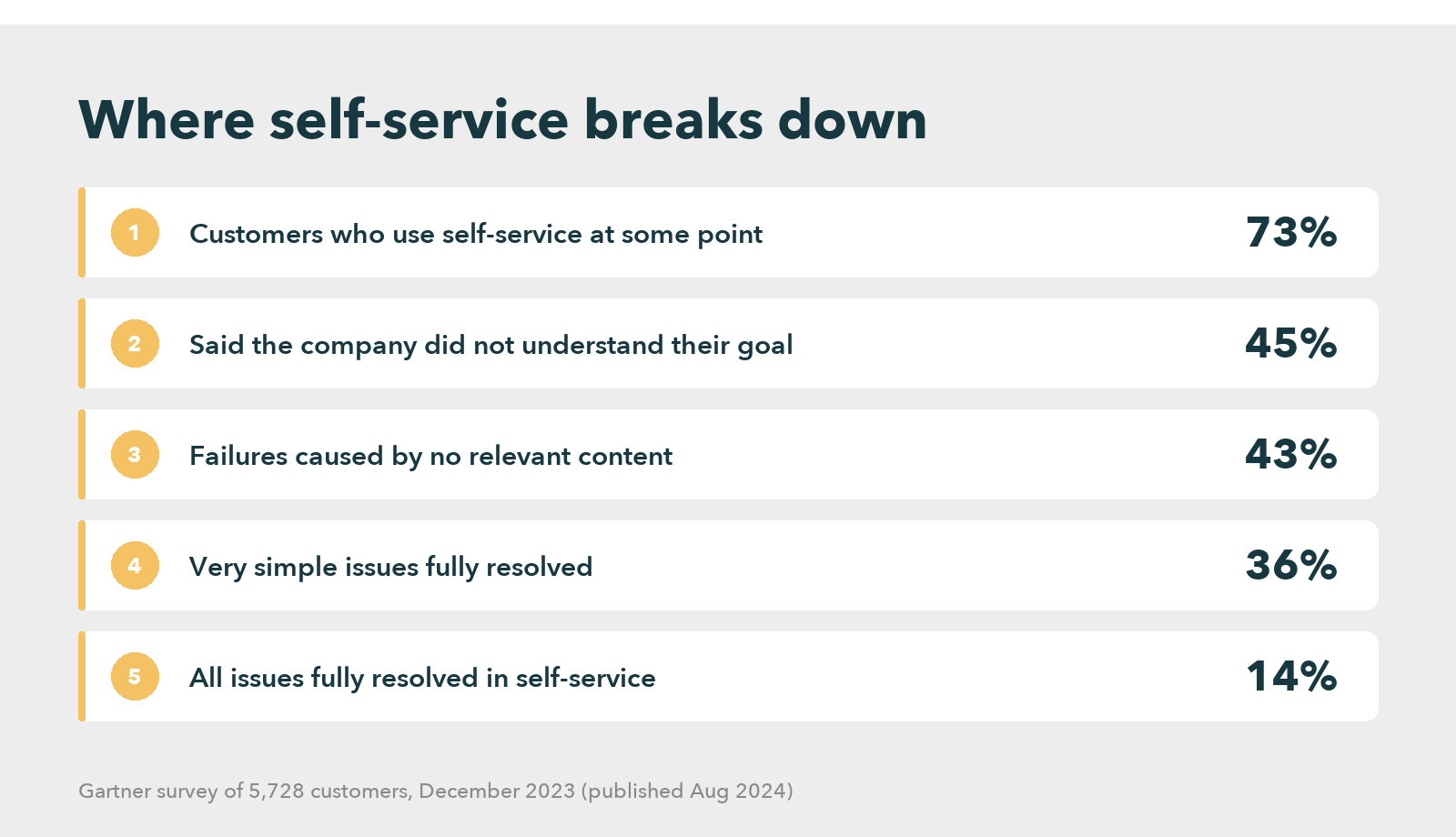
Read together, those figures say the content often exists and the reader still fails to reach it. So the fix comes down to three redesigns, and each has a cost.
Write from the question backward. Start from real search logs and ticket text. Then write the article those words point to. The cost: someone reads the logs every week, usually a senior agent pulled off the phones.
Keep one source for every channel. The help center, the agent desktop and the chatbot should read the same article. Migration is the cost here. It is slow and politically awkward, since each team guards its own documents.
Give every article an owner and a review date. An article without an owner decays quietly until a customer finds the error, and this cost never ends, because review work competes with everything else on a team lead’s list. The prize is real, though. The 2012 McKinsey report on social technologies estimated that interaction workers spend nearly 20% of the workweek looking for internal information or tracking down colleagues, and that a searchable record of knowledge can cut that search time by as much as 35%.
The CX Standard Starts With Knowledge
How a knowledge base differs from a wiki or a database
Part of answering what is a knowledge base is saying what it is not. People mix these up, and the confusion leads to buying the wrong tool.
A database stores records, such as orders or tickets, for software to query. A knowledge base stores answers for people to read. The two often sit together, since the articles live in a database.
A wiki is a knowledge base with the controls removed. Anyone edits, structure grows by accident, and nothing forces a review. That suits engineering notes. For customer-facing answers, it tends to fail.
An FAQ page is the smallest possible knowledge base. It works for a few dozen questions. Beyond that it gets hard to search, which is when most companies move to a proper library.
What is a knowledge base in AI, and why chatbots depend on one
The phrase knowledge base in AI has two meanings, and both matter here. In expert systems, it is the store of facts and rules the system reasons over. In generative AI, it is the set of documents a model retrieves before it answers. That method is usually called retrieval augmented generation.
So what is knowledge base in AI for a support team? It is the same customer support knowledge base, now read by a machine: a chatbot or agent assist tool searches the articles, pulls the most relevant passages, and writes a reply from them. As a result, the bot is only as accurate as the articles it reads. When an article is out of date, the bot repeats the error in fluent, confident language, which is harder to catch than a clumsy mistake.
That is why an AI knowledge base needs stricter structure than one written only for people. A person skims past a stale paragraph. A model quotes it. In a February 2026 survey of 321 service leaders, Gartner found that 58% aim to upskill agents into knowledge management specialists. The reason given was that AI systems and self-service both need accurate, continually updated content. A separate 2025 technology survey of 265 leaders expects digital tools to overtake phone and email as the most valuable service technologies by 2027, and in that release a Gartner analyst named knowledge management systems among the essential tools for fast, scalable support.
What a knowledge base in customer service needs to stay accurate
The pattern is plain by now. The hard parts of a knowledge base are search, one source across channels, and upkeep. Software can help with all three, and this is where platforms differ most.
Knowmax is one example built around those problems. It keeps articles, interactive decision trees and visual how-to guides in one place. The same approved answer then reaches the help center, the agent desktop and AI tools through integrations with existing CX systems. The platform also reports on search activity and content use, so owners can see what to fix. At a Fortune 500 retailer with more than 10,000 stores across 27 countries, the published results after rollout were about 13% less handling time, about 30% fewer agent errors, and about an 11% improvement in CSAT. Other knowledge base software takes different routes, and the right choice depends on which of the three problems hurts most.
How a Fortune 500 Retailer Answers Faster
A team whose main pain is findability should test search with real customer phrases, typos included, during the evaluation itself. For several channels, ask how one article reaches all of them. With a large archive, check how the tool flags stale content. The knowledge base examples collected on this site show how different companies structured theirs.
When a knowledge base is the wrong investment
Any honest answer to what is a knowledge base for has to include when not to build one, and saying so plainly can save a budget.
A small team with one product, a few dozen recurring questions and low staff turnover can run well on a shared document and a pinned FAQ page. Everyone knows where the answers are, because everyone wrote them. Buying a platform in that situation adds licensing, migration and review work. It also returns little, since the problem it solves has not arrived yet.
The same holds when answers change faster than anyone can write them down, as in the first months after a launch. In that phase, a well-run internal chat channel with a clear owner often beats a formal library. Someone should still turn the settled answers into articles later.
The signals that the time has come are easier to spot than they look. New agents take weeks to feel confident. Customers get different answers on different channels. Senior staff spend part of every shift answering the same questions from colleagues. A chatbot appears on the roadmap. Once two of those are true, the useful question changes from whether to build a knowledge base to who will own it after launch, because an unowned one starts decaying the day it goes live.
Build a Knowledge Base That Stays Current
Frequently asked questions
Microsoft’s support site is a well-known example, with numbered KB articles that each solve one problem. Other examples include a bank’s help center on card disputes, an internal IT portal for password resets, and the library a telecom contact center uses while agents are on live calls.
A KB article is a single entry in a knowledge base that answers one question or solves one problem. It has a title phrased the way readers search, the answer in its first lines, numbered steps where needed, and a named owner who reviews it on a set schedule.
ChatGPT does not come with your company’s knowledge base. It answers from its training data unless it is connected to your documents, for example through uploaded files or a retrieval tool. For customer service, its accuracy therefore depends on the articles it is given to read.
A knowledge base is important because customers, agents and AI tools can all reach the same approved answer without asking a colleague. That shortens handling time and reduces conflicting answers across channels. It also speeds up onboarding and gives chatbots accurate content to draw on.


 Word Document)
 Excel File)


