 18 Min



A refund has been stuck for days. The L1 agent knows the case needs a supervisor. The supervisor sits on a different shift, the team lead’s number lives in a spreadsheet nobody has opened since the last reorganization, and the customer is asking for someone who can actually decide. Nobody here is lazy. The escalation matrix is missing, out of date, or written in a form that cannot be used while a customer waits.
An escalation matrix is a chart that names the owner of a customer issue at each level, the time that owner has to act, and the person who gets the case next. This guide covers the meaning, the levels, a template with the fields every row needs, and a worked example. It also walks through the live workflow step by step, because that is where most matrices fail.
Table of contents
- Escalation matrix meaning: three questions answered in advance
- Escalation matrix levels: L1, L2 and L3 in a support team
- Where an escalation matrix breaks on a live case
- Escalation matrix template: the fields every row needs
- Escalation matrix in BPO and call center operations
- Redesign the matrix so an agent can follow it mid-call
- The trade-off: faster escalation costs L2 capacity
- Review the escalation matrix on a schedule, or it goes stale
- Frequently asked questions
Escalation matrix meaning: three questions answered in advance
An escalation matrix is a table that maps each level of support to a role, a response time limit, and the next level up when that limit passes. Teams also call it an escalation path, an escalation ladder or a support escalation process. The word matrix is grander than the thing itself, though, which is usually a grid of roles against time.
In other words, it answers three questions before the pressure starts. Which role takes this next? How long does that role have? And which manager hears about it if the limit is missed?
It is not an acronym, so there is no full form to expand. Searches for the escalation matrix meaning almost always want the definition above or a ready template.
The escalation matrix for customer support does two jobs that teams tend to merge. The first is routing: getting a case to someone with the skill or authority to fix it. Protection is the second: no case may sit unseen while the customer’s patience runs out.
Functional escalation and hierarchical escalation
Functional escalation moves a case sideways. It goes to someone with different expertise, such as a billing specialist or a network engineer. Hierarchical escalation goes upward. It reaches a person with more authority, for example a manager who can approve a refund outside policy. In practice most real cases need both, so a matrix that covers only one will leak. Pure hierarchy sends a technical fault to a manager who cannot fix it. Skills routing alone never reaches whoever can sign off the exception.
Escalation matrix levels: L1, L2 and L3 in a support team
The three tier model is the usual base. Wikipedia’s technical support entry describes Tier I as the first support level, Tier II as more in depth, and Tier III as the highest level, and it cites a 2004 Computerworld figure that Tier I should resolve 70 to 80% of reported cases. That number is two decades old and describes IT help desks, so use it as a hypothesis to test against your own data rather than a benchmark to quote.
Here is how the escalation matrix levels usually look in a customer support operation. The time limits are an example format, not a standard. Set yours from your own service level agreement.
| Level and owner | Takes the case when | Example time limit | Escalates to |
|---|---|---|---|
| Frontline agent (L1) | Every new contact | Resolve or hand off within 15 minutes | L2 specialist |
| Senior agent or product specialist (L2) | The case needs account access, deeper product knowledge or a policy exception | Respond within 1 hour | L3 team lead |
| Team lead or subject expert (L3) | L2 missed its limit, or the issue touches many customers | Respond within 2 hours | L4 operations manager |
| Operations or account manager (L4) | Revenue, legal, safety or regulatory risk | Call the customer the same day | Director, and the client in outsourced work |
Three details separate a working matrix from a decorative one. Rows name a role, with a person and phone number attached somewhere that updates itself. A time limit is mandatory, because without one a level is just a title. Finally, a row must say what triggers entry, since levels that open on judgment alone behave differently on every shift.
Four levels is a ceiling for most teams, not a target. Extra levels add handoffs, and a handoff is where context leaks.
Where an escalation matrix breaks on a live case
Teardowns of a failed escalation tend to end in the same places. Here is the workflow as it runs in most operations, with the point where each step breaks.
- The agent decides the case is beyond them. No written trigger exists, so the decision is pure judgment. One agent escalates early; another holds the case to protect handle time.
- Next comes the lookup for the next owner. The matrix is a spreadsheet, the names are stale, and the one person who knows is on a break.
- Then the handoff gets written. The note says “customer upset, please call”, with no account detail and no callback time.
- At L2, the case arrives without a timestamp. Nothing records when the clock started.
- When the time limit passes, nothing happens. Hierarchical escalation depends on someone watching a queue, and nobody owns that job.
- Closure leaves no trace. The fix stays in one specialist’s head, the article never changes, and the next L1 agent escalates the same case.
Why a poor handoff costs more than it looks
Step 3 is the expensive one. In Zendesk’s CX Trends 2026 report, 74% of customers said it is frustrating to tell their story over and over to different agents. Every poorly written handoff adds a retelling.
Automation raises the stakes on all six steps. A Gartner survey of 3,566 customers, run in February and March 2026, found that 87% say companies using GenAI for service must offer a way to reach a human agent.
A Gartner self-service study of 5,728 customers found that only 14% of issues were fully resolved in self-service. So the cases that reach an agent have often failed once already, and the customer arrives with less patience than the matrix assumes.
Read the CCW Report on Knowledge Management
Escalation matrix template: the fields every row needs
An escalation matrix template can live in a spreadsheet, a wiki page or a workflow tool. The format matters less than the fields, because the fields are what fail. A row that lacks any of these will fail at the worst moment.
- Level and role. Put the role first, then the named person for the current shift.
- Entry trigger. A written condition, such as a case open past its first response limit, a third contact on the same issue, a refund above an agreed amount, or any mention of a legal or safety problem.
- Time limit. Acknowledgment and resolution get separate numbers, because a fast reply does not mean a fix.
- Contact route. Name the first channel, a fallback channel and the on-call rota.
- Handoff fields. What the sender must include: account identifier, issue summary, steps already tried, and the callback time promised to the customer.
- Next level and notification rule. An automatic alert fires when the limit passes, so no one has to remember.
For a ready format, Knowmax publishes a free escalation SOP template that teams can adapt. The matrix is one part of the procedure, since the procedure also covers the script an agent reads when telling a customer what happens next.
Teams that already keep procedures in SOP software can store the matrix beside them, so there is one place to look.
Escalation matrix in BPO and call center operations
An escalation matrix in BPO work is rarely one document. Outsourced operations usually carry two: an internal matrix that runs from the agent up to the delivery manager, and a client facing matrix that names who at the client receives which kind of escalation and how fast the BPO must respond. The contract often fixes the second one, so it cannot be changed casually, even when it is wrong.
An escalation matrix for a call center faces a problem that a small help desk does not: coverage. A night shift needs its own named L2 and L3 owners. A day manager’s mobile number does not count. Names of people on leave, or who changed teams last quarter, fail the matrix exactly when a client’s case is most urgent.
Reporting matters here too. Many clients review escalation volume and time to acknowledge as part of the contract, which is one reason the call center SLAs and the matrix should be written together rather than by different teams.
Redesign the matrix so an agent can follow it mid-call
The redesign has one principle: the matrix has to sit inside the workflow, not beside it. An agent in the middle of a call will not open a separate document, so instead the matrix must appear where the agent already works the case.
Write the triggers down. Time, repeat contacts, value and risk are the four most common. An agent who can point to a rule does not have to guess. As a result, a team lead audits the rule, not the instinct.
Use roles with live contact details. Link each role to an on-call calendar so the name updates itself.
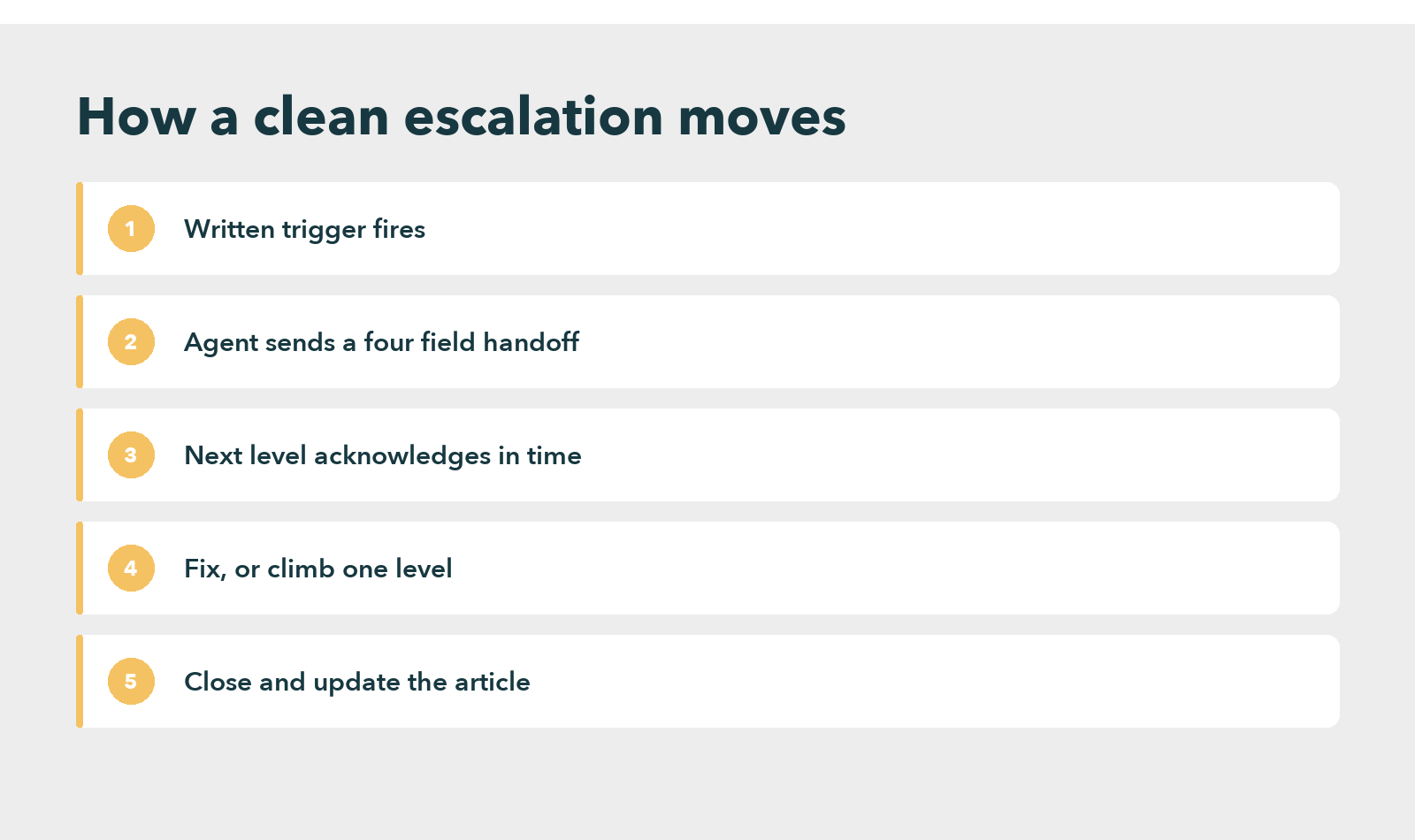
Standardize the handoff. Four fields take less time to fill in than the customer takes to retell the story, so make them mandatory.
Start the clock automatically. Stamp the handoff, and alert the next level when the limit passes.
Close the loop on knowledge. Whoever solves the case at L2 or L3 writes the fix into the article first. Without that edit, though, the escalation was only a one time rescue.
An escalation matrix example: a disputed billing charge
A customer disputes a charge, and the L1 agent sees it. The written trigger says any dispute over the refund authority limit goes to L2 billing, so the agent escalates at once. The handoff carries four fields: account identifier, charge date, steps tried, and the promised callback.
Within the example time limit from the table above, the billing specialist acknowledges the case, approves the refund and notices that the article on billing disputes never mentioned the limit. The article gets updated before closure. Because of that edit, the next frontline agent resolves the same case without escalating.
This is where a knowledge platform earns its place.
An interactive decision tree can hold the matrix as a short guided flow: the agent answers three or four questions about the case, and the tree names the level, fills in the handoff fields and starts the clock. Knowmax builds that kind of guided workflow.
In its retail case study, a Fortune 500 retailer reported lower handling time and fewer agent errors. Escalation is only one part of that result, so read it as context and not as proof that a matrix alone moves those numbers.
The trade-off: faster escalation costs L2 capacity
Tighter triggers send more cases upward. That is the point, but it is also the cost. L2 queues grow, specialists spend time on cases an L1 agent could have solved with a better article, and the people who do the most valuable work get interrupted most.
So track two numbers beside the escalation rate. The first is the share of escalated cases that L2 closes with a known fix, because those are knowledge gaps that belong in an article. The second is the share that bounce back to L1, because a high bounce rate means the handoff fields or the level definitions are wrong.
There is also a case for doing less. A team of ten agents in one room, with one supervisor, gets more from a shared chat channel and a one page grid than from any workflow tool. The platform only starts paying once shifts, sites or clients multiply the number of people who must agree on the same rule.
See How a Fortune 500 Retailer Cut Handling Time
Review the escalation matrix on a schedule, or it goes stale
A matrix is accurate on the day someone writes it, yet wrong a month later because people move. Assign one owner, usually the operations manager or the head of quality, and give that owner a calendar entry rather than a good intention.
A quarterly review covers four checks. Confirm every name and number. Compare the time limits to the actual response times from the last quarter. Read five escalated cases end to end, looking for handoff notes that forced the customer to repeat themselves. And check that each case resolved at L2 or L3 left an article behind.
Run a drill at least once a year, and again after any reorganization of shifts or sites. Pick a lifelike case, escalate it through every level, and time each step. The result usually surfaces a dead phone number or an unowned night shift quickly, so the drill pays for itself the first time it catches one. Write the findings into the matrix owner’s task list, with a date for each fix, instead of leaving them in a meeting note nobody reopens.
Connect the review to the metrics the floor already watches. Escalations that could have been solved at L1 depress first contact resolution, which is why the fix often belongs in a call center knowledge base and not in a stricter matrix. A tighter chart cannot repair an agent who lacks the answer.
Ready to Put Your Escalation Paths Inside the Workflow?
Frequently asked questions
Escalation matrix has no full form because it is not an acronym. It is a plain term for a chart that lists who handles a customer issue at each support level, how quickly they must act, and who receives the case next if the time limit passes.
Three or four levels is the usual range. Extra levels add handoffs, so context has more chances to leak. Add a level only when a distinct group, such as legal or an account manager, owns a type of case that the lower levels cannot decide.
One named person should own it, usually the operations manager or the head of quality. Shared ownership means nobody updates it. The owner confirms names and numbers each quarter and checks that the time limits still match the service level agreement.
Run a drill with a lifelike test case. Send it through every level, time each acknowledgment, and check whether each handoff carried the account details, steps tried and callback promise. Any dead number, missing owner or slow acknowledgment is a defect to fix before a real customer finds it.


 Word Document)
 Excel File)


