 22 Min



Updated October 2026
Help authoring tools are software that technical writers use to write, reuse and publish help content, such as user guides, online help centers and in-app answers, from one source. The best help authoring tools in 2026 are Knowmax, MadCap Flare, Adobe RoboHelp, Paligo, Heretto, ClickHelp, Document360, Help+Manual, HelpSmith and HelpNDoc.
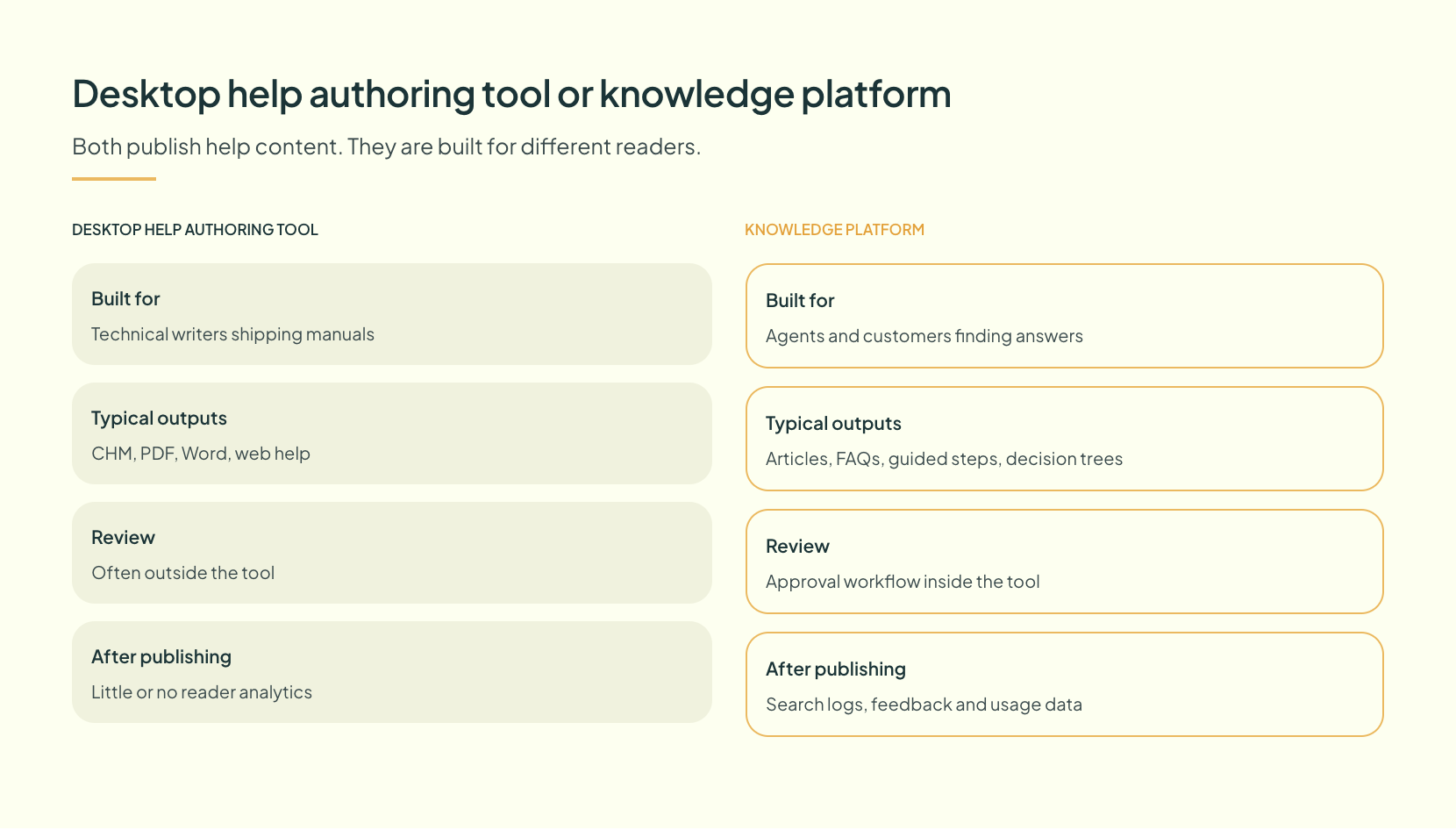
They are not interchangeable. Some are Windows desktop programs that compile a CHM file and a PDF manual. Others are cloud platforms built around structured XML, translation and a hosted portal. A third group treats help content as a live knowledge base that agents and customers search all day. So the right pick depends less on features and more on who reads the output, and where. This guide starts with a comparison table, then gives a verdict on each tool, a section on which type fits which team, and an honest look at when none of them is the answer.
Table of contents
- Best help authoring tools at a glance
- What help authoring tools actually do, stage by stage
- How these help authoring tools were chosen
- The 10 best help authoring tools, reviewed
- Desktop HAT, CCMS or knowledge platform: which type fits your team
- When help authoring software is the wrong purchase
- How to run a help authoring tool comparison in two weeks
- Frequently asked questions
Best help authoring tools at a glance
Every row below comes from the vendor’s own product page, read in October 2026. Prices are left out, because most of these vendors quote by seat, edition or scope, and a price copied from a third-party list goes stale within months.
| Tool | Type | Best for | Main outputs named by the vendor |
|---|---|---|---|
| Knowmax | Cloud knowledge platform | Contact centers that need guided answers for agents and customers | Articles, FAQs, visual guides, decision trees |
| MadCap Flare | Desktop and cloud HAT | Large topic-based documentation sets with many outputs | HTML5, PDF, Word, PowerPoint, SCORM |
| Adobe RoboHelp | Desktop HAT | Teams already working inside Adobe’s stack | HTML5, PDF, Microsoft Help, Adobe Experience Manager |
| Paligo | Cloud CCMS | Component reuse across products, versions and languages | Hosted portal, help center answers, Slack and Teams answers |
| Heretto | Cloud CCMS on DITA | Enterprises standardizing on DITA XML | Portal, web, PDF, interactive API docs |
| ClickHelp | Browser-based HAT | Mid-size teams that want one online platform | Web portal, PDF, DOCX, CHM |
| Document360 | Cloud knowledge base | SaaS teams publishing internal and external knowledge bases | Hosted knowledge base, AI search, chatbot |
| Help+Manual | Desktop HAT | Single-source manuals with conditional text and translation | Webhelp, HTML Help, eBooks, PDF |
| HelpSmith | Desktop HAT | Windows software vendors who need annotated screenshots | CHM, Web Help, PDF, Word, ePub, Markdown |
| HelpNDoc | Desktop HAT | Solo writers and small projects on a tight budget | HTML, PDF, CHM, ePub, Word, Markdown |
Three groupings sit inside that table, and they matter more than any single checkbox. The classic help authoring tool is the desktop compiler. The component content management system, or CCMS, is the structured cloud option. Finally, the knowledge platform is where help content becomes something a person answers from, in real time, while a customer waits.
What help authoring tools actually do, stage by stage
Wikipedia’s definition is short. It calls a help authoring tool software that technical writers use to build online help, and it lists compiled outputs such as WinHelp and CHM, plus PDF, XML, HTML and JavaHelp. That still holds for the desktop tools. However, it misses what most teams buy these products for now: one repeatable workflow from draft to published answer.
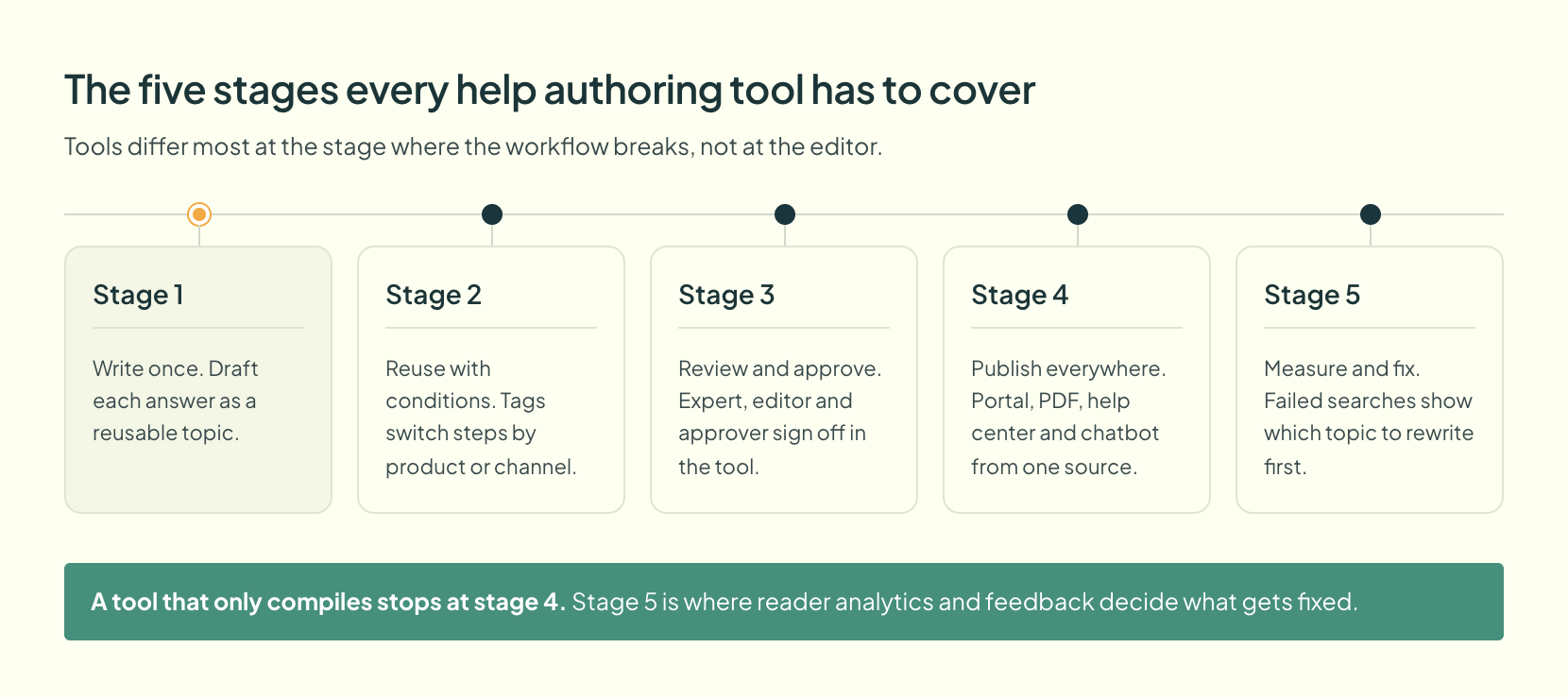
Walk that workflow end to end and the differences between tools appear exactly where it breaks.
- Write once. A writer drafts “Reset a locked account” as one reusable topic. Tools that store whole documents get those steps pasted into four guides, where they drift apart.
- Reuse with conditions. One topic shows “Tap Settings” on mobile and “Click Settings” on desktop, because a tag controls it.
- Review and approve. An expert comments, an editor checks, an approver signs off. Email review fails, since nobody knows which version is live.
- Publish everywhere. A single click sends the topic to a portal, a PDF and, in newer tools, a chatbot.
- Measure and fix. Search logs show readers typing “locked out” and finding nothing. Without reader analytics, nobody knows which topic to fix first.
Why the measure stage carries the business case
Readers fail even when the writing exists. In December 2023 a Gartner survey of 5,728 customers found that 43% of self-service failures happened because customers could not find relevant content. Any help documentation software that stops at “publish” leaves that problem untouched.
How these help authoring tools were chosen
The shortlist started with the tools that appear most often on ranking roundups and practitioner threads for this search. It then kept only products whose own website describes help or documentation authoring as a core job. General word processors and project tools dropped out, even though several popular lists include them, because writing a manual in a word processor is possible in roughly the way that writing a novel in a spreadsheet is possible.
Four questions decided each verdict:
- Does it support single-sourcing, so one topic feeds many outputs?
- Which outputs and channels does the vendor itself name?
- How do review and approval work inside the tool?
- What does it offer once content is live, such as search analytics or AI answers?
Capabilities come only from each vendor’s live product page. When a page did not state something, this guide does not claim it. That rule also explains why the best help authoring tools below get different amounts of detail: some vendors say more about their product than others.
Start Your Next User Guide From a Ready Template
The 10 best help authoring tools, reviewed
1. Knowmax: best for guided answers in contact centers
Help authoring at Knowmax starts on the support floor, not in the documentation department. Its help authoring tool page describes a Word-like editor for articles, FAQs, visual guides and decision trees. An image editor handles screenshot annotation, and content can be viewed in multiple languages.
Governance is the core of it. Under a maker-checker workflow, authors create, editors review, admins approve and a super admin schedules publication, while content sits in pending, approved and published states. Feedback from agents and users also flows back to authors. In addition, the product listing names usage analytics and generative AI for search, creation and migration.
The trade-off is plain. As a product, it is the knowledge layer that sits beside a help desk or CRM and serves answers that get used minute by minute on live calls and chats, and its page names guided formats rather than CHM files or print manuals. A software vendor shipping a 400-page offline manual should look further down this list.
2. MadCap Flare: best for large multi-format documentation
Flare is built for documentation teams that publish at volume. Built on XML and topic-based authoring, it lets a writer create each topic once and reuse it. The vendor names responsive HTML5, PDF, Word, PowerPoint and SCORM outputs, plus direct publishing to Salesforce, Zendesk and ServiceNow. Its translation support covers multiple languages in one output, including right-to-left scripts. Flare Desktop handles offline work on large projects, while Flare Online adds browser-based review for subject experts and AI-assisted writing. Still, expect a learning curve, because that is the price of the control.
3. Adobe RoboHelp: best for teams inside Adobe’s stack
RoboHelp offers HTML5 and CSS3 authoring with single-sourcing, so writers create content once and reuse it across channels. Adobe lists responsive HTML5, PDF, Microsoft Help, Adobe Experience Manager, and knowledge base and self-service platforms as outputs. It also integrates manual and machine translation. For version control, it connects to Git and SharePoint Online, and review happens on the web. The vendor page mentions microcontent for chatbots and featured snippets, too.
4. Paligo: best for component reuse at scale
Paligo is a cloud CCMS. Writers build content as components, tag them by product, version and audience, and reuse them, so a correction at the source flows to every output. The platform also handles translation. Before anything reaches outputs or AI answers, a person reviews and approves it. Its Nexus Portal publishes hosted, searchable sites, while Nexus Answers delivers cited answers in a portal, an existing help center, Slack or Microsoft Teams.
5. Heretto: best for DITA-based technical documentation software
Heretto is a CCMS built on DITA, an open XML standard for structured technical content. The vendor lists content reuse, version control, real-time collaboration, translation management and governance. Publishing runs through Heretto Portal and a Deploy API that pushes to web, PDF and portals, with interactive API documentation inside the portal. Etto, its AI copilot, helps summarize and create structured content. DITA rewards discipline. So a small team without that discipline will find it heavy.
Free SOP Templates for Documentation Teams
6. ClickHelp: best for online help authoring software in one browser
ClickHelp handles reuse through snippets, variables and conditional content, all edited in one place. It publishes branded web portals on a custom domain plus PDF, DOCX and CHM, and teams can embed content in a product. Reviewer roles, statuses, inline comments and notifications drive the review process. Its analytics report the questions readers ask and the searches that return nothing. That is the measure stage done properly. On the AI side, it offers drafting help, source-linked answers that respect access permissions, and Markdown at page URLs so that AI assistants and crawlers can read the published docs cleanly without scraping a styled page.
7. Document360: best for SaaS knowledge bases, internal and external
Of the ten, this one sits nearest the knowledge base end. It covers internal and external knowledge bases, a custom workflow builder, analytics and a dashboard. Its AI features include grounded search with source citations, a chatbot that draws on docs, tickets and files, a writing agent, and duplicate content detection. The vendor also lists more than 60 connectors, among them Slack, Intercom, Zendesk, Salesforce, GitHub and Microsoft Teams.
8. Help+Manual: best for conditional text and translation
Help+Manual produces webhelp, HTML Help, eBooks and PDF user manuals from one source. Conditional tags build channel-specific outputs without post-processing. Translation management comes included, with a DeepL plugin on its Professional and Floating licenses. Multi-user editing and integrated version control suit a small writing team that has outgrown one person and one file.
9. HelpSmith: best for screenshot-heavy Windows help
HelpSmith generates CHM, responsive Web Help, printed manuals, PDF, Word, ePub and Markdown from one project. It supports conditional compilation by build tags, along with variables and topic templates. Its standout feature is the built-in image tool: capture a screenshot, annotate it with arrows, balloons and labels, then add hotspots that link parts of the image to other topics.
10. HelpNDoc: best for solo writers on a budget
According to its vendor, HelpNDoc is free for personal use and evaluation. From one project it produces responsive HTML, PDF, ePub and Kindle eBooks, Windows CHM, Word and RTF, and Qt Help, with Markdown import and export. That makes it a natural first stop for anyone looking for free help authoring tools. Commercial terms are another matter. Its page does not spell them out, so check the license before you ship a product with help built in it.
Turn Your Help Content Into a Self Service Playbook
Desktop HAT, CCMS or knowledge platform: which type fits your team
Most failed purchases in this category come from buying the right tool for the wrong team. A help authoring tool comparison that lines up feature lists hides the real question. How many people write, how many outputs do they ship, and does anybody read the result under time pressure?
| If your team looks like this | Start with this type | Examples from the list |
|---|---|---|
| One to three writers shipping a manual and a CHM file | Desktop HAT | HelpNDoc, HelpSmith, Help+Manual |
| A documentation group with many outputs and heavy reuse | Desktop and cloud HAT | MadCap Flare, Adobe RoboHelp, ClickHelp |
| Many products, versions and languages, with strict governance | Cloud CCMS | Paligo, Heretto |
| Support agents and customers searching answers all day | Knowledge platform | Knowmax, Document360 |
Where technical writing tools meet customer service
The last row of that table deserves a closer look. According to a Gartner survey of 4,861 employees published in May 2023, 47% of digital workers struggle to find the information they need to do their jobs. A beautifully compiled PDF does nothing for that number. Instead, it takes content that agents can search, follow step by step and trust as the approved version. For that reason, support teams often weigh dedicated knowledge base software next to the best help authoring tools on this list.
Developers sit at the other end. In the 2024 developer survey, Stack Overflow found that 83.9% of the 48,822 people who answered the question use technical documentation to learn. For API references and SDK guides, a docs portal from a CCMS or from Flare usually serves them better than an agent-facing knowledge base.
How to Choose the Right Knowledge Platform for Support Teams
When help authoring software is the wrong purchase
Sometimes none of these tools should be bought yet.
A team with no owner for its content will not be rescued by help authoring software. Instead, the tool simply makes stale content faster to publish. If nobody answers for a topic when the product changes, the cheaper fix is a named owner per section and a review date on every page, and that works in any editor. Very small products are similar. A ten-page guide kept by one person can live in a word processor for years, and buying a CCMS for it is like buying a forklift to move a chair.
Vendor demos also understate a real cost. Moving from a desktop compiler to a structured CCMS means restructuring content into components, which takes weeks before anyone sees a benefit, and some writers dislike structured authoring enough to leave. The same is true of Knowmax: teams that move from long documents to decision trees and visual guides have to break procedures into steps, and that conversion takes real editorial time. Budget for the migration, not just the license.
Finally, if most of your audience is staff following internal procedures, dedicated SOP software may fit better than any of the classic documentation tools. In that case, the job is enforcing the current process rather than publishing a manual.
How to run a help authoring tool comparison in two weeks
Shortlists of three work better than shortlists of ten. Once the table above narrows the type, run the same test on each finalist:
- First three days: import one real section of existing content, such as the 20 most viewed articles, and note how much cleanup the import needs.
- By the end of week one: build one topic with a condition, for example different steps for two product editions, and publish it to two channels.
- Days 8 to 10: run a full review cycle with a subject expert who has never used the tool, and time it.
- Final four days: search the published output the way a customer or agent would, using their words rather than the article titles. Then check what analytics the tool shows.
Judge on what happened, not on the demo. The tool that kept the second edition’s steps easy to maintain, and that showed which searches failed, is usually the one worth paying for.
For test material, the guide to software documentation covers the content types worth trying.
Pick at least one long procedure, one short FAQ and one screenshot-heavy topic, since each exposes a different weakness. Print-style outputs get deeper treatment in the post on user manual software.
And for agent-facing content, an interactive decision tree makes a good stress test, because a branching procedure exposes weak reuse faster than a flat article does. Whichever of the best help authoring tools wins that test, the decision rests on evidence rather than on a feature grid.
Ready to Turn Your Help Content Into Answers Agents Can Use?
Frequently asked questions
A help authoring tool, or HAT, is software for writing and publishing help content such as user guides, online help, FAQs and manuals from a single source. It typically supports reusable topics, conditional content, review workflows and output to several formats, such as a web help center, PDF and CHM.
Knowmax is the best help authoring tool for contact centers that need guided answers agents follow in real time. MadCap Flare and Paligo lead for large sets. HelpNDoc suits solo writers on a budget. The best choice depends on who reads the output and how many channels you publish to.
Yes. HelpNDoc is free for personal use and evaluation, and produces HTML, PDF, CHM, ePub and Word from one project. For the other tools on this list, look for a trial instead. Either way, read the license terms before publishing customer-facing help built with a free edition.
A help authoring tool focuses on writing and publishing documentation, often as manuals, help files and portals. A knowledge base focuses on how people find and use answers day to day, with search, feedback and analytics. Many modern tools now do both. So the real question is which side the product was built for first.


 Word Document)
 Excel File)


