 18 Min


Updated October 2026
Bloomfire alternatives are knowledge management tools that teams consider in place of Bloomfire when they need something it does not prioritize: guided answers for contact center agents, a public help center, a lighter wiki, or knowledge inside the help desk. The strongest options in 2026 are Knowmax, Guru, Shelf, eGain, Document360, Helpjuice, Zendesk, Confluence and Notion.
Which one fits depends on a single question. Who reads the answer, and where are they when they need it? A claims agent with a customer on hold needs something very different from a product manager hunting for last quarter’s research deck, and most lists of Bloomfire alternatives blur the two. This guide keeps them apart. You get a comparison table, a verdict on each tool, a section on when staying put is smarter, and a switching checklist.
Table of contents
- What Bloomfire is in 2026, and why teams look for Bloomfire alternatives
- Bloomfire alternatives at a glance
- The best Bloomfire alternatives for customer service
- Bloomfire alternatives for documentation and team wikis
- When Bloomfire is still the right choice
- How to choose between Bloomfire competitors
- Where Knowmax fits among Bloomfire alternatives
- Frequently asked questions
What Bloomfire is in 2026, and why teams look for Bloomfire alternatives
Over the last few years, the product has changed shape, and many of the reviews still ranking for it describe a company that no longer quite exists. Older reviews describe a question-and-answer sharing tool. Today the site leads with what it calls an Enterprise Intelligence Engine, a governed context layer that builds a “Persistent Semantic Memory” of a company’s documents, conversations and media. AI answers then draw on that memory. Synapse, its conversational assistant, does the answering. The homepage also claims more than 100 connectors, plus a headless, API-first design that lets other AI agents use the same context.
So the Bloomfire knowledge management pitch now targets enterprise AI programs. For a company whose scattered content feeds unreliable AI, that is a real strength.
It also explains most of the switching. Teams that go shopping for Bloomfire alternatives usually fall into one of four groups:
- Contact centers that need step-by-step guidance inside a live call, rather than a sourced answer to read.
- Product and support teams that must publish a customer-facing help center alongside internal content.
- Small teams that want a simple wiki and a price they can see before talking to sales.
- Help desk shops that would rather keep knowledge inside the ticketing tool they already pay for.
What about Bloomfire pricing? The vendor’s own page offers a custom quote: a fixed price based on scope, with no consumption charges or user counts. That is predictable, certainly. However, a smaller team cannot compare cost without a sales call, and that alone sends some buyers toward Bloomfire competitors.
Bloomfire alternatives at a glance
Here is the full shortlist. Each row draws on the vendor’s own product pages as read on 26 October 2026, and prices stay out because plans change often.
| Tool | Type of tool | Best for |
|---|---|---|
| Knowmax | Knowledge management platform for customer service | Contact centers that need guided answers beside the CRM |
| Guru | Governed knowledge layer for people and AI | Companies that want answers inside Slack, Teams and the browser |
| Shelf | Knowledge quality and AI data layer | Enterprises cleaning up content before an AI rollout |
| eGain | AI Knowledge Hub for customer service | Large, regulated service operations |
| Document360 | Knowledge base software | Public and private documentation from one editor |
| Helpjuice | Knowledge base software | Support teams that want a quick, searchable help center |
| Zendesk | Help desk with built-in knowledge | Teams already running Zendesk ticketing |
| Confluence | Team wiki and AI workspace | Atlassian shops that live in Jira |
| Notion | Flexible workspace and wiki | Startups that want docs, wikis and projects together |
These Bloomfire alternatives split naturally in two. The first four focus on customer service or enterprise knowledge quality, where Bloomfire competes hardest. The last five are broader documentation and wiki tools, and they matter if your real need is simpler than anything Bloomfire sells.
The best Bloomfire alternatives for customer service
1. Knowmax: best for contact center guidance
Knowmax is a knowledge management platform for customer service, and it sits beside the help desk or CRM an agent already uses instead of replacing it. Where Bloomfire grounds an answer in a semantic memory, Knowmax turns long SOPs into guided workflows, so the agent answers one question at a time and cannot skip a step. Agents, chatbots and self-service all draw on one library.
Among Bloomfire alternatives, this is the one built around the live call. Take a refund that depends on plan, region and payment method. A paragraph of policy is hard to follow while a customer waits. A guided flow is not. Key capabilities, from the Knowmax product page:
- Guided workflows that link articles, files and URLs to each step.
- Visual guides, support articles and FAQs in one library.
- Google-like search with filters, plus in-document search.
- A Chrome extension that brings knowledge into the agent’s screen.
- Self-service delivery through help articles, FAQs and guided flows.
- Analytics on content use, so gaps show up early.
To be clear about the limit, Knowmax is a customer service tool. If you want a company-wide AI context layer for finance, legal and engineering, Bloomfire or Guru fits better. Its published retail case study, for example, covers a large retailer’s service agents, not its back office.
See How a Fortune 500 Retailer Gave Every Agent One Answer
2. Guru: best for answers inside Slack and Teams
Guru now calls itself the governed knowledge layer for enterprise AI. That puts it closer to Bloomfire than any other tool here. Its site lists automations that detect conflicting versions, merge duplicates, flag stale SharePoint pages and route content to an expert for review. Answers respect each user’s permissions and carry citations. In a Bloomfire comparison, Guru wins on delivery inside chat tools, while Bloomfire leans harder into the headless context engine. For its own rivals, see these Guru alternatives.
- Auto-verification as people use content, and unverification of non-compliant content.
- Answers scoped by role, with full audit trails and citations.
- SOC 2 Type 2, enterprise SSO and configurable guardrails.
3. Shelf: best for fixing content quality before AI
Shelf names the problem bluntly: poor quality, unclear structure and missing context. Its Cortex engine turns documents and files into structured, contextualized information, adding metadata, relationships and quality controls so both people and AI can trust it. There are two routes in. AI Knowledge Management serves business and KM teams. Meanwhile, the AI Data Layer serves technical teams building their own AI products.
- Quality checks for outdated, duplicate and conflicting information.
- Business context and relationships added across sources.
- Cortex as a Service for teams that own their application layer.
4. eGain: best for large, regulated service operations
eGain’s AI Knowledge Hub connects content silos such as SharePoint, CRM knowledge bases and policy libraries into one hub. Its Knowledge Automation feature pulls real questions out of calls, chats and messages, then flags what is missing. In turn, Knowledge Intelligence checks published content for duplicates, compliance gaps and stale articles. On its site, eGain also says Gartner named it a Leader in the first Magic Quadrant for Customer Service Knowledge Management Systems.
- Graphs that connect regulations, products and content.
- Genie, an authoring assistant that drafts or updates articles to match templates.
- WYCA, a free tool that surfaces what customers ask while masking personal data.
Compare Knowledge Platforms With a Buyer’s Checklist
Bloomfire alternatives for documentation and team wikis
5. Document360: best for public and private documentation
The Bloomfire vs Document360 choice comes down to audience. Document360 lists five pillars on its features page: an editor portal for writers and reviewers, a public or private knowledge base site with a custom domain, an embeddable assistant widget, integrations, and a REST API. By contrast, Bloomfire serves internal knowledge and AI context. Document360 exists to publish. If it makes your shortlist, read this roundup of Document360 competitors too.
6. Helpjuice: best for a fast, searchable help center
Helpjuice keeps its pitch simple: knowledge base software that actually gets used. Its homepage lists AI search, a chatbot called Swifty, analytics, localization, customization, collaboration and integrations. Also, a 14-day free trial needs no card. It suits a team that wants fewer repeat tickets through self-service, without a long rollout.
7. Zendesk: best for teams already on Zendesk
Zendesk Knowledge is the AI knowledge base inside the Zendesk suite. Its knowledge builder analyzes historical tickets to suggest a structure and draft articles. Help center search, meanwhile, returns short AI answers with source articles attached. A Knowledge Graph connects help center content, policies and third-party sources, so AI and human agents work from the same approved answers. The catch is obvious. Because the knowledge lives in Zendesk, a team on another help desk, or on several, gains little.
8. Confluence: best for Atlassian and Jira shops
In the Bloomfire vs Confluence decision, Jira usually decides it. Atlassian now presents Confluence as an AI workspace with live docs, whiteboards, databases, videos and slides, and Rovo AI handles search, summaries and agents across connected apps. As a wiki, it is mature. Still, as a contact center knowledge base it is weak, since a long page is hard to follow while a customer waits.
9. Notion: best for startups that want one flexible space
Notion’s wiki page highlights drag-and-drop pages, @ links, verification so readers know a page is current, and Synced Blocks that update the same content everywhere it appears. Besides, there is a free plan, which makes it the cheapest place to start. Of all the Bloomfire alternatives here, it is the lightest, and for a 15-person team that is usually the point.
When Bloomfire is still the right choice
Switching has a cost, and buyers tend to understate it. Migration takes planning, owners need retraining, and every link in every old Slack thread breaks at once. Because a knowledge base sits underneath so many daily habits, from the macros agents paste into tickets to the bookmarks new hires inherit from their managers, even a well-run migration usually costs months of attention that could have gone into improving the content itself. So it is worth being plain about when to stay.
Stay with Bloomfire if your main project is grounding several AI tools in one governed source of company context, especially across departments that never talk to a customer. Its current platform targets exactly that brief. In that case a customer service tool, Knowmax included, would be the wrong answer, and none of the Bloomfire alternatives above would beat it on its home ground.
Stay, too, if the real problem is adoption. A 2025 Gartner survey of more than 200 service leaders found that those effective at organizational readiness saw a 300% increase in the likelihood of reaching technology goals. Those effective at vendor evaluation saw only 50%. In other words, readiness beat vendor selection by six to one.
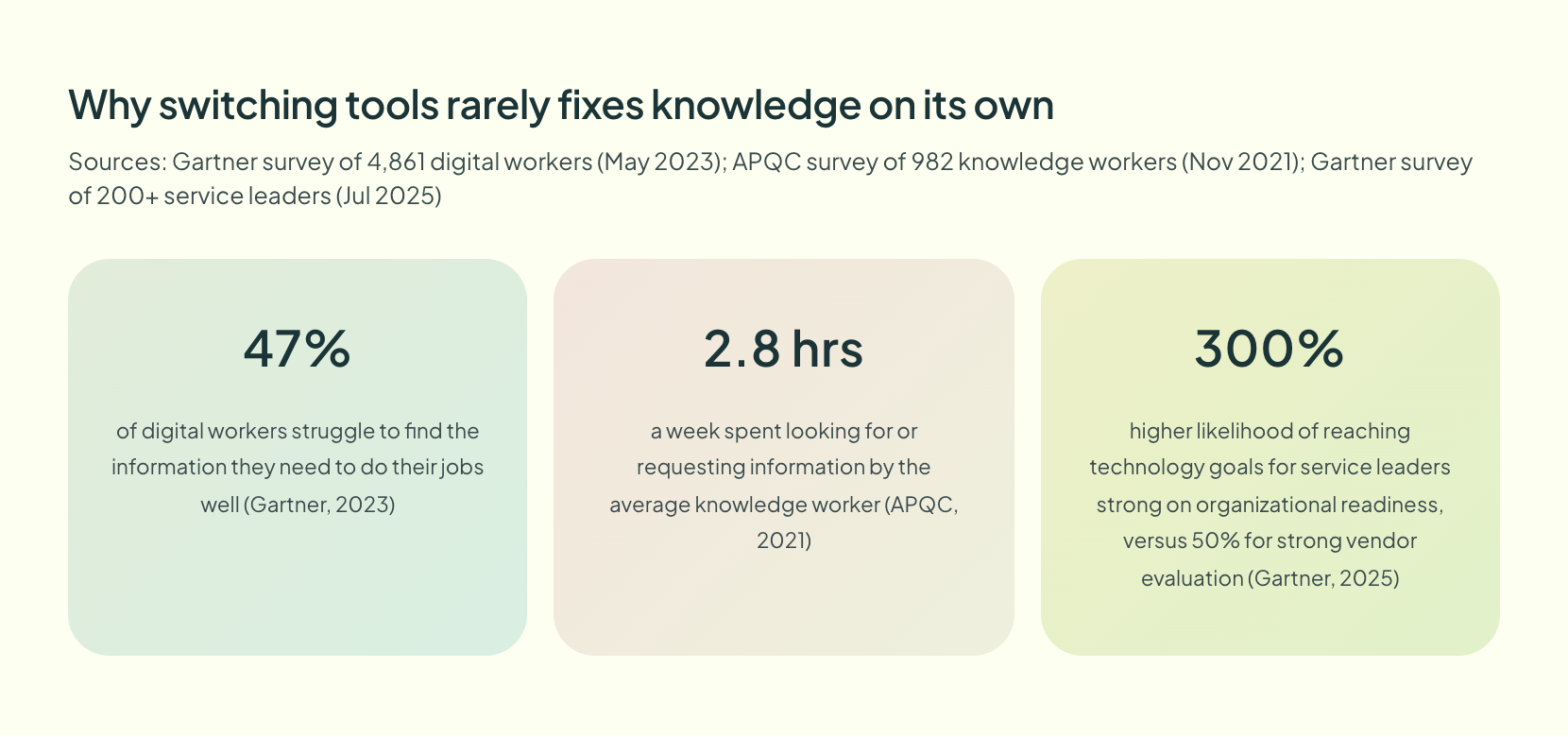
The findability numbers point the same way. A 2023 Gartner survey of 4,861 digital workers found that 47% struggle to find the information they need to do their jobs well. Similarly, an APQC survey of 982 knowledge workers found they spend 2.8 hours a week looking for or requesting information. A new logo fixes neither problem. Content that someone owns, keeps current and delivers where people work fixes both.
See What a Higher Standard of Service Knowledge Looks Like
How to choose between Bloomfire competitors
Most teams compare features first and regret it. Instead, run these five checks in order, and the list of Bloomfire alternatives usually shrinks fast. Try it.
- Name the reader. Agents on live calls point to Knowmax or eGain. Customers point to Document360, Helpjuice or Zendesk, and employees to Guru, Confluence or Notion.
- Test your hardest procedure. Build one real SOP, for example “refund within 30 days, card payment, international order”, in each trial. Can a new hire follow it unaided?
- Check where answers appear. Bloomfire integrations matter, but delivery matters more. A Chrome extension beside the CRM beats a search page nobody opens.
- Ask who keeps content current. Pick the verification workflow your owners will actually follow.
- Get a quote last. A cheap tool that nobody uses costs the most.
For a contact center, the call center knowledge base is part of the agent’s desktop rather than a library next door. That is why guided workflows tend to win the second check.
Where Knowmax fits among Bloomfire alternatives
For one kind of team, Knowmax earns its place. Think of service organizations where an inconsistent answer costs money: a telecom handling plan changes, a bank handling disputes, a retailer handling returns across channels. There, one library feeds the agent’s guided workflow, the chatbot and the help center, while analytics show which articles fail. And because it works beside the CRM you already run, you fix knowledge without replacing your stack. For the wider market beyond these nine Bloomfire alternatives, see this list of knowledge management vendors, then shortlist two and test them on your own hardest procedure.
Ready to See a Bloomfire Alternative Built for Contact Centers?
Frequently asked questions
Companies use Bloomfire to build a governed, searchable source of company knowledge for people and AI. Its current platform connects documents, conversations and media into what it calls a Persistent Semantic Memory, and its Synapse assistant answers questions grounded in that content. Enterprises mainly use it to improve AI accuracy across departments.
Knowmax is the best Bloomfire alternative for customer service and contact center teams, because it turns SOPs into guided workflows and delivers them beside the CRM. Guru suits companies that want answers inside Slack and Teams, while Document360 suits teams publishing a public help center.
There is no public price list. The Bloomfire pricing page offers a custom quote with a fixed price based on your intended scope, and it states there are no consumption charges or user counts. Buyers need a sales conversation to get a figure, so compare quotes only after testing fit.
Yes. Notion offers a free plan that works as a basic team wiki, and Helpjuice and Zendesk both offer free trials. Free plans usually leave out verification workflows, advanced permissions and analytics, so expect to upgrade once several teams depend on the knowledge base.


 Word Document)
 Excel File)


