 21 Min



The weekly report looks fine. Tickets close inside their service level, the backlog is flat, and the queue dashboard shows a reassuring wall of green.
Then someone in finance mentions that the expense tool broke again. The same fault has come in over and over since spring. Several agents fixed and closed it, and each of them solved it from scratch. Nobody lied. The help desk ticket system measured exactly what its designers meant it to measure: whether a ticket closed on time. Whether anyone learned anything from closing it was never one of its fields.
That gap is the subject here, along with what to change before anyone blames the tool.
Table of contents
- What a help desk ticket system actually records
- The help desk ticket workflow, from intake to closure
- Ticket triage, priority and the ticket escalation process
- Why a green SLA report can hide a failing help desk
- A help desk ticket system stores problems, not answers
- Where chatbots and email hand tickets over badly
- What to change in the help desk ticket system first
- Support ticket response templates, with examples
- Choosing ticket system software without repeating the mistake
- How to tell the help desk ticket system is working
- Frequently asked questions
What a help desk ticket system actually records
So what is a ticketing system, stripped of vendor language? It is a common record of requests, each with an owner, a status and a clock. A help desk ticket system applies that record to support work. Every request becomes a ticket, every ticket has someone responsible for it, and the software logs every change. Before ticketing, requests lived in personal inboxes and vanished when somebody went on leave.
What is a support ticket, field by field
A support ticket is one request for help, structured enough that a second person can pick it up: a requester, a channel, a category, a priority, an assignee. Plus a status, a timestamp for each change, and a free-text thread of everything said. That thread holds most of the value, and loses most of it too, since the resolution usually sits inside it as one sentence nobody will ever search for.
What is an IT ticket, and how do you put one in?
An IT ticket is the same record raised to the IT team. A locked account, a laptop that will not boot, a request for software. ITIL splits these into incidents, where something broke, and service requests, where someone wants something standard. IT support ticket queues usually mix both. That is why the category field matters so much.
Submitting one is easy: a portal form, a monitored inbox, or a chatbot line, all becoming the same record. Speed depends on what goes in, not the channel. Name the system, the error text, what was already tried.
Trouble tickets, service tickets and internal tickets
Vendors sell the same software under different names, split by who raises the ticket.
| Type | Who raises it | Typical example | What closes it |
|---|---|---|---|
| Trouble ticket system | An employee or customer reporting a fault | “The expense tool rejects every receipt” | A fix, a workaround, or a problem record |
| Service ticket system | Someone asking for something standard | “I need access to the finance share” | Fulfillment against a catalog |
| Internal ticketing system | Staff asking HR, facilities or IT | “My laptop needs replacing” | An internal team completing the task |
| Support ticketing system | External customers | “My order shows delivered but never arrived” | An answer, a refund, or an escalation |
An IT help desk ticket system usually handles the first three at once in one queue, as long as the categories stay honest. Customer-facing desks lean on the fourth, often with an email ticketing system underneath that threads each inbound message into a ticket, so replies stay attached to the right case.
The help desk ticket workflow, from intake to closure
Every platform names its statuses slightly differently, though the shape underneath is stable. A ticket arrives, somebody sorts it, an agent works it, it waits, the agent solves it, and finally it locks.
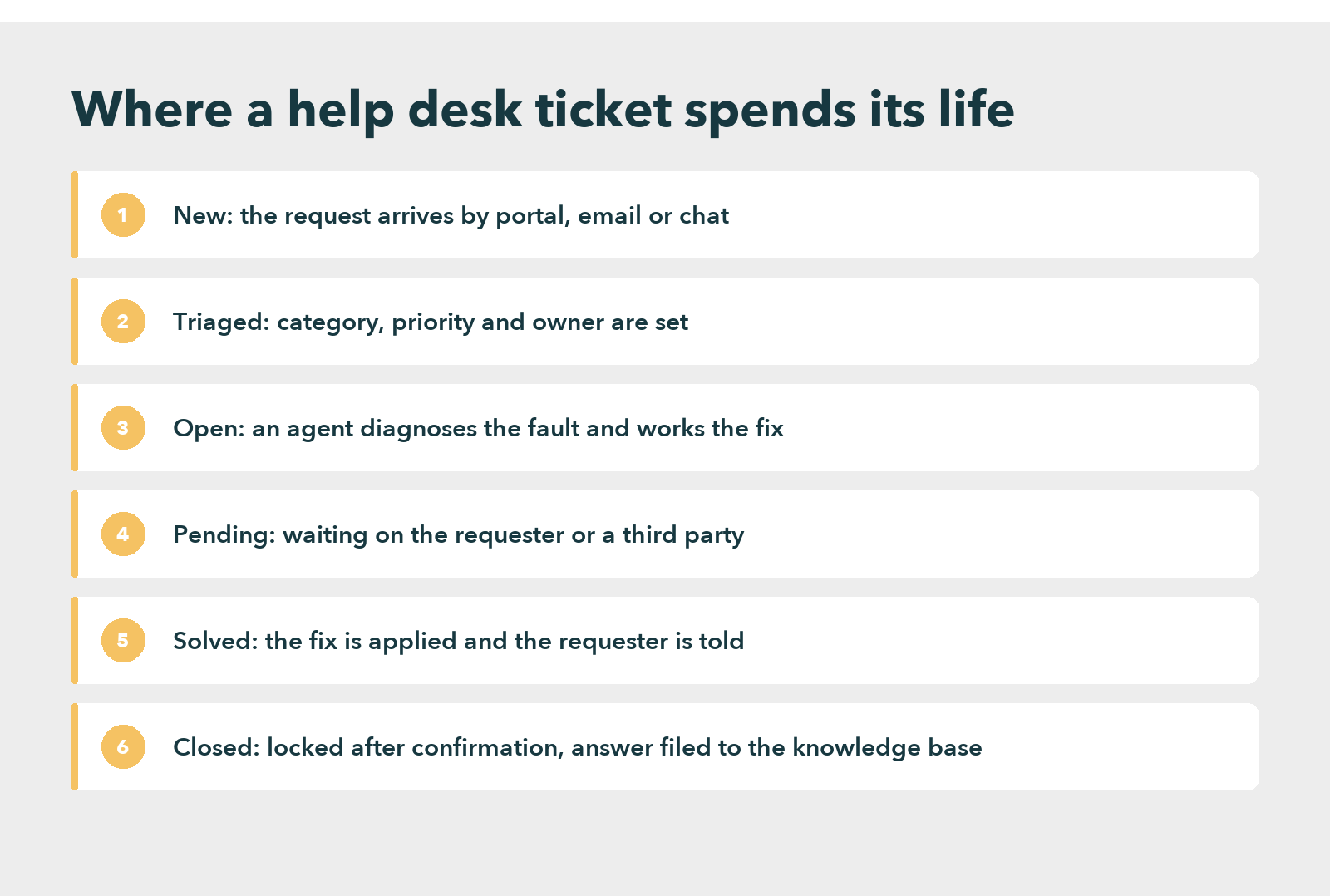
Each stage fails in its own way. Pending is where tickets age. The clock often pauses while the desk waits on the requester, so a ticket can sit for weeks without breaching anything. Solved and Closed also blur together: a solved ticket has a fix applied, while a closed one has a confirmation and a lock, and a desk that auto-closes after three days of silence counts silence as agreement.
The sixth stage is the one desks skip. Closure should be the moment the answer leaves the ticket and goes somewhere reusable. When it does not, help desk ticket management turns into a loop, in which agents diagnose the same fault again every time it recurs and the report logs every recurrence as a fresh success. The wider help desk automation question sits on top of this loop, because nothing automates well while each fix lives only in the ticket where somebody first found it.
Ticket triage, priority and the ticket escalation process
Triage is the first read of a ticket, and it sets three things: category, priority and owner. It fails quietly. A ticket under the wrong category still closes, but it teaches the reporting something false.
Priority works best as a product of two questions rather than a gut call. How many people does this affect, and how soon does it hurt? ITIL calls these impact and urgency, and many desks cross them in a grid like this one.
| Impact | High urgency | Medium urgency | Low urgency |
|---|---|---|---|
| Whole site or service down | P1 | P2 | P3 |
| One team affected | P2 | P3 | P4 |
| One person affected | P3 | P4 | P5 |
Each priority then carries its own service level, which is what people mean by an SLA ticket: a response target and a resolution target, with a clock that runs, pauses and breaches.
Escalation comes in two kinds. Functional escalation moves the ticket to deeper skills, such as the network team. Hierarchical escalation pulls in a manager, usually because a service level or a customer is about to break. Either way, the ticket escalation process should hand over the diagnosis so far, not just the ticket. “User reports issue” makes the specialist start over. A written escalation SOP template is the cheapest fix.
Why a green SLA report can hide a failing help desk
Staffing and tooling are the usual suspects. Both are sometimes guilty. Neither explains the expense tool, though, which a fully staffed team on a capable platform closed again and again, inside its service level every time.
The real explanation is simpler. A ticket tracking system counts time and status, and a service level is a promise about time. Nothing in a default configuration measures resolution quality, so the report never shows it. In fact, a ticket that closes in two hours with a workaround and returns next Tuesday scores better than one that took two days and fixed the fault for good, which means the report quietly rewards the behavior that generates the next ticket.
Three signals expose this, and a standard SLA dashboard shows none of them:
- Reopen rate. How often a closed ticket comes back.
- Repeat contact. A new ticket from the same requester about the same thing within two weeks, which a naive report counts as new.
- Category concentration. When a handful of categories carry most of the volume month after month, the desk is handling those faults rather than solving them.
A help desk ticket system stores problems, not answers
Ticketing software centers on the problem, not the fix. Its data model tracks who asked, when, through which channel and at what priority. The answer gets one free-text box, typed in a hurry.
The cost shows most clearly when customers try to help themselves. In a survey of 5,728 customers run in December 2023, Gartner found that only 14% of customer service issues reached full resolution in self-service. In 43% of failed attempts, the customer could not find content relevant to the issue. Those answers existed somewhere. Mostly they existed inside closed tickets.
Staff pay the same price. A 2012 McKinsey Global Institute report estimated that interaction workers spend nearly 20 percent of the workweek looking for internal information or tracking down colleagues, and that a searchable record of knowledge can cut that search time by as much as 35 percent.
That is why knowledge base support ticket software now describes a category of its own. Better tools treat ticket and article as halves of one record. An agent closing a ticket either links the article that solved it or writes one, and the next agent who opens a similar ticket sees that article first. A customer service knowledge base is the other half of that record, and the order of work matters: write the answers for the top twenty categories, then wire the ticket system to suggest them.
Knowledge Management For a Higher CX Standard
Where chatbots and email hand tickets over badly
A growing share of tickets now start somewhere other than the help desk. They start in a chatbot, an email thread or a portal search. They reach a person only after that first attempt fails, and the handoff is where a support ticketing system either earns trust or loses it.
Across 3,566 B2B and B2C customers surveyed in February and March 2026, Gartner found that only 27% would try a chatbot again after a negative experience. Meanwhile, 87% said access to a human agent is essential when a company uses GenAI for service.
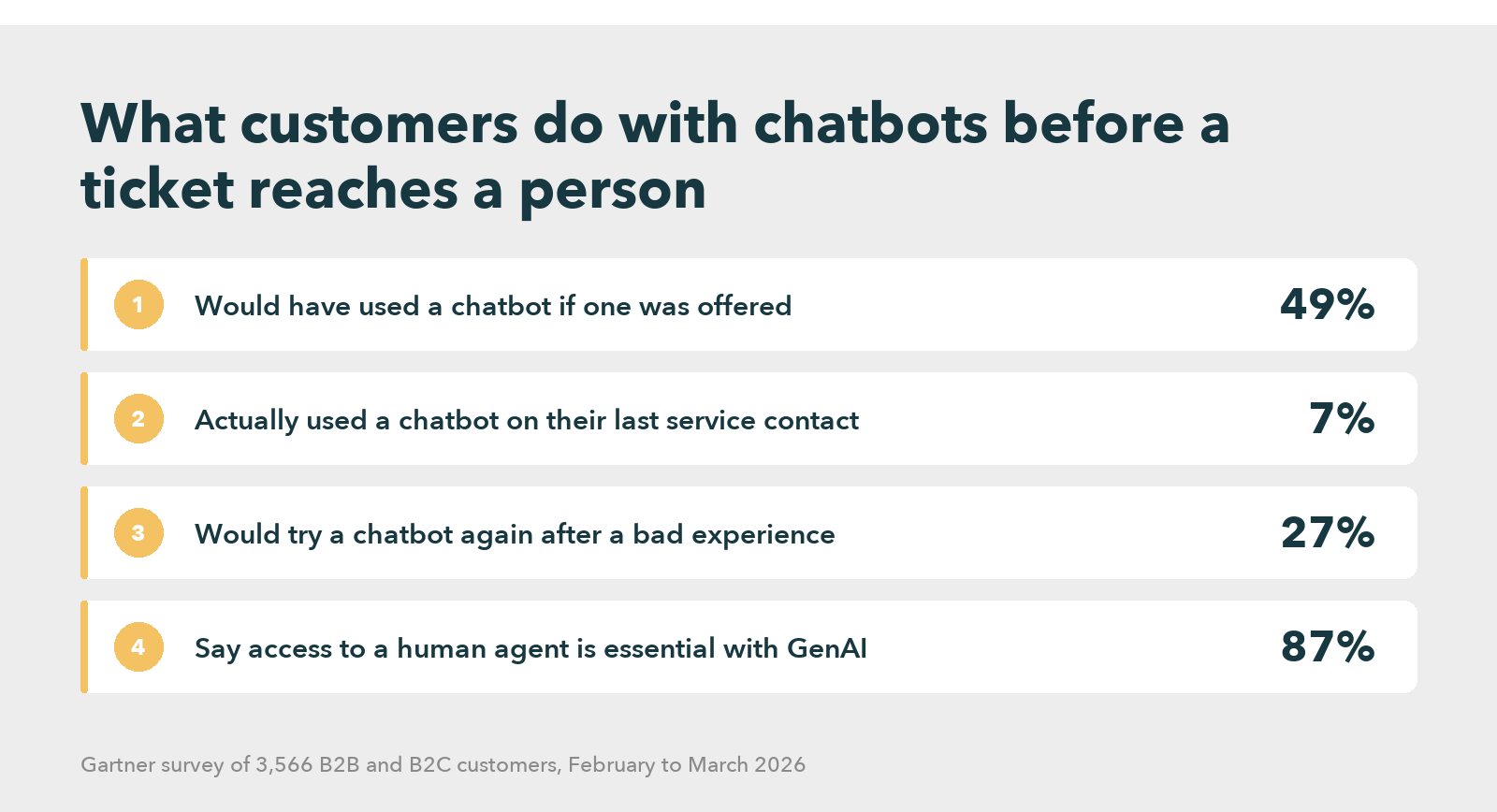
Repetition is what customers resent most at that handoff. Zendesk’s CX Trends 2026 research found that 74% of customers find it frustrating to tell their story over and over to different agents. So the ticket has to arrive carrying the transcript, the steps already tried and the category the bot guessed.
Email fails the same way, only slower: a reply outside the thread spawns a duplicate customer support ticket, and nobody holds the whole story.
What to change in the help desk ticket system first
None of this requires a new platform. It requires changing what the existing one treats as done.
Start with the closure rule. No ticket in a top category closes without a linked article or a note explaining why none applies. Cheap, and it turns closure into a small act of writing.
Then prune the category tree. Categories nobody picks, or that agents pick by default, corrupt every downstream report and aim next quarter’s automation at the wrong faults. Separate reopen from new, so a returning fault links to its first ticket. Show the article at intake, before anyone diagnoses from scratch.
A worked example: the expense tool fault
Suppose the expense tool fault is the fourth most common category. Once the closure rule applies, the first agent to solve it writes a six-line article with the workaround and the permanent fix. The second agent sees that article on the intake screen and closes in minutes. By the fourth recurrence, an interactive decision tree can walk the requester through the workaround before anyone raises a ticket at all.
That is what ticket deflection should mean, measured honestly.
Where this advice is wrong
Some desks gain little from it. A platform team fielding one-off infrastructure faults sees little recur, so linking adds busywork. The ticket itself, rich with logs, is the better store of knowledge there. The approach pays where volume concentrates in repeating categories, which describes most IT and customer support desks but not all of them.
Support ticket response templates, with examples
Replies are part of the record too. A good support ticket response template does two jobs: it tells the requester where things stand, and it leaves the next agent a clean trail. Four support ticket response examples cover most of a ticket’s life.
- Acknowledgment: “Thanks, we have your request about the expense tool. It is ticket 4471, and you will hear from us by 3 p.m. today.”
- Request for detail: “To narrow this down, which browser are you using, and does the error appear on every receipt or only some? The ticket stays paused until you reply.”
- Resolution: “Clearing the cached login fixed this. The steps are in the linked article, in case it happens again.”
- Closure check: “We have marked this solved. If the fault comes back within 14 days, reply here and the ticket reopens rather than starting over.”
The fourth line does the most work, because it turns a returning fault into a reopen instead of a new ticket. A service desk ticket template does the same job on the intake side. Its required fields decide how much diagnosis the first agent inherits, and any help desk ticket template worth using asks for the steps already tried.
Choosing ticket system software without repeating the mistake
Most selection processes compare feature lists, and the lists converge. Common ticketing system examples show the spread. ServiceNow and Jira Service Management sit at the enterprise IT end. Zendesk and Freshdesk center on customer support, and osTicket is the open-source option many small IT teams start with. Nearly every option now ships as a cloud based ticketing system, and any of them will run the workflow above.
Readiness predicts success better than features
What predicts success mostly never appears in the demo. Gartner surveyed more than 200 service and support leaders between December 2024 and January 2025, and it found that leaders who were effective at vendor and product evaluation saw only a 50% increase in the likelihood of reaching their technology goals, while leaders effective at organizational readiness saw a 300% increase.
Data is a large part of readiness. Salesforce’s seventh State of Service report, drawn from 6,500 service professionals, found that companies which unify their customer service channel data are 1.4 times more likely to report a very successful AI rollout. For help desk ticket software, that means email, chat and portal landing in one record.
For an IT support ticketing system, readiness also means content. Before comparing ticket system software, list the twenty highest-volume categories. Check that each has a current, findable answer, because that list is the real requirement, and the gaps usually sit in the knowledge layer rather than the queue.
Knowmax works in that layer, as one option among several. It sits beside the ticket system, holding the articles, guided flows and decision trees that agents and customers read from, and its knowledge base software suggests the relevant answer as a ticket arrives. One Fortune 500 retailer runs more than 10,000 stores across 27 countries. With Knowmax, it cut handling time by 13% and agent error by 30%, and CSAT rose by 11%.
Read the Full Case Study
How to tell the help desk ticket system is working
Four numbers, reported together, tell the truth where an SLA report cannot. First, the reopen rate on closed tickets, which should fall. Second, repeat contacts from the same requester on the same category within fourteen days, which should also fall.
Third, the share of top-category tickets that close with a linked article. That one should climb toward nearly all of them. Fourth, time to first useful response, meaning the first reply that moved the problem forward rather than the automated acknowledgment.
Few platforms report repeat contact out of the box. It usually takes an export: join tickets on requester and category, then count pairs that open within the window. Crude, but it works. Run it monthly, and keep the definition fixed so the trend means something.
So watch one trap here. As article linking takes hold, average handle time on the remaining tickets tends to rise. The quick fixes now resolve earlier, so what reaches agents is harder on average. Read that as improvement, not decline, and report it beside total volume so nobody in the room reads it backward.
Give it a full quarter. If reopen and repeat contact have not moved, the articles are missing, wrong or invisible at intake. Audit those three before touching the platform. Replacing a help desk ticket system that was never the actual problem costs a year of migration, and it hands the business back the same report in a new color.
Ready to Give Your Help Desk the Answers Its Tickets Keep Asking For?
Frequently asked questions
A ticketing system gives every request one owner, one status and one timestamped history, which a shared inbox cannot. Inboxes lose requests when people are out, hide who is working on what, and produce no reporting. The switch usually pays once a few people share the load.
Jira Software is an issue and project tracker for development teams, and it can stretch into a basic ticketing tool. Atlassian sells Jira Service Management separately for help desk work, with a request portal, queues and service levels. For a help desk queue, the latter is the product to evaluate.
A CRM ticketing system is ticketing that lives inside a customer relationship management platform, so each ticket attaches to the customer record beside sales and account history. HubSpot Service Hub and Salesforce Service Cloud work this way. It suits customer-facing support better than internal IT work.
A small business needs one once requests start going missing or receiving two different answers. Below that point, a well-labeled shared inbox is fine. Beyond it, a free or low-cost ticketing tool costs less than the requests it stops losing, and it produces the first reporting the team has ever had.


 Word Document)
 Excel File)


