 23 Min


A customer types “charged twice refund” into a help center. The article that answers it exists, titled “Duplicate payment reversal policy”. It returns nothing. The customer opens a ticket, and an agent then runs the same search and gets the same empty page. Nobody wrote a bad article. The failure sat in knowledge base search, the layer between the question and the answer. It is also the layer most teams test least.
This guide explains what knowledge base search is, how it processes a query, and the five types of search worth knowing. It then sets out the numbers on failed search, a three-phase plan to fix it with owners and timings, the metrics that show whether the fix worked, and the cases where better search is the wrong answer.
Table of contents
- What is knowledge base search? A definition you can quote
- How knowledge base search works, from query to answer
- Types of knowledge base search, compared on what they fix
- Why agents and customers still cannot find answers
- A three-phase plan to fix knowledge base search
- How to tell whether knowledge base search is working
- Choosing a knowledge management search engine
- When better search is the wrong fix
- Frequently asked questions
What is knowledge base search? A definition you can quote
Knowledge base search is the function that takes a question typed by a customer, an agent or a bot and returns the most relevant approved answer from a knowledge base. It covers query cleanup, matching, filtering, ranking and logging, so a searchable knowledge base depends on all five working.
Everything else is implementation detail.
Still, the definition hides a trap. People describe problems in their own words, while articles describe solutions in the company’s words, so the whole job of a knowledge base search engine is translation. When a team says it wants to “search knowledge base content better”, it usually means the translation is failing, and the fix sits in the content and the synonyms as often as in the software. For what goes inside a library of answers and how one is organized, see the guide to a knowledge base.
Who searches which knowledge base
Different readers search different libraries:
- External knowledge base. Customers searching a help center in their own words.
- Internal knowledge base. Employees looking for HR, IT and policy answers, such as the procedure for resetting a locked account password on a new laptop.
- Agent knowledge base. Contact center staff searching mid-call. Speed matters most.
- Product knowledge base. Specifications, setup guides and release notes, often searched by model number or error code.
- Chatbot knowledge base. The library a bot or agent assist tool retrieves from, so every search result becomes a spoken or written answer.
How knowledge base search works, from query to answer
Every engine, from a help center plugin to an enterprise platform, runs some version of the same six stages. Knowing them tells you where to look when results go wrong.
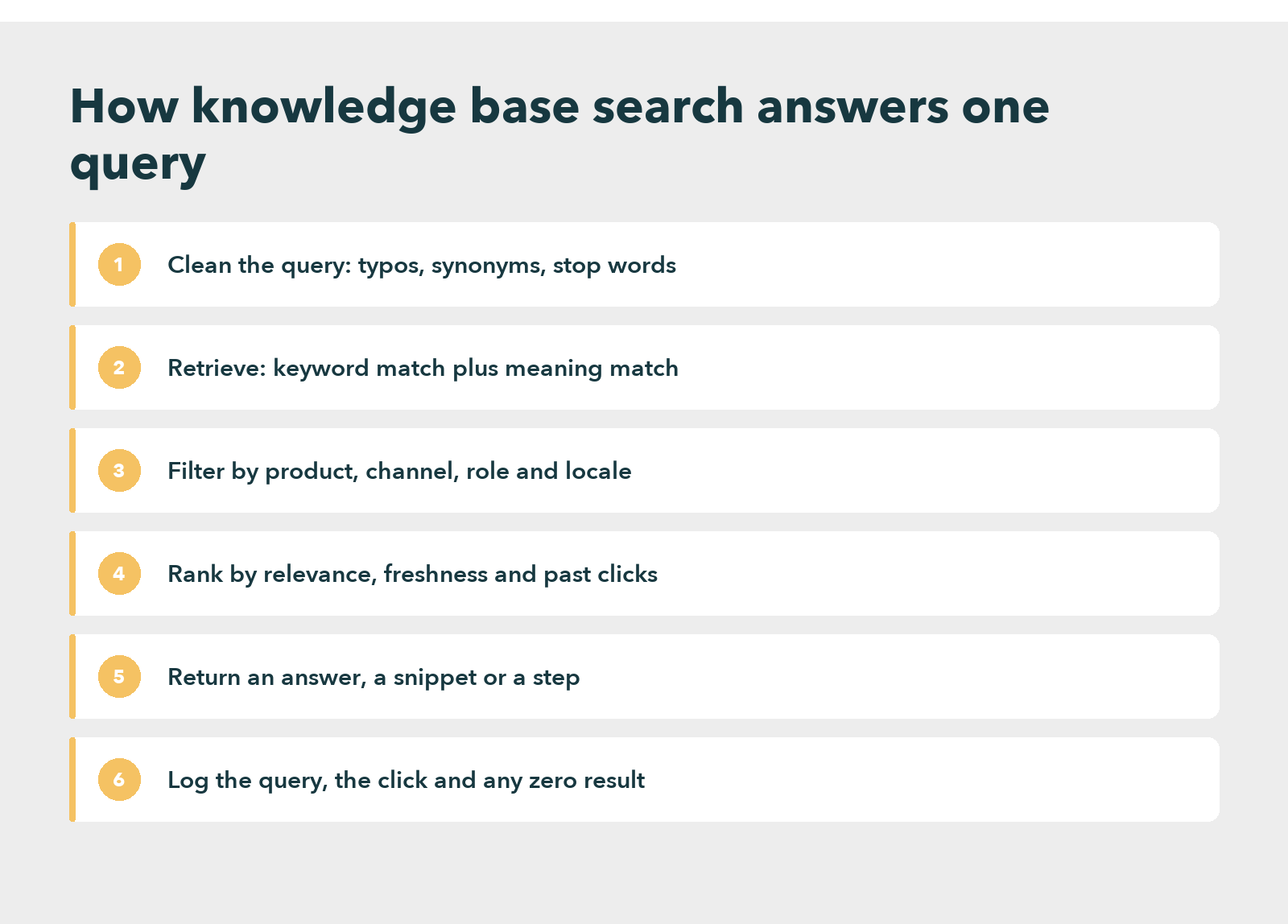
- Clean the query. The engine corrects typos, expands synonyms and drops filler words, so “cant login pasword” becomes a search for “cannot log in password”.
- Retrieve candidates. Plain keyword matching finds articles that share words with the query. Meaning matching, often called semantic or vector search, also finds articles that share intent without sharing words.
- Filter. The engine narrows results to the right product, channel, language and permission level. An agent may see internal steps that a customer must not.
- Rank. The engine orders what is left by relevance, then adjusts for freshness, popularity and the clicks earlier searchers made.
- Return. It shows a list, a highlighted snippet, a generated answer, or the first step of a guided flow.
- Log. Finally, it records every query, every click and every search that returned nothing, which becomes the most useful report the knowledge team will ever read.
That last stage is the one teams forget to read. The log is a free, daily list of the questions the knowledge base cannot answer, written in the customer’s own words.
Types of knowledge base search, compared on what they fix
Almost every product on the market uses some mix of five approaches. Most modern tools combine two or more. That is why the phrase hybrid search for enterprise knowledge management keeps turning up in vendor documentation.
| Search type | Best for | Main limit |
|---|---|---|
| Keyword search | Exact product names, error codes and policy numbers | Misses the answer when customer and article use different words |
| Faceted search | Large libraries where readers filter by product, region or role | Only as good as the tagging behind it |
| Semantic search | Natural language questions and internal notes written loosely | Can return a plausible article that is close but wrong |
| Federated search | Agents who need answers from several systems at once | Ranking results from different sources is hard to get right |
| AI generated answers | Short, direct answers in chat, voice and agent assist | Repeats whatever the source article says, errors included |
The keyword approach is old but not obsolete. An agent who types an error code wants that exact code, and meaning matching can blur it. Semantic search for internal knowledge bases solves the opposite problem, where staff write “the reset thing for locked accounts” and still expect the right procedure.
Federated and AI search, where the cost rises
Federated search deserves its own evaluation, because the need to search across multiple knowledge bases is where enterprise knowledge search gets expensive. A telecom agent may need the billing wiki, the network status page and the device troubleshooting library in one query. Connecting them is the easy part. Ranking a CRM note against a policy article is not.
AI knowledge search, the newest layer, sits on top of the others rather than replacing them. An AI powered knowledge search tool retrieves articles first and then writes an answer from them. So it inherits every gap and every stale paragraph in the source. For a closer look at that pattern in customer-facing bots, see the guide to the knowledge base chatbot.
Why agents and customers still cannot find answers
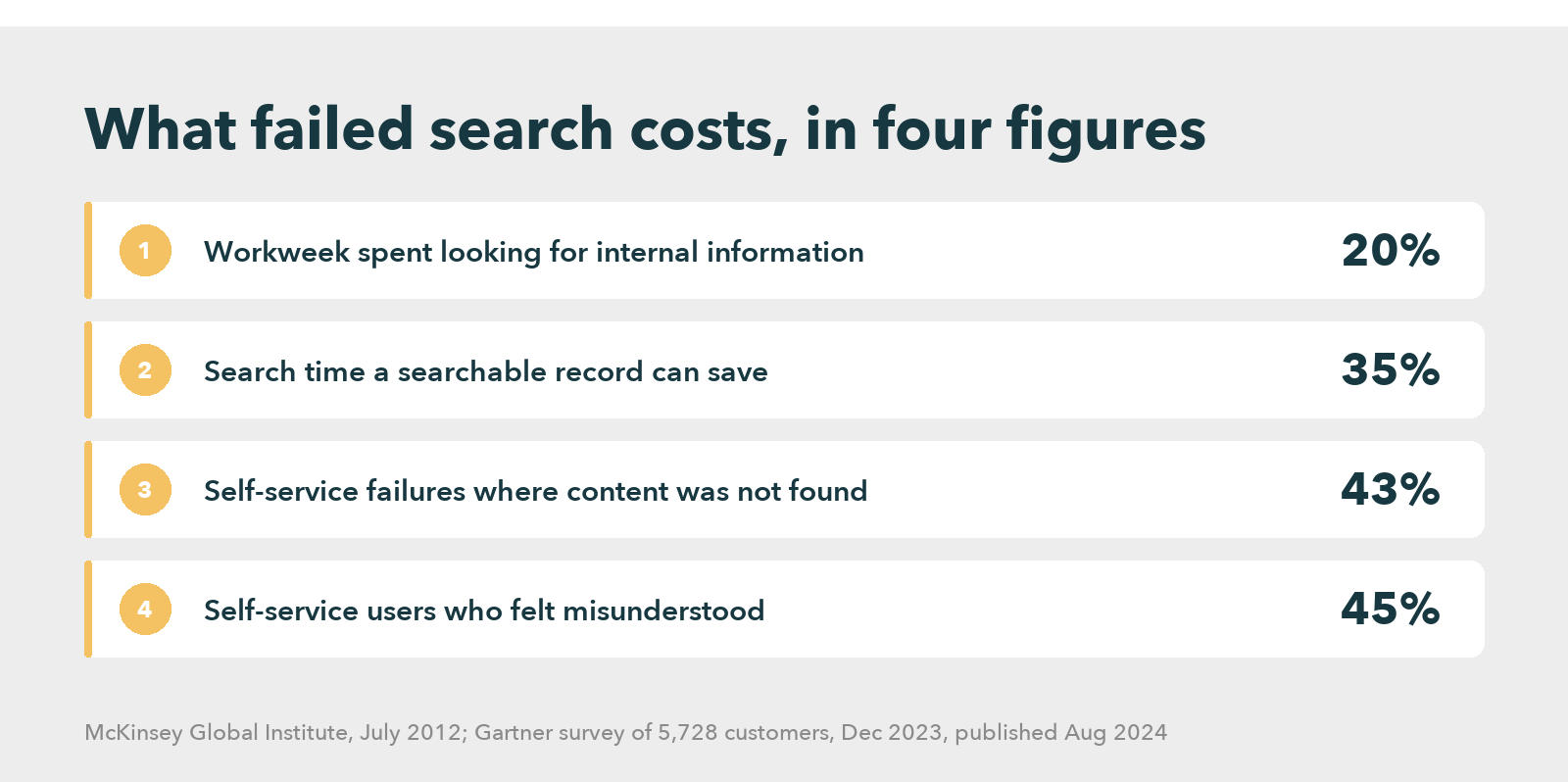
The cost of failed search is measured, and it is large. A Gartner 2023 worker survey of 4,861 employees found that 47% struggle to find the information or data they need to do their jobs well, and that the average knowledge worker now uses 11 applications, up from six in 2019. APQC’s productivity study of 982 knowledge workers put a number on it: 2.8 hours a week spent looking for or requesting information.
The older benchmark points the same way. In its 2012 report on social technologies, the McKinsey Global Institute estimated that interaction workers spend nearly 20 percent of the workweek looking for internal information or tracking down colleagues who can help. The same study found that a searchable record of knowledge can cut the time employees spend searching for company information by as much as 35 percent.
Customers fare no better. A Gartner December 2023 survey of 5,728 customers, published in August 2024, found that in 43% of self-service failures the customer could not find content relevant to the issue, and 45% of customers who started in self-service said the company did not understand what they were trying to do.
Missing content, or content nobody can match?
Read those two Gartner figures together and a pattern appears. Some of the failures were missing content. But many involved content that existed and still could not be matched to the customer’s description. That is a search failure wearing a content label. Usability research from Nielsen Norman Group describes the same pattern on websites: people often land on a no results page when the content exists but does not match the words they typed.
Three causes account for most of it:
- Vocabulary mismatch. Articles use internal product names, whereas customers use symptoms.
- Duplicate and stale articles. Near-identical answers split the ranking signal, so none of them reaches the top.
- Nobody reads the log. Internal knowledge search fails silently, because an agent who finds nothing simply asks a colleague, and no ticket records that.
The third cause is the cheapest to fix and the one most often ignored.
Better Search Starts With Better Knowledge
A three-phase plan to fix knowledge base search
This plan assumes an existing library of a few hundred articles or more, a help center, and an agent desktop. Each phase has an owner, a rough duration, and an exit test that must pass before the next phase starts.
Phase one, weeks 1 to 2: read the knowledge base search analytics
Owner: the knowledge manager, with a support analyst.
Export the last 90 days of search logs from both the help center and the agent desktop. Then sort them three ways: the most frequent queries, the queries that returned zero results, and the queries followed by a ticket or a call within the same session.
Knowledge base search analytics rarely need a data team for this. Most tools export a CSV, and a spreadsheet pivot is enough. What matters is reading the actual phrases. A zero-result list full of “refund” variants tells a very different story from one full of product codes.
The exit test is simple: a ranked list of the 50 failing queries, each tagged as missing content, wrong vocabulary, or poor ranking.
Phase two, weeks 3 to 6: how to create a searchable knowledge base, starting with the content
Led by the knowledge manager and the article owners for each product line.
Fix content before touching the engine, because no ranking model rescues an article titled with an internal code name. Work through the failing list:
- Rewrite titles as the question a customer asks, for example “Why was I charged twice?” rather than “Duplicate payment reversal policy”.
- Merge duplicates into one article and redirect the rest.
- Add the customer’s phrases as synonyms or tags, so “charged twice”, “double charge” and “billed two times” all reach the same answer.
- Put the answer in the first two lines, since snippets quote it.
The guide to knowledge base metrics covers the article-level measures worth tracking during this phase. Exit test: half of the 50 failing queries now return a relevant first result.
Phase three, weeks 7 to 12: tune the engine and connect the sources
Run by the knowledge manager, with IT or the platform administrator.
Only now adjust the engine. Turn on typo tolerance and synonym expansion if they are off. Boost fresh and frequently used articles. Test semantic retrieval on the queries that keyword matching still misses, and check that it does not bury exact matches such as error codes.
Then decide whether federated search is worth it. That is where enterprise search and knowledge management meet, and it pays off when agents regularly switch between three or more systems during a single contact. It does not pay off when one well-kept library already holds the answers.
How to tell whether knowledge base search is working
The knowledge manager can review five measures weekly to see whether the plan worked. None needs a new tool.
- Search success rate: the share of searches followed by a click on a result and no new ticket in the same session.
- Zero-result rate: the share of searches that return nothing. It should fall sharply after phase two.
- Click position: how far down the list readers go before clicking. A healthy engine gets most clicks on the first three results.
- Reformulation rate: how often a reader searches again straight away with different words, which is a direct sign the first query was misread.
- Contact after search: searches followed by a ticket, chat or call. This is the number finance cares about.
Set a baseline in phase one and compare at week 12. Track agent-side and customer-side figures separately. Agents search with product vocabulary and customers search with symptoms, so one blended number hides both problems.
Choosing a knowledge management search engine
Buyers comparing a knowledge management search solution should test with their own failing queries, typos included, rather than the vendor’s demo script, and any knowledge base software worth shortlisting should pass a short checklist:
- Typo tolerance and synonym management that non-technical owners can edit.
- Keyword and semantic retrieval together, with exact matches protected.
- Filters by product, channel, role and language, respecting existing permissions.
- Search analytics with zero-result and reformulation reports, exportable.
- Connectors to the CRM, ticketing and other libraries agents already use.
- Generated answers that cite the source article, so a reader can check them.
- The same approved answer served to the help center, the agent desktop and bots.
Searchable knowledge base tools compared
Analysts see the same shift. Forrester’s 2024 KM evaluation found that AI is changing how knowledge tools categorize, search and personalize content, while many buyers still test those features outside production first. The six tools below are listed with what each vendor states about search on its own product pages. They are not ranked on price, which changes too often to print.
| Tool | Search approach, as the vendor describes it | Best fit |
|---|---|---|
| Knowmax | One search across articles, decision trees and visual guides, with filters by title, category and date, plus usage reports that flag content gaps | Contact centers serving one approved answer to agents, customers and bots |
| Zendesk | AI answers inside help center search, grounded in knowledge with source articles, plus connectors for Google Drive, Confluence and SharePoint | Teams already running Zendesk for tickets |
| Confluence | Advanced search, labels and page hierarchy, with Rovo AI to find information and explain company jargon | Internal documentation for teams on Jira |
| Guru | Enterprise AI search with citations on every answer and permission-aware results | Employee knowledge searched inside Slack and Teams |
| Document360 | Conversational AI search grounded in articles that cites every source | Product documentation and public help sites |
| Bloomfire | AI answers with clickable citations, indexing of files and video, and flags for outdated content | Research and insight libraries with many file types |
Why Knowmax is listed first
Knowmax sits first because it is built for the case this guide focuses on: an agent and a customer searching for the same answer under time pressure. HubSpot’s own tested software list, updated in August 2026, also includes Knowmax among the knowledge management platforms it reviewed. Still, the table is a starting point, not a verdict. Run your own failing queries through each shortlist before you decide.
At a Fortune 500 retailer with more than 10,000 stores in 27 countries, the published results after rollout were about 13% less handling time, about 30% fewer agent errors, about 11% better CSAT and about 20% better first contact resolution. Other vendors take different routes, and a team whose knowledge lives mostly in one help center may need far less than a full knowledge management platform.
How a Fortune 500 Retailer Answers Faster
When better search is the wrong fix
Sometimes the engine is fine and the library is the problem. If the zero-result list from phase one is dominated by questions no article answers, a smarter search tool will not help. It will only return the wrong article faster. So write the missing content first, and judge the engine afterward.
A quick test separates the two cases. Take twenty failing queries from the log and look each one up by hand, using the wording an article would use. If the article appears, the engine or the vocabulary is at fault. If it does not exist at all, the gap is content, and no search project will close it.
A second case is volume. A library of forty articles for one product rarely needs semantic retrieval or AI answers. Clear titles and a decent keyword engine will do.
The third case is the most uncomfortable one for vendors, including Knowmax. Sometimes the answers change daily, as in a product recall or a pricing change. In that case the real fix is a publishing process that gets the update live within the hour. No engine can find what has not been written, approved and published.
And AI answers carry their own risk. A generated answer reads as confident whether or not the source article is current. So a team without review dates on its articles should hold off on AI knowledge search until it has them. The order matters: content, then vocabulary, then engine, then AI.
Make Every Answer Findable in One Search
Frequently asked questions
Enterprise search is hard because company knowledge sits in many systems with different permissions, formats and owners, and employees describe problems in words the documents never use. Ranking results from a wiki, a CRM and a policy library against each other is harder still, since each source signals relevance differently.
Knowmax suits contact centers that need one approved answer served to agents, customers and bots, with search across articles, decision trees and guides. Teams with a single help center may prefer a simpler tool. The best choice is the one that passes a test on your own failing search queries.
Type the symptom rather than the product name, use two or three specific words, and include an error code when there is one. When results miss, reword once using the terms a policy document would use. Agents should flag every failed search so the knowledge owner can fix it.
An AI-based knowledge base is a library of approved answers that uses AI to search by meaning, suggest synonyms, flag stale articles and write short answers from the matching content. The AI does not replace the articles. It reads them, so its answers are only as accurate as the library behind it.
A knowledge management search engine is software that indexes an organization’s approved knowledge, such as articles, procedures and decision trees, and returns the most relevant answer to a question. Unlike web search, it respects permissions, filters by product and role, and logs failed searches so owners can close content gaps.


 Word Document)
 Excel File)


