 16 Min



Updated October 2026
Knowledge management and information systems are two connected fields: information systems capture, store and move an organization’s data, while knowledge management turns that data, and the experience inside people’s heads, into knowledge a team can find, trust and reuse. A knowledge management system is the information system built for that second job. The two are often treated as one. They are not, and the gap between them is where most knowledge projects quietly fail.
The distinction sounds academic. It is not. A support organization that buys a database and calls it knowledge management ends up with a searchable pile of documents nobody can act on. One that understands the difference builds something agents actually open mid-call. This piece walks through what each term means, how a knowledge system sits inside the wider family of information systems, the three system types that carry knowledge in practice, and the point where the whole model stops working.
Table of contents
- What knowledge management and information systems actually are
- How knowledge management and information systems fit together
- How information systems grew into knowledge systems
- The three types of knowledge management information systems
- A knowledge system and a general information system, side by side
- Where a knowledge information system is the wrong tool
- What this means for a support operation
- Frequently asked questions
What knowledge management and information systems actually are
Start with the ladder every textbook draws, because it explains the split. Data is raw: a timestamp, an order number, a call duration. Information is data with context, the kind an ordinary report gives you. And knowledge is information plus judgment: knowing why the order failed and what to tell the customer.
By comparison, an information system moves the first two rungs. It records transactions, generates reports, and keeps the books straight. A general ledger, a CRM, an order management tool, all of these are information systems, and they are very good at answering what happened.
The top rung belongs to knowledge management. It captures how an experienced agent resolves a billing dispute. Then it writes that down for a new hire, and keeps the article current as policy shifts. The output is not a record. Instead, it is a reusable answer.
So the two are not competitors. One handles the organization’s memory of facts. The other handles its memory of how to act. A knowledge management system is simply the information system built for that harder, softer kind of memory.
How knowledge management and information systems fit together
Here is the cleanest way to say it. A knowledge management system is a type of information system. Think of a sports car as a type of car. Every knowledge system runs on the same plumbing as any other enterprise application: a database, an interface, access controls, a search layer. What makes it a knowledge system is its job: applying know-how, not recording transactions.
That is why the comparison people reach for, a knowledge management system versus an information system, is slightly the wrong question. The honest version is a knowledge system versus a transaction-processing system, because both are information systems. Still, we will keep the looser phrasing below, since that is how people usually ask it, and the relationship is one of family, not rivalry.
And the stakes are not small. When the knowledge layer is missing or broken, people fall back on the slowest possible retrieval method, which is asking a colleague or hunting through folders.
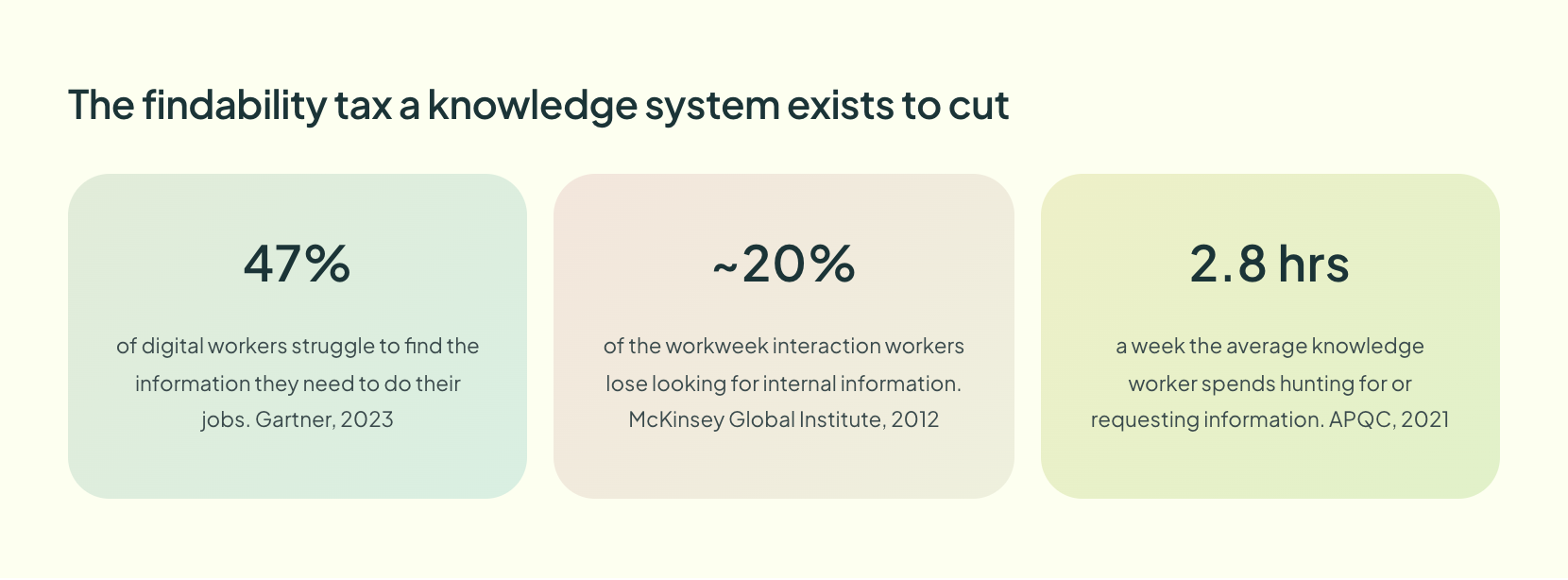
A 2023 Gartner survey of 4,861 digital workers found that 47% struggle to find the information they need to do their jobs, and that the average knowledge worker now juggles 11 applications, up from six in 2019. A decade earlier, a McKinsey study put the cost in time: interaction workers lose nearly a fifth of the workweek looking for internal information. The 2021 APQC survey landed on 2.8 hours a week per worker spent looking for or requesting information. None of those hours show up on a transaction system’s dashboard, which is exactly why the cost stays invisible until a frustrated team finally decides to measure it for itself.
Start With the Fundamentals of Knowledge Management
How information systems grew into knowledge systems
The two fields did not arrive separately. These systems grew out of ordinary information systems, one capability at a time, and each era kept the last one’s job.
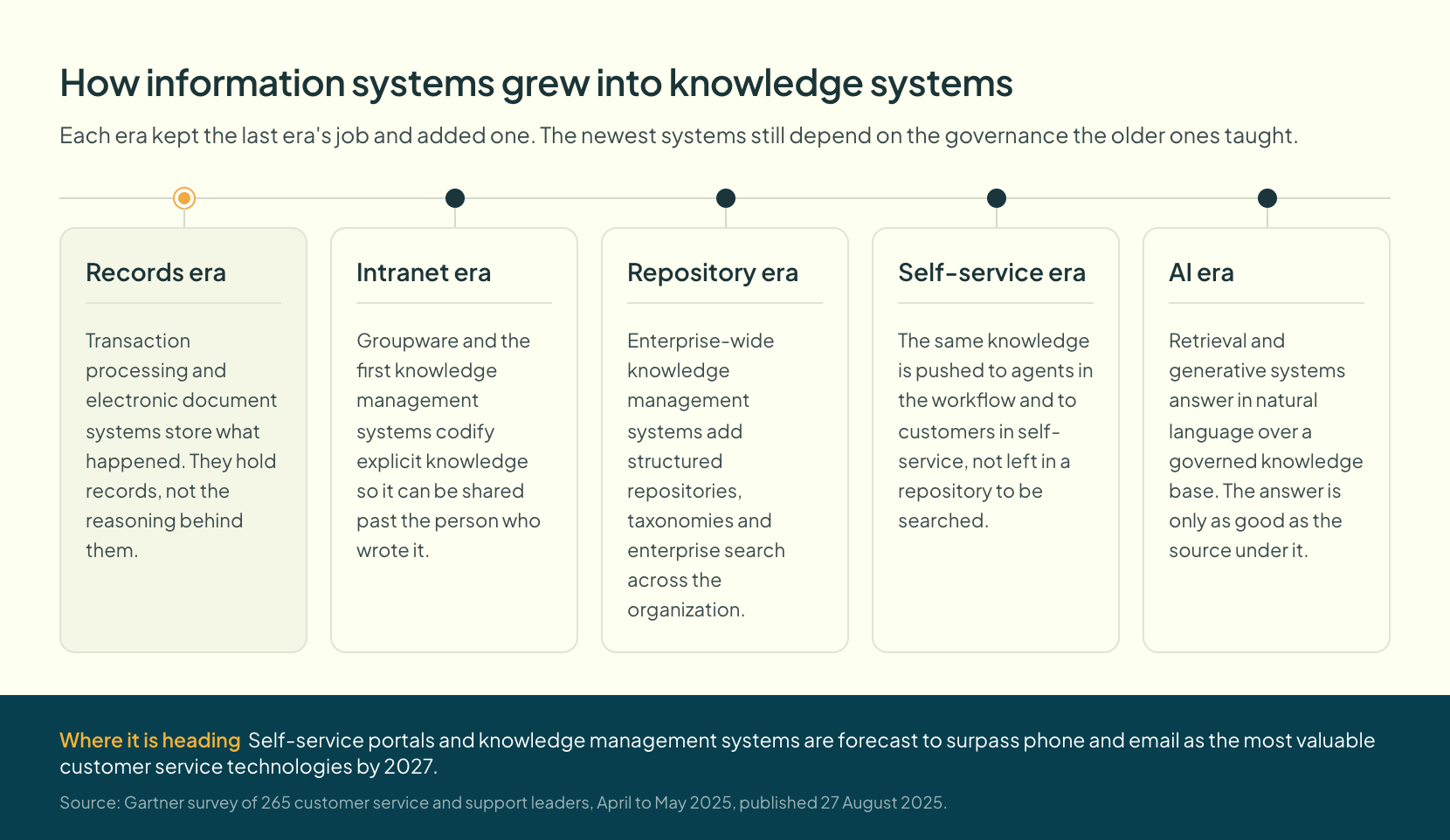
First came the record keepers: transaction processing and electronic document management, systems that stored what happened without storing why. Then intranets and groupware arrived in the 1990s. With them came the first systems built to codify explicit knowledge, so it outlived the person who wrote it. The 2000s added structured repositories, taxonomies and enterprise search across the whole organization. Later, the 2010s pushed that knowledge out of the repository and into the workflow, surfacing it to agents and customers through self-service. Now retrieval and generative models answer in natural language over a knowledge base.
The pattern matters more than the dates. Every new layer assumed the governance the older ones taught. A generative assistant that answers over ungoverned content is a faster way to be wrong, which is why the oldest discipline in that timeline, keeping the source accurate, is also the one the newest systems lean on hardest.
The three types of knowledge management information systems
The most useful map of this territory comes from Laudon and Laudon’s Management Information Systems, the standard course text, which sorts knowledge management information systems into three families. Each answers a different question, and a mature operation runs all three.
| System type | What it does | Example tools |
|---|---|---|
| Enterprise-wide knowledge systems | Store and organize structured and semistructured knowledge, and connect people to the right expert | Central knowledge base, document repository, expert directory |
| Knowledge work systems | Help specialists create new knowledge and bring it into the business | CAD software, financial modeling tools, scientific workstations |
| Intelligent techniques | Capture and reuse knowledge automatically, or find patterns a person would miss | Expert systems, case-based reasoning, data mining, neural networks |
Enterprise-wide systems are the ones most support leaders mean when they say knowledge management: the searchable base of articles, decision trees and policies. Upstream of that sit the knowledge work systems, where engineers and analysts produce the knowledge in the first place. Intelligent techniques then sit on top of both, automating retrieval or surfacing patterns, which is where today’s AI knowledge management tools belong.
Most organizations over-invest in the first family and ignore the other two. That is usually fine for a contact center, where the enterprise-wide base does the heavy lifting. It is a real gap in a research or engineering firm, where the knowledge work systems are the actual source of value.
A Framework for Choosing Your Knowledge Management System
A knowledge system and a general information system, side by side
Set the two next to each other, and the difference stops being abstract.
| Dimension | General information system | Knowledge management system |
|---|---|---|
| Handles | Data and transactions | Context, reasoning and know-how |
| Core question | What happened? | Why, and what should we do about it? |
| Typical output | Reports and records | Reusable answers and guidance |
| Fails when | The data is wrong | The knowledge is stale or unsourced |
Read the bottom row twice, because it is the one teams forget. A transaction system fails loudly: a wrong total, a missing order, something a reconciliation catches. A knowledge system fails quietly. The article is still there, still well formatted, still returned by search. It is just out of date, and the agent who trusts it gives the customer last quarter’s answer. Nobody gets an error message. So the failure shows up three weeks later, as a repeat contact.
This is why good knowledge management software is judged on review workflows and freshness, not storage. The hard part was never holding the knowledge. It was keeping it true.
Where a knowledge information system is the wrong tool
Now the concession, because the honest version of this argument has one. However, the limits are real. A knowledge management system is not always the right answer, and treating it as universal is how it earns a bad name.
For a pure lookup against structured data, a knowledge system adds friction. An agent checking whether an invoice was paid needs a query against the billing system, not a wiki article about invoices. Wrapping that in knowledge management slows it down. The same goes for anything that changes by the second: live inventory, account balances, order status. Those belong in the transaction system, surfaced directly, and a knowledge base that tries to mirror them will always be a step behind.
There is a second trap, and it comes from the knowledge management literature itself. A widely cited 1999 framework by Hansen and colleagues split knowledge strategies into codification, writing everything down, and personalization, connecting people to the experts who hold it in their heads. Firms that force codification onto knowledge that is genuinely tacit, the judgment of a senior engineer, the feel of a difficult negotiation, spend a fortune documenting things nobody reads, and the knowledge still walks out the door at five o’clock. Some knowledge is better reached through a person than through a system. A good contact center knowledge management program knows which is which, and does not try to codify the uncodifiable.
See What a Higher Knowledge Standard Looks Like
What this means for a support operation
For a support leader, the practical takeaway is narrower than the theory suggests. In short, you do not need to build all three system families at once. You need the enterprise-wide knowledge system to work, you need it wired into the transaction systems your agents already use, and you need a discipline for keeping it current. The other two families matter later, once the base itself is solid and well used.
The wiring is where most of the value hides. An agent should not have to decide whether an answer lives in the knowledge base or the CRM. The two systems should meet at the desktop, so a billing question pulls the account record and the how-to in the same motion. That integration, not the size of the content library, is ultimately what separates a knowledge system people actually use from one they quietly route around.
As for the intelligent layer, it is arriving fast, and it changes the economics rather than the principle. An AI knowledge system can retrieve and summarize far better than keyword search ever did. What it cannot do is invent governance. Point a capable model at a stale, unsourced base and you get confident, well-written errors at scale. The oldest rule in this field outlives every new system built on top of it: an answer is only ever as good as the source underneath it.
Ready to Give Agents One System for Every Answer?
Frequently asked questions
They are related but distinct. Knowledge management captures and reuses know-how; information systems store and move an organization’s data. A knowledge management system is one kind of information system, built to handle knowledge rather than transactions. Information systems supply the plumbing, while knowledge management supplies the discipline that turns stored content into usable answers.
The three types are enterprise-wide knowledge systems, knowledge work systems, and intelligent techniques. Enterprise-wide systems store and share structured knowledge, such as a central knowledge base. Knowledge work systems help specialists create new knowledge, such as CAD or modeling tools. Intelligent techniques, including expert systems and data mining, automate retrieval or find patterns people would miss.
Yes. A knowledge management system is a specialized type of information system. It shares the same foundations as any enterprise application, a database, an interface, search and access controls, but it is tuned to find and apply know-how rather than record transactions. So the useful contrast is really a knowledge system versus a transaction-processing system.
A knowledge work system supports the specialists who create new knowledge, not the staff who consume it. Engineers, designers, scientists and analysts use these systems to build, test and document ideas. Examples include computer-aided design software, financial modeling tools and scientific workstations. They sit upstream of the knowledge base, feeding it the expertise others later reuse.


 Word Document)
 Excel File)


