Cisco Webex Contact Center + Knowmax

Guided Knowledge for Every Call, Right Inside Cisco Webex

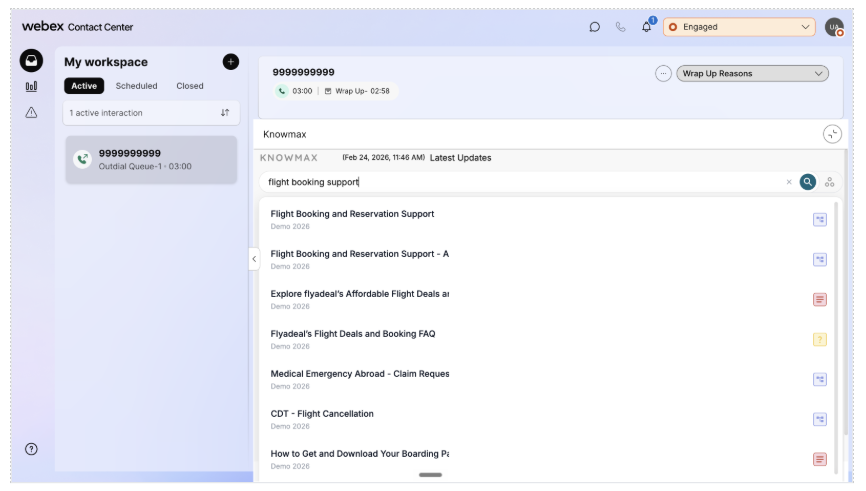
Integrate Knowmax directly into Cisco Webex Contact Center and give every agent the confidence of an expert on every call. No more digging through tabs or placing customers on hold, Knowmax surfaces AI-guided knowledge the moment a conversation begins, so agents resolve issues faster and customers get accurate answers, every time.

    Top Capabilities

  • Native Contact Center Integration
  • AI-Powered Search
  • Guided Decision Trees
  • Omnichannel Knowledge Delivery
  • SOP & Version Control
  • Self-Service Knowledge

Trusted by
Global Leaders

majid
pinelabs
NBA
zepto
dialog
PHS
Tata
Starlink
majid
pinelabs
NBA
zepto
dialog
PHS
Tata
Starlink
STC
Tata
Tata
Tata
Tata
Tata
Tata
ministry of sports
STC
Tata
Tata
Tata
Tata
Tata
Tata
ministry of sports
STC

Take your Cisco webex support to the next level by adding AI-powered decision trees, visual troubleshooting, and smarter knowledge management.

Author: Knowmax

Category: Knowledge base

Attestations: GDPR | SOC 2 | ISO 27001| HIPAA


Confidence, Built Into Every Conversation

Delivering exceptional support is a team effort, and having the right tools makes all the difference. Knowmax integrates directly with Cisco Webex Contact Center, giving your agents real-time access to structured, AI-powered knowledge across voice, chat, and digital channels.

For your team, this means faster resolutions, fewer escalations, and a consistent experience no matter the channel. Customers benefit too, with self-service that answers simple questions before they ever need to call in.

Why Cisco Webex + Knowmax?

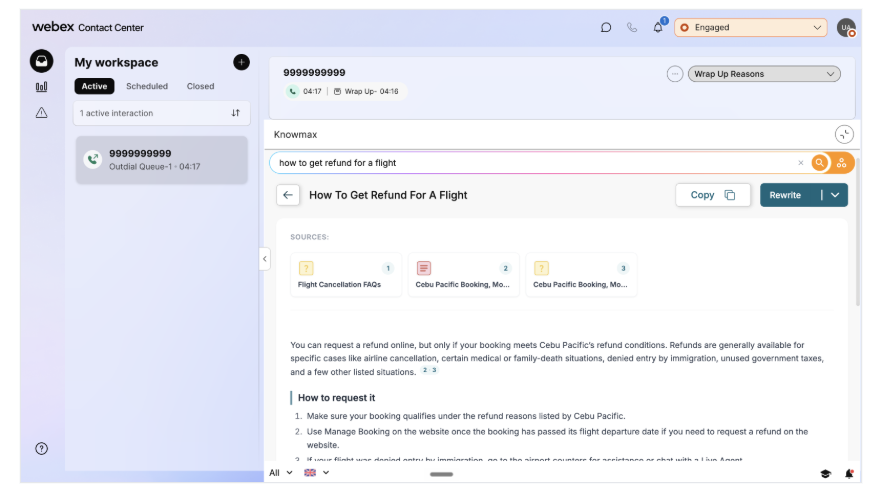
  • AI-powered search that finds the right answer mid-call, so agents never have to hunt for it.
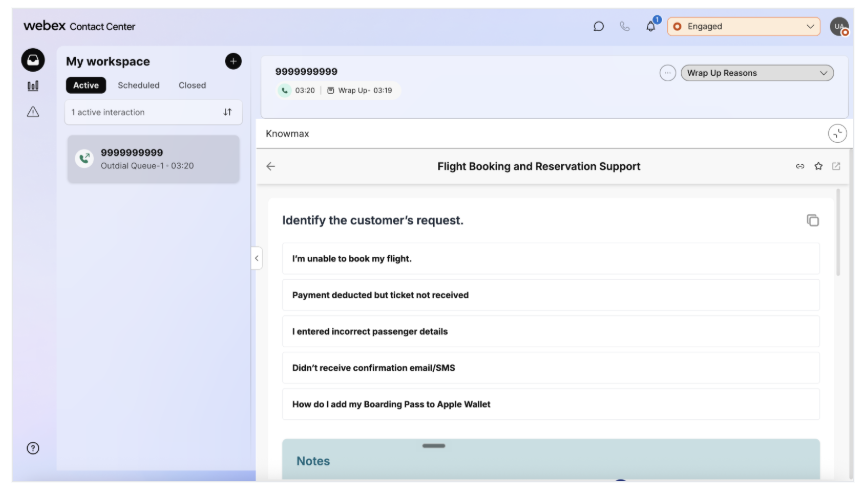
  • Guided decision trees that walk agents through resolution, one step at a time.
  • Real-time knowledge delivered right inside the Webex Contact Center agent desktop.
  • One governed source of truth, so every agent gives the same accurate answer, regardless of who picks up.
  • Self-service knowledge that lets customers solve simple issues without ever calling in.

Product Screenshots

Product Overview

In a contact center, every second on a call counts. When conversation and knowledge live in separate systems, agents put customers on hold, escalate unnecessarily, or guess, and average handle time climbs. The Knowmax integration for Cisco Webex Contact Center closes that gap by embedding AI-guided knowledge directly into the agent desktop, so answers appear inside the call instead of a separate tab.

Agents get contextual, decision-tree-guided answers based on the nature of the interaction, not a generic keyword search. New agents ramp up faster, experienced agents make fewer errors on complex, multi-step processes, and every customer gets a consistent, accurate answer, whether they call, chat, or email.

Setting Up Knowmax in Cisco

  1. Log in to the Knowmax Admin Portal.
  2. Click your name in the top-right corner and select Settings.
  3. Under Organization Settings, click App Integrations.
  4. Find the Cisco tab and open the user guide provided there.
  5. Follow the steps in the guide to complete the installation.
  6. Once done, confirm the integration is active. During a call, you should see the Knowmax panel appear on the calling screen.

Benefits

Faster Agent Onboarding

New hires handle complex queries correctly from day one, guided step by step.

Improved First Contact Resolution

Guided decision trees help agents resolve issues in a single interaction.

Reduced Handle Time

Answers surface inside Webex, so agents spend less time searching, more time resolving.

Consistent, Accurate Answers

Every agent works from the same governed source, no matter which agent takes the call.

Higher Agent Productivity

Less context-switching means more interactions handled per shift, with less friction.

Built-In Self-Service

The same knowledge base powers customer-facing portals and chatbots.

Let's Talk

See Knowmax Inside Your Contact Center

Give your agents guided knowledge, wherever the conversation happens.

Request a Demo arrow

You're in safe hands